If you have been thinking about learning UI/UX design, 2026 is honestly one of the best times to start. The demand for skilled UX designers and UI specialists keeps climbing — and even with AI reshaping the design industry, companies still need people who understand how real humans think, feel, and interact with products. That is something no algorithm fully replaces.
I have spent years following the online learning space, testing courses, and talking to designers at every career stage. One thing is always clear: the right UI/UX design course online can genuinely change the direction of your career. The wrong one just wastes your time and money.
In this guide, I am cutting through all the noise. Whether you are a complete beginner, a developer wanting to add design skills, a career changer, or a freelancer looking to upgrade your services — I have mapped out the best options for every situation. Here is exactly what we will cover:
- The best paid UI/UX design courses with real career outcomes
- The best free UX design courses for learners on a budget
- Which programs offer recognized certificates that employers actually respect
- The most beginner-friendly ui ux online courses available right now
- Career-focused bootcamps with mentorship and portfolio support
- A practical month-by-month learning roadmap built for 2026
Quick Answer: Which UI/UX Design Course Is Best in 2026?
Short on time? Here is my quick breakdown before we dive into the full details.
Best Overall Course
Google UX Design Professional Certificate (via Coursera). It is structured, beginner-friendly, affordable, and backed by one of the most recognized tech brands in the world. If you are starting from zero and want a solid foundation with a real certificate to show employers, this is your best first move.
Best Free UI/UX Course
Interaction Design Foundation offers the deepest free and affordable content in the UX space. Their free trial gives you serious learning hours, and their paid membership at around $13 per month is the most cost-effective UX education I have ever come across.
Best UI/UX Design Course With Certificate
The Google UX Design Certificate and Coursera’s Meta UX Design Specialization both offer widely recognized credentials. For employer recognition specifically, the Google certificate consistently shows up on job descriptions and LinkedIn skill filters.
Best UI Design Program for Visual Designers
CareerFoundry’s UI Design Program is built for people coming from a visual background — graphic designers, illustrators, marketers. It teaches you how to translate visual skills into product design, with mentor support and a real portfolio at the end.
Best UX Design Online Course for Research and Strategy
Interaction Design Foundation’s UX research courses are the gold standard for understanding the theory, psychology, and research methods behind great user experience. If you want to go deep into the strategy side, this is where you go.
Who Should Take UI/UX Design Courses in 2026?
Before spending money on any course, it helps to understand whether UI/UX is actually the right direction for you — and which type of learner you are. Let me walk through the main groups I see succeeding in this field.
Beginners With No Design Experience
One of the biggest myths I hear is that you need a design degree to break into UI/UX. You do not. The field is genuinely open to career changers and self-taught learners. However, you do need to be willing to build a portfolio from scratch and put in consistent practice time. Most successful beginners I have seen transition in 6 to 12 months with the right course and real project work.
Here are common beginner concerns — and my honest answers:
- “I am not creative enough” — UX design is more about problem-solving than artistic talent.
- “I have no technical background” — You do not need to code. Figma is learnable within days.
- “It will take too long” — A focused 4 to 6 month plan with real projects can get you genuinely job-ready.
Career Changers From Other Industries
This is actually where UI/UX shines. I have seen people from all kinds of backgrounds make successful transitions into UX roles. Teachers and educators bring natural empathy and communication skills. Customer support professionals have deep, first-hand understanding of user pain points. Marketing professionals understand audience behavior and conversion. Developers already know how software works and just need to add design thinking. Business analysts are already comfortable with research, data, and stakeholder communication. Each background brings real value — the key is learning how to frame your existing skills in a design context.
Freelancers and Agency Owners
Adding UI/UX services to a freelance business is one of the highest-leverage moves you can make. Website design rates jump significantly when you can offer wireframing, user research, and prototype testing alongside visual design. I have spoken to freelancers who doubled their project value simply by reframing their services around UX outcomes instead of just aesthetics.
Product Managers and Startup Founders
Understanding UI/UX does not mean becoming a designer. But having enough design literacy to review prototypes, give meaningful feedback, and make decisions that center the user — that is genuinely transformative. Many startup founders I know credit basic UX knowledge as one of their biggest early advantages when building product.
What Actually Matters When Choosing a UI/UX Design Course
Not all courses are created equal, and the marketing around online learning is genuinely misleading sometimes. Here is what I actually look for when evaluating any ui ux design course.
Certificate Value and Employer Recognition
Certificates help — but they are not everything. The Google UX Certificate and Coursera specializations carry real weight because they are searchable on LinkedIn and recognizable to hiring managers. However, a certificate from a lesser-known platform rarely opens doors on its own. The honest truth: employers care far more about your portfolio than your certificate. A certificate signals effort and commitment. Your portfolio proves you can actually do the work.
Project-Based Learning vs Theory-Only Learning
This is the single biggest differentiator between courses that produce job-ready designers and ones that do not. If a course only teaches you concepts without making you apply them to real design problems, you will finish with knowledge but no evidence of skill. Therefore, every ui ux design course I recommend in this guide includes project-based learning. Always check whether a course requires you to build actual deliverables — wireframes, prototypes, case studies.
Course Duration and Time Commitment
There are three main formats to choose from. Short courses running 4 to 8 weeks are good for picking up specific skills like Figma basics or UX research fundamentals. Bootcamps running 3 to 6 months are full or part-time, career-focused, and centered on portfolio building. Specialization tracks running 6 to 12 months are comprehensive, often university-backed, and cover everything from research to delivery. Match the format to your goal. If you just want to understand UX better for your current job, a short course works fine. If you are pivoting to a full-time design career, you need a full program with portfolio support.
Figma, Adobe XD, and Modern Design Tools Covered
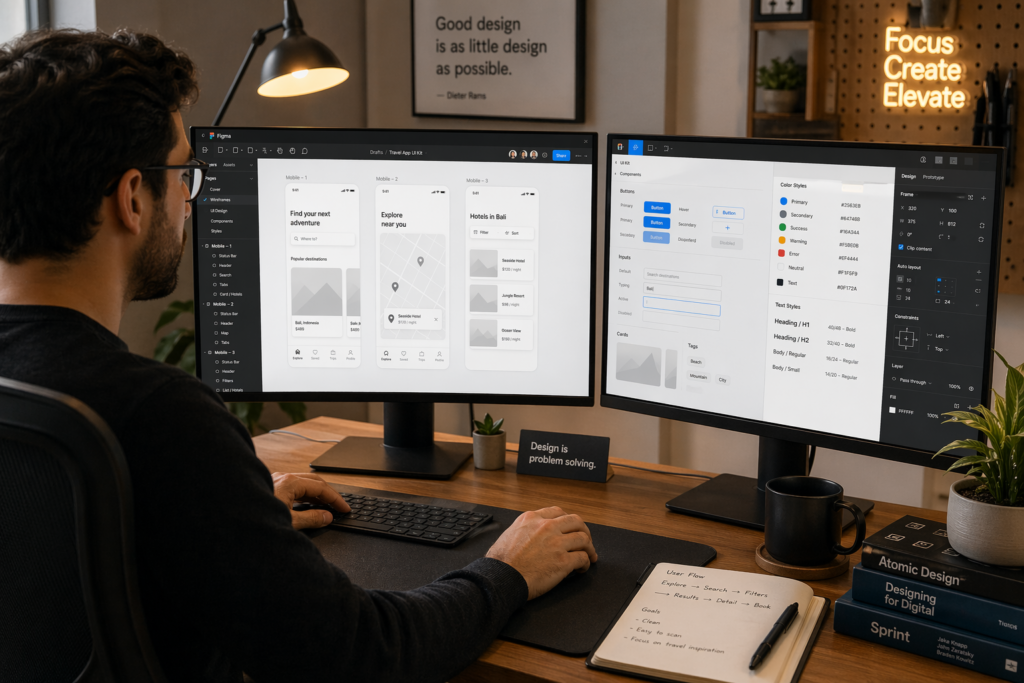
In 2026, Figma is the industry standard. It is collaborative, browser-based, and what most product teams use every day. Any course worth taking teaches Figma. Adobe XD is still around, and Sketch is still used in some organizations — but if a course only covers these and ignores Figma, that is a red flag. Additionally, AI-assisted design tools are becoming part of the standard workflow. Look for courses that at least acknowledge tools like Adobe Firefly, AI features within Figma, or AI for user research synthesis.
→See our full guide on the best free AI tools for students and professionals in 2026
Mentorship, Community, and Career Support
For serious career changers, this might be the most important factor on the list. Features that genuinely matter include portfolio reviews from working designers, mock interview practice with real feedback, community Slack or Discord groups, job placement assistance or employer connections, and one-on-one mentor sessions. Courses with strong mentorship cost more. But for a career change, that support can be the difference between landing a job in 6 months versus never quite breaking through.
Comparison Table: Best UI/UX Design Courses in 2026
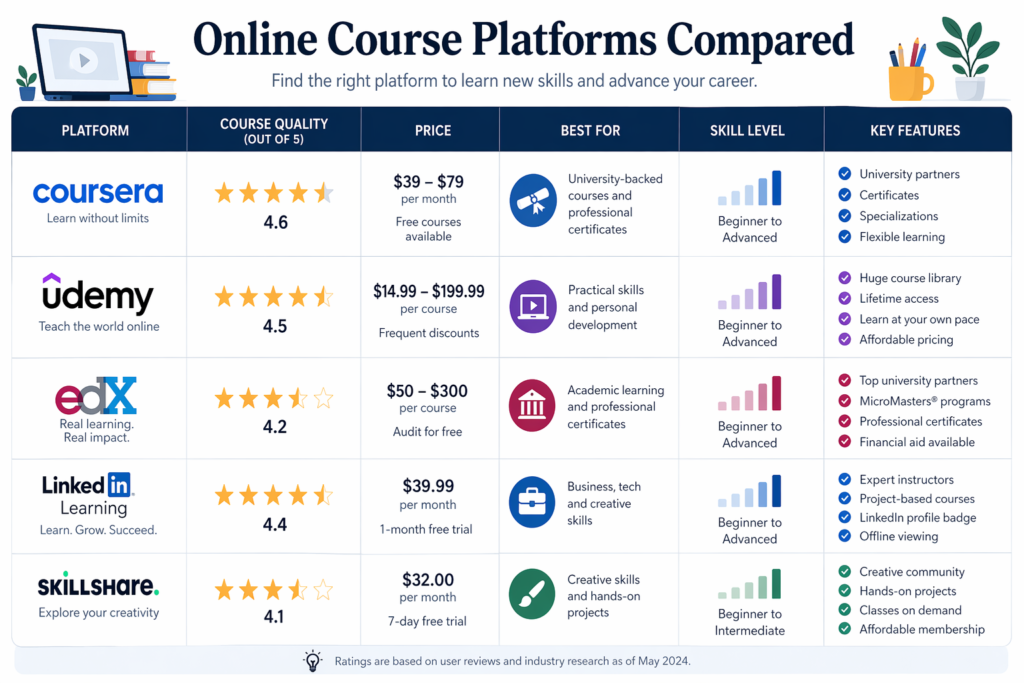
| Course | Best For | Price | Certificate | Duration | Level | Mentorship | Portfolio |
| Google UX Design Certificate | Beginners & career changers | ~$49/mo Coursera | Yes | 6 months | Beginner | No | Yes (7 projects) |
| CareerFoundry UI Program | Mentorship & career support | $1,600–$4,200 | Yes | 3–6 months | Beginner–Mid | Yes (1-on-1) | Yes |
| Interaction Design Foundation | UX theory & affordable depth | $13–$17/mo | Yes | Ongoing | All levels | Community only | Some |
| Udemy UI/UX Courses | Budget learners | $10–$20 (sale) | Completion only | 10–40 hrs | Beginner | No | Varies |
| Coursera Specializations | University credentials | Free audit/$49mo | Yes | 3–6 months | Beginner–Mid | No | Yes |
| Springboard UX Track | Full career transition | $7,900–$9,900 | Yes | 9 months | Beginner–Mid | Yes (weekly) | Yes |
| LinkedIn Learning | Busy professionals | $40/mo or included | Completion only | 2–15 hrs | All levels | No | No |
| Designlab UX Academy | Portfolio & mentorship | $1,925–$4,999 | Yes | 3–6 months | Beginner–Mid | Yes (1-on-1) | Yes |
Best UI/UX Design Courses Online in 2026
Let me walk you through each top course in detail. I am going to be honest about the pros and cons — including things the course marketing pages will not tell you.
1. Google UX Design Professional Certificate
| Google UX Design Certificate | Best for Complete Beginners This is the course I recommend most often to people starting from zero. Offered through Coursera and designed by Google, it covers the full UX design process across 7 courses — from empathy mapping and user research to wireframing, prototyping in Figma, and usability testing. The structure is logical, the content is practical, and the certificate carries real name recognition in hiring conversations. Pros:• ✅ 7 portfolio-ready projects across the full program• ✅ Figma taught throughout as the primary tool• ✅ Google brand recognition on LinkedIn and resumes• ✅ Financial aid available — making it genuinely accessible• ✅ Covers both UX research and UI design basics Cons:• ⚠️ No live mentorship or instructor feedback on your work• ⚠️ Self-paced format means it is easy to fall behind without discipline• ⚠️ Certificate alone will not get you hired — portfolio still matters most Best Suited For: Complete beginners, career changers, and people with a limited budget who still want structure and a recognized credential. |
2. CareerFoundry UI Design Program
| CareerFoundry UI Design Program | Best for Mentorship & Career Support CareerFoundry is one of the most career-focused design education providers I have encountered. Their UI Design Program pairs you with a personal mentor — a working designer — who reviews your work throughout the course. The curriculum is project-heavy, the community is active, and the job guarantee adds real accountability on their end. Pros:• ✅ Personal mentor — a real working designer reviewing your projects• ✅ Job guarantee with conditions that show genuine confidence in outcomes• ✅ Strong alumni network and active community Slack• ✅ Excellent curriculum covering UI fundamentals, Figma, and design systems• ✅ Flexible payment plans available Cons:• ⚠️ More expensive than self-paced alternatives• ⚠️ Job guarantee has specific conditions not all learners will meet• ⚠️ Time commitment is significant — not ideal if you are very part-time Best Suited For: Career changers serious about landing a UI/UX job within 6 months, especially those who thrive with accountability and guided feedback. |
3. Interaction Design Foundation
| Interaction Design Foundation | Best for UX Theory & Affordable Depth IDF is the most underrated resource in the UX learning space. Their membership model gives you access to a massive library of courses covering UX research, information architecture, design thinking, accessibility, and much more. The content is created by actual UX researchers and academics — not just practitioners repurposing YouTube content. Pros:• ✅ Most cost-effective deep UX education available at $13–$17 per month• ✅ Covers UX theory, psychology, and research in genuine academic depth• ✅ Courses taught by respected UX researchers and academics• ✅ Community groups and local meetups included in membership• ✅ Certificates recognized within the UX professional community Cons:• ⚠️ UI-focused learners may find it less practical on the visual and tool side• ⚠️ Self-directed format requires strong personal motivation• ⚠️ No mentor or career support included in the membership Best Suited For: UX-focused learners who want depth in research, strategy, and design thinking. Also excellent as a complement to a more project-based course. |
4. Udemy UI/UX Design Courses
| Udemy UI/UX Courses | Best Budget Option Udemy is where you go when you want solid learning at an almost unreasonably low price. Courses regularly go on sale for $10 to $15. The best-rated UI/UX options on the platform cover Figma, design principles, and portfolio projects at a practical level. Just be selective — quality varies significantly between instructors, so always check reviews and preview lessons before buying. Pros:• ✅ Extremely affordable, especially during frequent sales• ✅ Lifetime access to all course content you purchase• ✅ Huge variety covering UI design, UX research, Figma, and Adobe XD• ✅ Good for picking up specific skills quickly without a big commitment Cons:• ⚠️ Completion certificate has very limited employer recognition• ⚠️ No mentorship or feedback on your design work• ⚠️ Quality varies widely — research instructors carefully before buying• ⚠️ No structured career support or job placement assistance Best Suited For: Budget-conscious beginners, people wanting to explore before committing to a paid bootcamp, and professionals picking up specific tool skills. |
5. Coursera UI/UX Specializations
| Coursera Specializations | Best University-Backed Programs Beyond the Google certificate, Coursera hosts UI/UX specializations from universities like the University of Michigan and CalArts, along with the Meta UX Design Specialization that is increasingly employer-recognized. These carry academic credibility and are ideal if you want something that looks like a formal qualification rather than just a bootcamp credential. Pros:• ✅ University credentials carry academic weight in formal hiring contexts• ✅ Financial aid available for many programs — including full scholarships• ✅ Structured semester-style learning with clear milestones• ✅ Certificates are visible directly on your LinkedIn profile Cons:• ⚠️ Pacing can feel slow compared to career-focused bootcamps• ⚠️ Some programs are theory-heavy and less practical in project work• ⚠️ No career coaching or portfolio feedback included Best Suited For: Learners who want university-level credentials, or those who respond well to structured academic-style content. |
6. Springboard UX Design Career Track
| Springboard UX Design Career Track | Best Structured Career Transition Springboard is one of the most serious career-transition programs available. At around $7,900 to $9,900, it is a major investment — but the weekly one-on-one mentorship model and job guarantee are among the strongest in the industry. You work directly with a mentor throughout the 9-month program, building a substantial portfolio across the full UX process. Pros:• ✅ Weekly 1-on-1 mentorship with experienced industry designers• ✅ Job guarantee — money back if you do not land a role within conditions• ✅ Comprehensive curriculum covering research, UI design, and strategy• ✅ Strong alumni hiring network with real employer connections• ✅ Structured deadlines keep you accountable through the full program Cons:• ⚠️ High price point — requires serious financial planning• ⚠️ 9-month timeline demands consistent dedication week after week• ⚠️ Overkill if you just want to explore the field or add basic skills Best Suited For: Committed career changers who are serious about full-time UI/UX work and can justify the investment with a clear financial goal. |
7. LinkedIn Learning UI Design Classes
| LinkedIn Learning UI Design | Best for Short Practical Lessons If you already have a LinkedIn Premium or Learning subscription, this is genuinely useful for supplementing your main course. The UI design classes are short, digestible, and practical. They are not enough on their own for a career transition — but for a working professional who wants to pick up specific skills like design thinking, Figma basics, or accessibility fundamentals, they are excellent. Pros:• ✅ Already included in many LinkedIn Premium subscriptions• ✅ Short modules easy to complete during lunch breaks or commutes• ✅ Covers a broad range of design and design-adjacent topics• ✅ Completion certificates are visible directly on your LinkedIn profile Cons:• ⚠️ Completion certificate has limited recognition beyond LinkedIn• ⚠️ Not designed to be career-transition ready on its own• ⚠️ No projects or portfolio development included Best Suited For: Working professionals supplementing a main course, or people doing preliminary exploration before committing to a longer program. |
8. Designlab
| Designlab UX Academy | Best for Portfolio Building With Mentorship Designlab sits in a sweet spot between affordable self-paced courses and expensive full bootcamps. Their UX Academy provides structured curriculum, real portfolio projects, and access to a mentor — all at a price point below Springboard and CareerFoundry. It is particularly good for intermediate learners who have some design basics and want to formalize and deepen their skills. Pros:• ✅ Real portfolio projects with actual mentor feedback throughout• ✅ More affordable than the top-tier bootcamps• ✅ Strong community of active learners and graduates• ✅ UX Academy covers research, UI design, and product thinking comprehensively Cons:• ⚠️ Less robust career support than Springboard or CareerFoundry• ⚠️ Mentor quality can vary depending on your match• ⚠️ Some learners find the self-scheduling approach challenging to maintain Best Suited For: Intermediate learners with some design background who want to build a solid portfolio and get mentor feedback without the full bootcamp price tag. |
Best Free UI/UX Design Courses in 2026
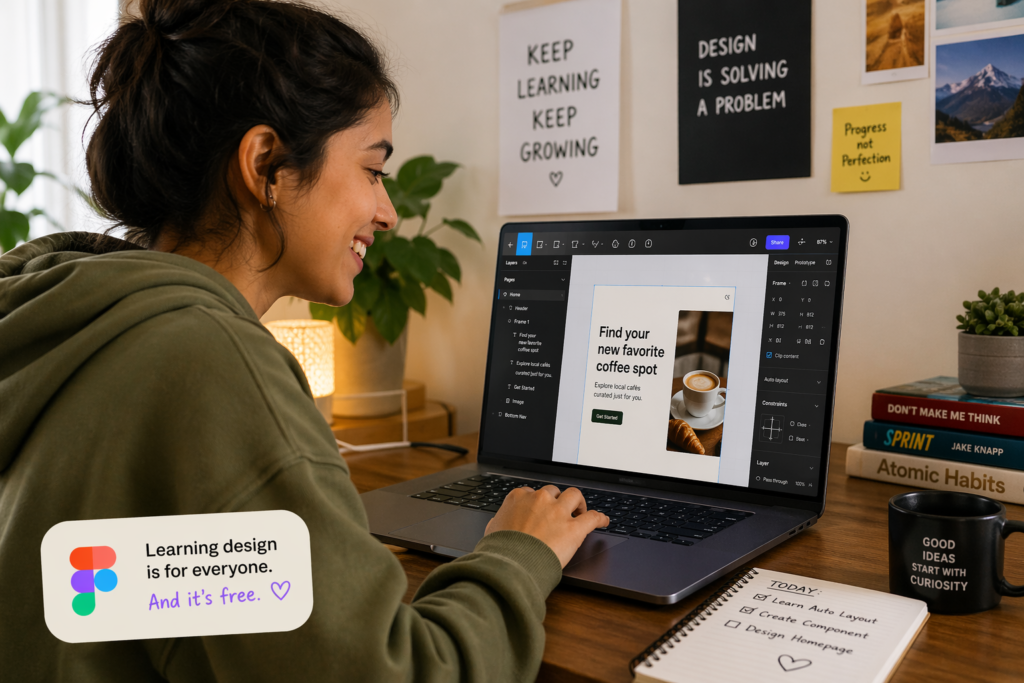
Not everyone should jump straight into a paid course. Honestly, I always recommend starting with free resources to confirm you actually enjoy the work before investing money. Here are the best free options I know of.
Free UX Courses for Beginners
These are the best free starting points available right now:
- Google UX Design Certificate — audit for free on Coursera (full content access, no certificate)
- Interaction Design Foundation — free trial gives access to multiple full courses with serious depth
- CareerFoundry free short courses — “Intro to UX Design” and “Intro to UI Design” are both solid free starters
- YouTube channels from designers like AJ&Smart and Design Pilot — genuinely useful Figma and UX tutorials
- Figma’s own official tutorial library — free, browser-based, and directly relevant to the tool you will use every day
Free UI Design Programs and Tutorials
For UI-focused learning specifically, these resources deliver real value:
- Figma Community — free UI kits, design systems, and files you can study and remix
- Figma’s official Design with Figma tutorials — completely free and directly from the source
- Google Fonts and Material Design guidelines — official resources that teach visual and UI fundamentals
- Behance and Dribbble — not courses, but studying real designer portfolios teaches you more than most tutorials
Free UI/UX Design Courses With Certificate
True free certificates with real employer recognition are rare. Here is the honest picture. Coursera financial aid can get you a real Google or Meta UX certificate for free — approval is required but genuinely available. HubSpot Academy offers free design-adjacent certificates, though they are not UX-specific. Alison.com offers free UX certificates, but employer recognition is limited. My honest take: if you want a certificate that actually helps on a resume, the Coursera financial aid route for the Google UX certificate is the best free path to a genuinely recognized credential.
When Free Courses Are Enough and When You Need Paid Training
| Key insight: Free courses are great for exploration and fundamentals. But if your goal is a career change or landing freelance clients, you need structured learning with portfolio projects and some form of feedback. That usually means a paid course is the right next step. |
UI vs UX Skills: Understanding the Difference
| UI Design Skills | UX Design Skills | Common Tools | Career Roles |
| Color theory & visual hierarchy | User research & interviews | Figma | UI Designer |
| Typography & spacing | Wireframing & information architecture | Adobe XD | UX Designer |
| Component & design systems | Usability testing | Miro / FigJam | Product Designer |
| Icon design & illustration | Journey mapping & personas | Maze / UserTesting | UX Researcher |
| Responsive layout design | Accessibility & inclusive design | Sketch | Interaction Designer |
| Microinteractions & animation | Prototyping & user flows | Principle / ProtoPie | UX Writer |
Beginner vs Advanced UI/UX Learning Paths
Where you start determines which course is the right fit. Here is how I would map out each learning path depending on your current level.
Best Learning Path for Beginners
If you are starting from zero, resist the urge to jump into advanced tools. Start with the thinking, then learn the tools:
- Learn UX fundamentals first — user personas, user flows, empathy maps, and basic research methods
- Practice wireframing by hand or with simple low-fidelity tools before touching Figma
- Learn Figma basics — frames, components, and auto layout
- Complete at least one end-to-end design project that includes user research, wireframes, and a prototype
- Test your design with real people — even asking 3 friends to use a prototype gives you real data
Best Learning Path for Intermediate Designers
If you already know Figma and have completed a few projects, focus on depth rather than breadth:
- UX research methods — card sorting, A/B testing, moderated vs. unmoderated testing
- Design systems — how to build and maintain shared component libraries
- Accessibility following WCAG 2.1+ guidelines — increasingly required by employers
- Advanced prototyping using tools like ProtoPie or Figma’s interaction features
- Product thinking — understanding business goals, metrics, and how design decisions serve strategy
Skills Employers Want From UI/UX Designers in 2026
Based on current job postings I have reviewed, here is what hiring managers consistently list as priorities:
- Figma — listed in over 90% of UI/UX job postings across all levels
- UX writing — clear, user-centered copy is increasingly part of the designer’s role
- Accessibility (WCAG 2.1+) — now a compliance requirement in many industries
- AI-assisted design workflow — using AI for ideation, content generation, and research synthesis
- User research — designing research plans and synthesizing insights into design decisions
- Design systems — contributing to and maintaining shared component libraries
- Mobile-first design — most products prioritize mobile; you need to design for it confidently
→See also: Top AI skills employers want in 2026
Free vs Paid UI/UX Design Courses: Which Gives Better Results?
| Factor | Free Courses | Paid Bootcamps |
| Learning Depth | Fundamentals to intermediate | Comprehensive, career-ready |
| Certificate | Limited recognition | Employer-recognized (varies) |
| Mentorship | None or community only | 1-on-1 or cohort-based |
| Portfolio Support | Minimal or self-directed | Guided portfolio projects |
| Cost | $0 | $500–$10,000+ |
| Career Support | None | Job placement assistance |
| Accountability | Self-directed | Structured deadlines & check-ins |
| Best For | Students, early explorers | Serious career changers, freelancers |
Benefits of Free Courses
- Zero financial risk — test whether you genuinely enjoy design before committing money
- Learn at your own pace, wherever you are, without any schedule pressure
- Good for building foundational knowledge and exploring whether UI/UX is the right path
Benefits of Paid Courses
- Structured progression that keeps you moving forward with clear milestones
- Accountability checkpoints through assignments, deadlines, and mentor check-ins
- Portfolio feedback from real designers who can identify gaps before you start applying
- Better career outcomes for people making a full, committed career pivot
Who Should Choose Free Courses
Students exploring their options, casual learners curious about design, and anyone in the earliest stage of figuring out whether UI/UX is the right direction for them.
Who Should Choose Paid Bootcamps
If you are serious about becoming a full-time UI/UX designer, freelancing in design, or adding credentialed design skills to your product or development role — invest in a structured program. The accountability and feedback alone are worth the price difference for most people who are genuinely committed.
→Related: How to evaluate the ROI of online career programs
Common Mistakes People Make When Choosing a UI/UX Course
I have seen these mistakes so often they are practically a pattern. Avoid them and you will save yourself significant time, money, and frustration.
Choosing Based Only on Certificate Value
I have talked with people who spent $3,000 on a course specifically because it came with a prestigious-sounding certificate — and then struggled to get interviews because their portfolio was weak. Employers almost always ask to see your portfolio before discussing credentials. Consequently, always prioritize courses with strong portfolio outcomes over those with impressive-sounding certificates.
Ignoring Portfolio Development
Your portfolio is your proof of skill. Without it, even the best certificate does not help much. Therefore, every course you take should give you something real to add to your portfolio — a case study, a prototype, a redesign challenge. If a course does not build toward portfolio work, weight that fact heavily in your decision.
Skipping UX Research and Focusing Only on Visual Design
This is the classic trap. Beautiful screens are not UX. UX is understanding why users struggle, what they actually need, and designing solutions around those needs. Designers who skip research create things that look great but do not solve real problems — and experienced interviewers spot this gap immediately during portfolio reviews.
Buying Expensive Courses Too Early
Start free or cheap. Spend 2 to 4 weeks with free resources to confirm you enjoy the work and the process. Then, if you are genuinely committed, invest in a structured program. Spending $5,000 or more before you have confirmed UI/UX is the right path is a mistake I have seen too many motivated people make.
Learning Too Many Tools Without Mastering the Fundamentals
Figma, Adobe XD, Sketch, Axure, ProtoPie, Maze — it is easy to spread yourself across tools without going deep on any of them. In practice, employers want genuine proficiency in Figma and a solid understanding of the design thinking process. Master the fundamentals first. The tools are learnable in days; the mindset and process take real practice to internalize.
| Related reading: Evaluating whether a certification is worth your investment — see our honest take on the Google Data Analytics Certificate for a framework that applies directly to any online design course. |
Recommended UI/UX Learning Roadmap for 2026
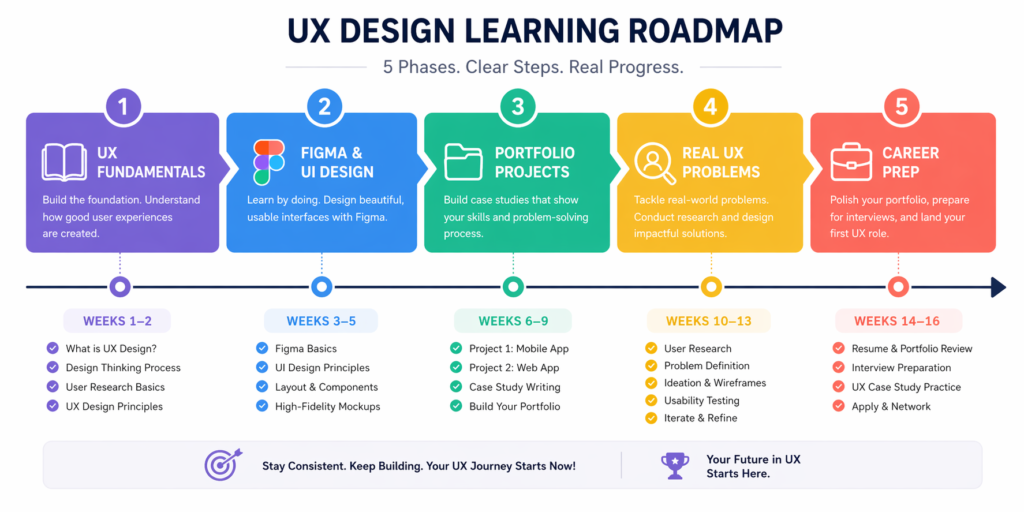
| Month | Skill Focus | Suggested Projects | Expected Outcome |
| Month 1 | UX Fundamentals: personas, user flows, empathy maps, research basics | User interview + journey map for a real local business | Solid UX vocabulary and research process understanding |
| Month 2 | Figma + UI Design: components, design systems, responsive layout, typography | Redesign a poorly designed mobile app screen entirely in Figma | Figma proficiency; first real UI portfolio piece |
| Month 3 | Portfolio Projects: full case studies from research to prototype | Landing page redesign + mobile app concept with full documentation | 2–3 case studies demonstrating the complete design process |
| Month 4 | Real-World UX: user interviews, accessibility reviews, product audits | Audit a live product; document findings and design recommendations | UX research and analysis skills; deeper case study quality |
| Month 5+ | Career Prep: resume, portfolio website, LinkedIn, networking, applications | Polish portfolio site; reach out to 5 designers per week on LinkedIn | Job-ready portfolio and active application pipeline |
Month 1: Learn UX Fundamentals
Do not touch Figma yet. Seriously. Month 1 is entirely about building the thinking behind good design. Learn what user flows are, how to write meaningful user personas, how to plan and conduct a basic user interview, and what empathy mapping looks like in practice. The Google UX Certificate or IDF are ideal for this phase. The goal is to understand the why before you ever touch a design tool.
Month 2: Learn Figma and UI Design Basics
Now you open Figma. Start with components and auto layout, then move to creating responsive frames, working with proper grids, and building simple UI screens from scratch. By the end of this month, you should be comfortable designing a full mobile screen from a wireframe — not just dropping in ready-made components.
Month 3: Build Portfolio Projects
This is where the real learning happens. Take a real product — an app you use daily, a local business website — and redesign it from the ground up. Document everything: your research process, your wireframe decisions, your design choices, your prototype. That documentation is your case study, and case studies are what get you hired.
Month 4: Practice With Real-World UX Problems
Start doing user interviews, even with friends or family. Conduct an accessibility review of a live website using WCAG guidelines. Audit a product’s user flow for friction points and document what you find. These exercises make your case studies significantly richer and demonstrate strategic thinking to employers reviewing your portfolio.
Month 5+: Prepare for Freelance or Full-Time Roles
Polish your portfolio website, update your LinkedIn profile with relevant keywords, write a clear designer bio, and start networking actively. Join designer communities on Discord or LinkedIn groups. Reach out to senior designers for informational interviews. Start applying — even before you feel 100% ready, because real application feedback is the fastest way to understand what needs improvement.
Tools and Resources That Pair Well With UI/UX Design Courses
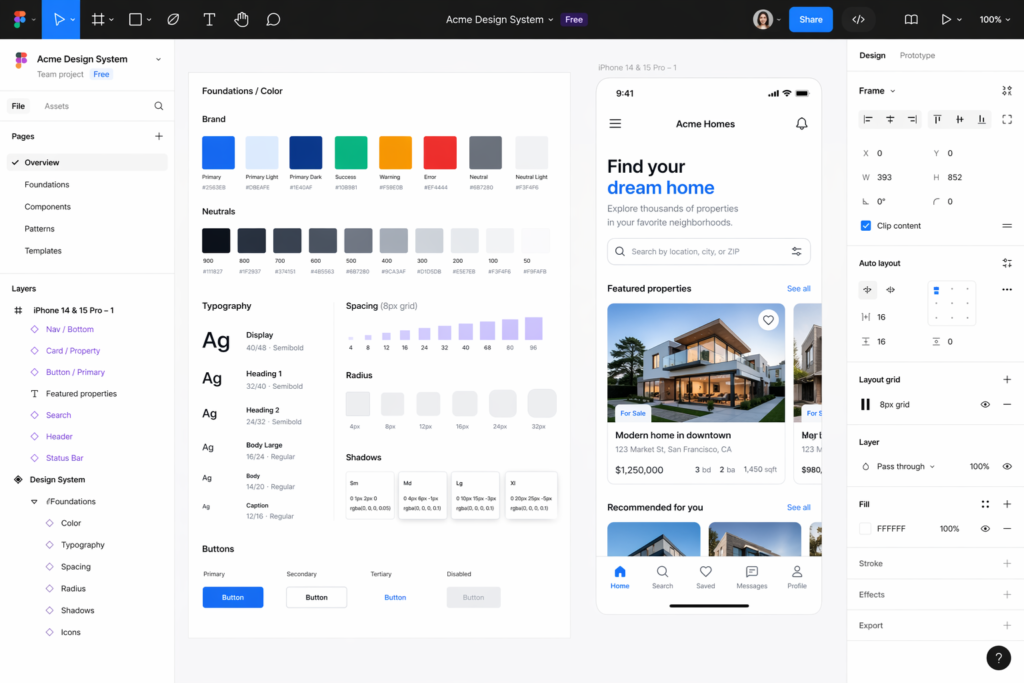
Best Design Tools
- Figma — industry standard for UI design, prototyping, and real-time collaboration. Learn this first and learn it deeply.
- Adobe XD — still used in some organizations, particularly those already in the Adobe ecosystem
- Sketch — popular on Mac-only product teams, particularly in fintech and enterprise software
- Miro / FigJam — collaborative whiteboarding for research workshops, journey mapping, and design sprints
Best Portfolio Platforms
- Behance — broad creative community, great for general visibility and searchability
- Dribbble — more UI and product focused, with a strong and active designer community
- Personal website — the most professional option; Framer and Webflow make it achievable without coding
- Notion — surprisingly effective for simple case study portfolios when you are just starting out
Best Communities for Feedback and Networking
- r/UXDesign and r/UI_Design on Reddit — active, honest communities with real feedback from working designers
- Designer Hangout on Slack — one of the largest and most active UX professional communities online
- LinkedIn design groups — useful for networking and staying current with industry trends and job openings
- Figma Community on Discord — direct access to designers, educators, and plugin developers
Final Checklist Before You Choose a UI/UX Design Course
| How to use this checklist: Go through each item before committing to any course. If you cannot check at least 6 of these 10 items, keep evaluating your options. |
☐ Does the course include real projects you can add to a design portfolio?
☐ Does it teach Figma — the current industry standard design tool?
☐ Does it help you structure and present a portfolio case study?
☐ Is there mentor feedback or instructor review of your actual design work?
☐ Does the price match your budget and the seriousness of your goals?
☐ Is the content appropriate for your current skill and experience level?
☐ Does it cover both UX research AND UI visual design (not just one)?
☐ Does it provide a recognized, employer-relevant certificate option?
☐ Does it include any career support — job boards, employer connections, or interview prep?
☐ Does the schedule and time commitment realistically fit your current life?
Final Action Plan: How to Choose the Right UI/UX Course for You
Here is the simple decision process I would walk anyone through, regardless of their background or budget:
6. Define your goal clearly — career change, freelance upgrade, or general skill building? Your goal determines the right investment level and time commitment.
7. Start free first — spend 1 to 2 weeks with free resources to confirm you genuinely enjoy the work. Try the Coursera audit for the Google UX Certificate or the IDF free trial.
8. Identify your real budget — there are excellent options at every price point. Do not assume expensive automatically means better for your specific situation.
9. Check for portfolio outcomes — will this course produce case studies you can actually show an employer? If the answer is unclear, supplement with your own projects regardless.
10. Look for feedback mechanisms — self-paced learning works, but some form of feedback (mentor, community, instructor review) dramatically improves learning outcomes.
11. Do not overthink your first course — the learners who succeed are the ones who start and stay consistent. There is no perfect course. Start and iterate.
Most importantly: build something. The gap between people who make it in UI/UX and those who do not usually comes down to whether they actually built a real portfolio. Start your first project this week — do not wait until you feel ready. You rarely will.
→ Also explore: Best graphic design courses online in 2026
→ Related: Digital marketing courses for business owners — pairs naturally with UI/UX skills
Frequently Asked Questions
What is the best UI/UX design course online in 2026?
The Google UX Design Professional Certificate on Coursera is the best overall option for most learners — especially beginners and career changers. It is affordable, well-structured, and produces 7 real portfolio projects. For career support and mentorship, CareerFoundry and Springboard are the strongest paid alternatives.
Are UI/UX design courses worth it?
Yes — if you choose the right one and actually build a portfolio. The median UX designer salary in the US is around $95,000 to $110,000, and the field continues to grow faster than the general job market. Even a mid-range course investment tends to pay back quickly once you land your first design role.
Which UI/UX design course is best for beginners?
The Google UX Design Certificate is the most beginner-friendly structured program available. It assumes zero design experience and walks you through the full process step by step. For a free beginner option, CareerFoundry’s free short courses or the Coursera audit track are solid starting points with no financial risk.
Can I learn UI/UX design for free?
Absolutely. You can access the Google UX Certificate content for free by auditing it on Coursera. Interaction Design Foundation has a free trial with access to multiple full courses. YouTube has genuinely high-quality Figma and UX tutorials. The main thing you miss with free learning is structured mentorship and portfolio accountability.
Which UI/UX course includes a certificate?
Google UX Design Certificate via Coursera, CareerFoundry, Springboard, Designlab, and most Coursera specializations all include recognized certificates. For the most employer-recognized free certificate option, apply for Coursera financial aid to receive the Google UX certificate at no cost.
How long does it take to learn UI/UX design?
Most people become job-ready in 6 to 12 months with consistent study. With a structured bootcamp and 20 or more hours per week, 6 months is realistic. With a part-time approach while balancing a full-time job, 9 to 12 months is more typical. Building a real portfolio is the key milestone — not just finishing the course content.
Is Figma necessary for UI/UX design?
Yes, for 2026, Figma is effectively the industry standard tool. Over 90% of UI/UX job postings mention Figma specifically. While Adobe XD and Sketch still exist in some workflows, starting with Figma gives you the highest practical return on your learning time.
What is the difference between UI and UX design?
UX (User Experience) design is about the overall experience — how a product works, feels, and meets user needs. It involves research, wireframing, user flows, and testing. UI (User Interface) design focuses on the visual layer — colors, typography, components, and how the product looks. Most modern job roles involve both, which is why ‘UI/UX’ is typically treated as a combined discipline.
Can I get a UI/UX job without a degree?
Yes — and this is one of the reasons the field is so accessible to career changers. Many employers explicitly prioritize portfolio over formal education. A recognized certificate from Google, Coursera, or a reputable bootcamp helps signal commitment and baseline knowledge. But ultimately, your portfolio is what gets you the interview.
What should I include in a UI/UX portfolio?
Aim for 3 to 5 case studies that each show: the problem you solved, your research process, your wireframes, your key design decisions, and the final prototype. Quality absolutely beats quantity. One deep, well-documented case study is far more impressive than five shallow project screenshots. Show your process, not just the outcomes.
Final Thoughts
If I had to give one piece of advice to anyone starting their UI/UX journey in 2026, it would be this: stop researching and start designing.
I have seen people spend months evaluating courses and reading guides — yes, even guides like this one — without ever actually opening Figma or talking to a user. The designers who break into the field, regardless of background or previous experience, are the ones who practice consistently, document their process, and put their work in front of real people.
The courses in this guide will give you structure, knowledge, and credentials. But the portfolio you build through real practice is ultimately what gets you hired.
Start with a free resource this week. Build something messy. Learn from it. Then, when you are ready to go deeper, pick the course that fits your goals and budget from this guide and commit to it fully.
You have got this.