Introduction
If you’ve searched for a python roadmap and ended up with a 50-tab browser session full of contradictory advice, I know exactly how you feel. I’ve been there — and so has almost every developer I’ve mentored over the past few years.
Here’s the truth: most beginner guides either overwhelm you with everything Python can do, or they give you such a basic overview that you finish reading and still don’t know what to actually do next.
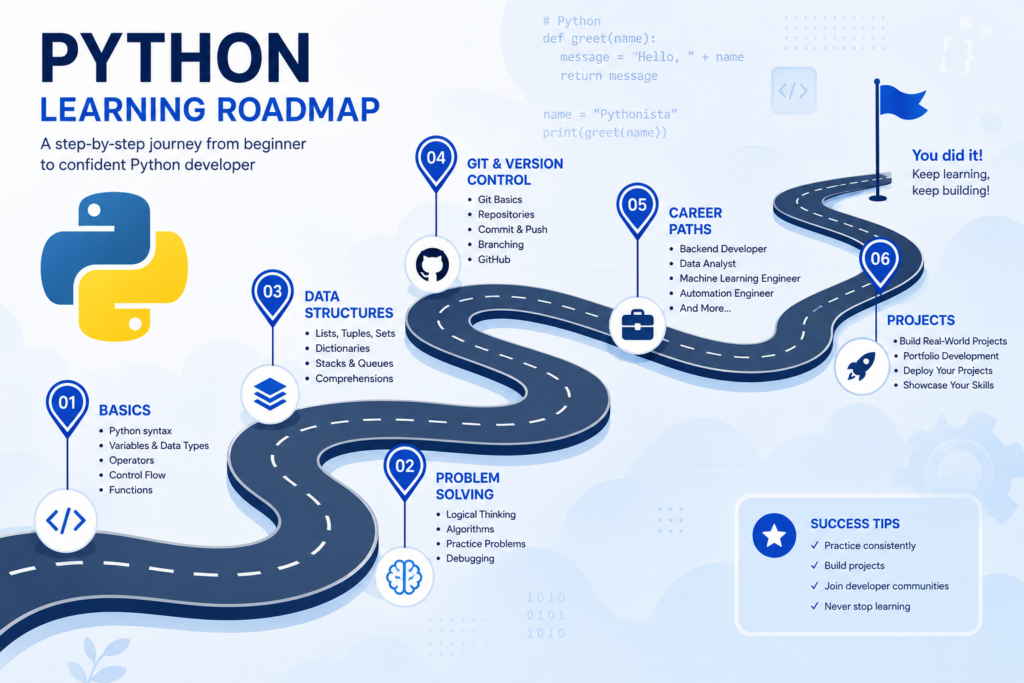
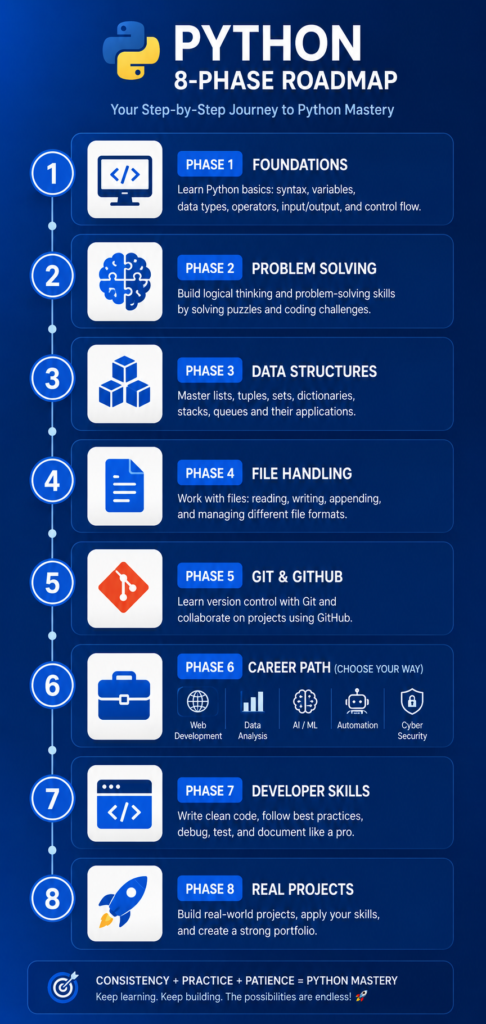
This guide is different. I’ve structured this python roadmap based on what actually produces results in 2026 — not theoretical progressions, but a tested sequence that takes you from your first line of code to a portfolio strong enough to get you hired. Whether you want to break into data science, web development, automation, or AI, this python learning path covers all of it.
The python roadmap you follow matters more than how many hours you spend studying. Let’s make sure you follow the right one.
| ✅ Why You Can Trust This Guide |
| This python roadmap was built by analyzing real hiring patterns, developer community feedback, and firsthand experience coaching beginners into Python careers. • Every phase in this roadmap is sequenced based on what builds on what — not on what sounds impressive. • I’ve watched hundreds of beginners skip steps and plateau. This guide tells you exactly which shortcuts cost you months. • Resources recommended here are vetted — not sponsored. I only include what I’ve seen produce results. • The career path sections reflect real 2026 market data and job posting analysis across Data, Dev, AI, and Automation roles. |
Why Most Beginners Fail to Learn Python Efficiently
Most people don’t fail to learn Python because Python is hard. They fail because they follow the wrong python learning roadmap — or no roadmap at all. I’ve seen this pattern repeat itself constantly, and it almost always comes down to three root causes.
The ‘Tutorial Trap’ That Slows Down Progress
From my experience, the tutorial trap is the single biggest reason beginners stall out. You start a Python course, it feels great, you’re writing code, and then… you finish it and realize you can’t actually build anything on your own.
What happens is that tutorials do the hard cognitive work for you. The moment you close the video and open a blank file, the illusion of progress disappears. Watching someone else code is not the same as coding yourself.
Here’s what actually works: after every tutorial section, close the video and rebuild what you just watched — from memory. It will feel uncomfortable. That discomfort is learning.
- Tutorials create a false sense of progress
- Passive watching does not build problem-solving muscle
- The goal of any tutorial is to give you enough to practice independently
- If you finish a tutorial and can’t rebuild it from scratch, you haven’t learned it
Why Learning Random Topics Creates Confusion
Another pattern I’ve seen destroy python progression is topic-hopping. You’re learning loops, then you watch a video on machine learning, then you jump to web scraping, then someone recommends you learn decorators — and none of it connects.
Without a structured python learning path, your brain has no framework to attach new information to. Python is modular, which means you can learn any part in isolation — but you can’t understand how it all works until you’ve built the foundations in sequence.
A proper python roadmap solves this by defining what to learn, in what order, and why. Every phase in this guide feeds into the next one.
What Actually Works in 2026
The python roadmap that works in 2026 has three non-negotiable principles:
- Build something real in every phase — not just run exercises
- Master problem-solving before jumping into frameworks
- Choose your career path before Phase 6 so your projects are actually relevant
These three principles separate the developers who land jobs from those who feel stuck after a year of learning. The rest of this guide is built entirely around them.
Who This Python Roadmap Is For
Before diving into the phases, let’s be clear about who this python learning roadmap is designed for — so you know you’re in the right place.
Complete Beginners Starting From Zero
If you’ve never written a line of code, this roadmap starts exactly where you are. Phase 1 assumes zero prior knowledge and walks you through every foundational concept with the context beginners actually need — not just what to do, but why it matters.
Future Data Analysts and Data Scientists
If data is your goal, Phases 1–5 give you the Python foundation you need, and the Data Analysis path in Phase 6 maps directly into pandas, NumPy, and visualization tools. I also link to a dedicated data analyst roadmap in this guide for deeper coverage.
Aspiring Backend Developers
If you want to build web applications, APIs, or server-side systems, this roadmap covers the Python fundamentals and then maps you into Django, FastAPI, and real project work in Phase 6.
Automation and AI Enthusiasts
Python is the dominant language for both automation scripting and AI/ML development. This roadmap includes both career tracks in Phase 6 with specific tool stacks and project ideas for each.
Career Switchers Entering Tech
If you’re switching from finance, marketing, healthcare, or any non-tech role, Python is one of the strongest entry points into tech in 2026. Many career switchers I’ve mentored found data analysis or automation to be the fastest path to their first tech job, and this roadmap covers both in practical detail.
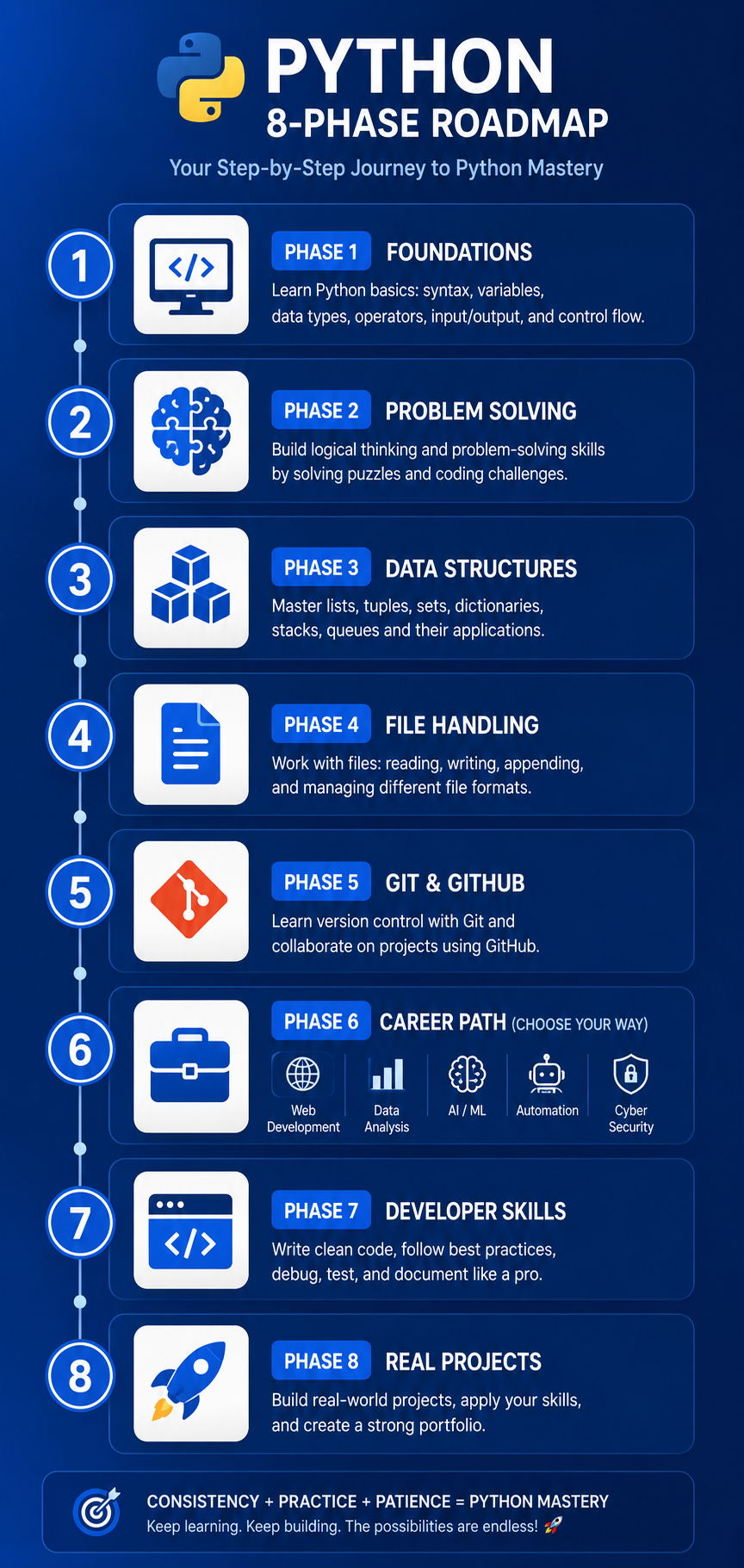
The Complete Python Learning Roadmap
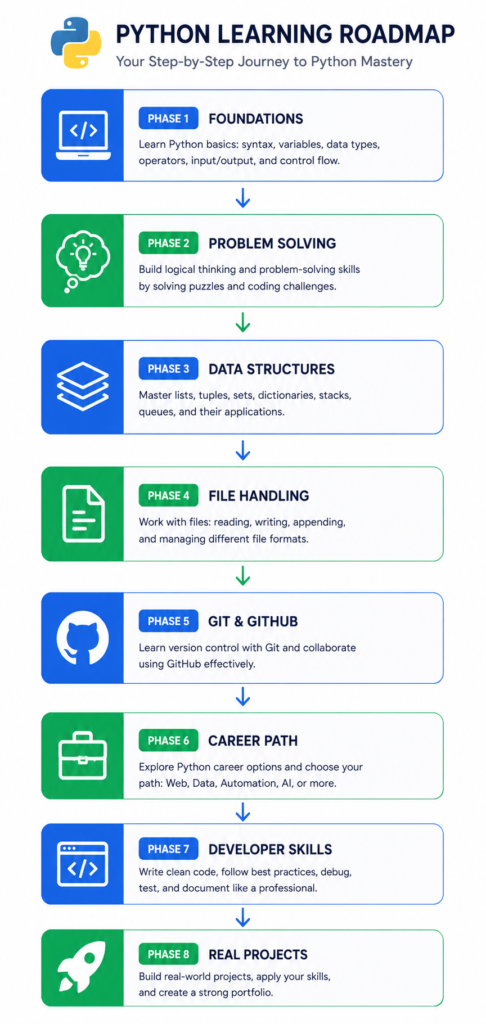
Phase 1: Build the Right Foundations First
Every python learning roadmap starts with foundations — but most beginner resources either rush through them or make them unnecessarily complicated. Phase 1 is about building mental models, not memorizing syntax.
Installing Python and Setting Up VS Code
The very first thing I recommend to every beginner is to set up a real development environment — not an online editor. Online editors are fine for a first demo, but they don’t reflect what actual Python development looks like.
Here’s how to do it properly:
- Download Python 3.12+ from python.org — always use the latest stable version
- Install VS Code from code.visualstudio.com
- Install the Python extension inside VS Code
- Open a terminal inside VS Code and type: python –version
- Create a folder called python_projects and open it in VS Code
That’s your development environment. It takes 15 minutes and you’ll use this setup for years.
| ⚠️ Common Mistake |
| Don’t spend days configuring the ‘perfect’ environment. Minimal working setup is always better than a complex setup you don’t understand. Get Python running, get VS Code open, start writing code. |
Understanding Variables, Data Types, and Input
Variables and data types are the vocabulary of programming. Without understanding them deeply, everything else in your python learning path becomes guesswork.
From my experience, beginners who struggle with data types later are almost always ones who treated this phase as something to get through quickly. Slow down here.
What you need to understand in this section:
- String, Integer, Float, Boolean — what each is and when you use it
- Type conversion — why int(‘5’) works but int(‘five’) throws an error
- Variables as labels, not boxes — this mental model matters later
- The input() function — how programs accept user data
- String formatting — f-strings are the modern standard, learn those first
The Core Logic Skills Beginners Must Master
Logic is the engine behind every program. Python syntax is the vehicle. Most beginners learn the vehicle but can’t drive it because they never understood the engine.
Core logic means: given a problem, you can break it into steps a computer can execute. This is not a Python skill — it’s a thinking skill that Python requires you to practice.
What I’ve seen work best is working through simple real-world logic problems before touching a Python file. Ask yourself: how would I explain this to someone who can only do one thing at a time?
Loops and Conditionals Without Confusion
If-elif-else and for/while loops are where most beginners hit their first real wall. Not because the concepts are hard, but because they don’t practice them enough before moving on.
My rule for beginners: write at least 10 loop programs before moving to the next topic. Not 10 variations of the same program — 10 different real-world scenarios.
- Count down from 100 to 1 using a while loop
- Print only even numbers between 1 and 50
- Ask the user for a password and keep asking until they get it right
- Build a simple menu system using if-elif-else
- Loop through a list of names and greet each one
These aren’t exercises — these are how you build the loop intuition that carries you through the rest of the python roadmap.
Functions and Why They Matter Early
Functions are one of the most underestimated topics in beginner Python courses. Most guides introduce them too late, which means beginners write hundreds of lines of bad code before understanding that there’s a better way.
A function is a named block of code that does one thing. Learning to write functions early forces you to write cleaner, more organized code from the start — and that habit compounds dramatically as your projects get bigger.
Master these before moving to Phase 2:
- def syntax and return vs print — understanding the difference is critical
- Parameters and arguments — how data flows into and out of a function
- Default parameter values
- Calling functions inside other functions
Beginner Mistakes That Create Bad Habits
| ⚠️ Common Mistakes in Phase 1 |
| 1. Memorizing syntax instead of understanding concepts 2. Copy-pasting code from Stack Overflow without reading it 3. Skipping the practice problems and jumping to the next video 4. Using print() to ‘test’ code instead of learning to use the debugger 5. Not naming variables clearly — x, y, a are not acceptable names for real code |
| ✅ Phase 1 Key Takeaways |
| • Set up a real local environment — VS Code + Python installed locally • Understand data types deeply, not just syntax • Build loop intuition through repetition — minimum 10 different loop programs • Learn functions early and write everything as a function • Never move to Phase 2 until you can write a working program from scratch without help |
Phase 2: Learn Problem Solving Before Advanced Topics
This is the phase that separates python developers from python learners. Problem solving is not an advanced skill — it’s the foundational skill that everything else in your python roadmap depends on. Most people skip it, and they pay for that later.
The Real Purpose of Python Practice
Practicing Python is not about learning new syntax. It’s about training your brain to break problems into code. Every time you solve a problem you’ve never seen before, you’re building a pattern library that makes future problems easier.
From my experience coaching beginners, those who spend 3 weeks on problem solving at this stage progress twice as fast as those who rush to frameworks. Invest the time here — it compounds.
Simple Coding Challenges That Build Logic
You don’t need competitive programming platforms at this stage. Start with straightforward logic challenges that force you to use everything you learned in Phase 1.
Great beginner problem sources:
- Exercism.io — excellent for beginners, mentor feedback available
- Codewars — start at 8-kyu and work upward
- Python Challenge — logic-based puzzles built specifically for Python
- HackerRank Python track — structured and beginner-friendly
Aim to solve 30–50 problems before moving to Phase 3. Don’t worry about speed. Worry about fully understanding each solution.
How to Think Like a Developer
The developer mindset is about decomposition — taking a large problem and breaking it into smaller ones that you already know how to solve. Here’s the framework I teach:
- Read the problem twice before writing a single line of code
- Write your solution in plain English first (pseudocode)
- Translate each English step into Python
- Test with simple inputs first, then edge cases
- Ask: what happens if the input is empty? Zero? Negative?
This framework works at every level of Python development. I still use it on complex real-world problems.
Mistakes That Kill Progression Early
- Solving the same type of problem 20 times — variety builds flexibility
- Reading the solution before genuinely trying — struggle time is learning time
- Ignoring error messages — errors are the most educational part of coding
- Moving on when a solution ‘works’ — understanding why it works matters more
| ✅ Phase 2 Key Takeaways |
| • Solve 30–50 problems before advancing — quantity builds pattern recognition • Always pseudocode before you write Python • Error messages are your teachers — learn to read them, not ignore them • Struggle is productive — don’t reach for hints too quickly |
Phase 3: Understand Python Data Structures Properly
Data structures are the containers that hold the information your programs work with. Every real-world Python application — from a data analysis script to a web backend to an AI model — depends on knowing when to use which data structure and why.
Lists, Tuples, Sets, and Dictionaries Explained Practically
Here’s how I explain the four core Python data structures to every beginner I work with:
| Data Structure | Best Used For | Key Property | Example Use Case |
| List | Ordered, changeable collections | Allows duplicates, indexed | Shopping cart items |
| Tuple | Fixed data that shouldn’t change | Immutable | GPS coordinates |
| Set | Unique values, fast lookup | No duplicates | Unique website visitors |
| Dictionary | Key-value pairs, fast lookup | Keys must be unique | User profile data |
What Beginners Usually Misunderstand
The most common misconception I see is treating lists as the universal solution. Beginners reach for a list even when a dictionary would be 10x faster and more readable.
The second biggest misunderstanding is mutability. Not knowing that lists are mutable and tuples are not leads to bugs that are extremely difficult to diagnose.
Spend dedicated time on these distinctions — they show up in every job interview and in every real project.
Real Examples Developers Use Daily
- Dictionary: storing API response data — keys map to values, fast lookups
- List: processing rows from a CSV file in sequence
- Set: removing duplicate entries from a dataset instantly
- Tuple: returning multiple values from a function
- List of dictionaries: the backbone of almost every data processing script
Data Structure Practice Framework
- Build a phonebook using a dictionary — add, update, delete, lookup contacts
- Write a script that removes all duplicate words from a sentence using sets
- Process a CSV-like list of tuples and calculate totals
- Build a simple inventory system using nested dictionaries
These four projects will give you more data structure intuition than any tutorial series.
| ✅ Phase 3 Key Takeaways |
| • Default to dictionaries for key-value data — not lists • Use sets whenever uniqueness matters and order doesn’t • Understand mutability — it affects how you pass data between functions • Build the four practice projects above before moving to Phase 4 |
Phase 4: Learn File Handling and Error Management
Real programs don’t just run in isolation — they interact with files, databases, APIs, and user input. Phase 4 is where your Python skills start to feel genuinely useful, because you’ll be writing programs that do things that matter.
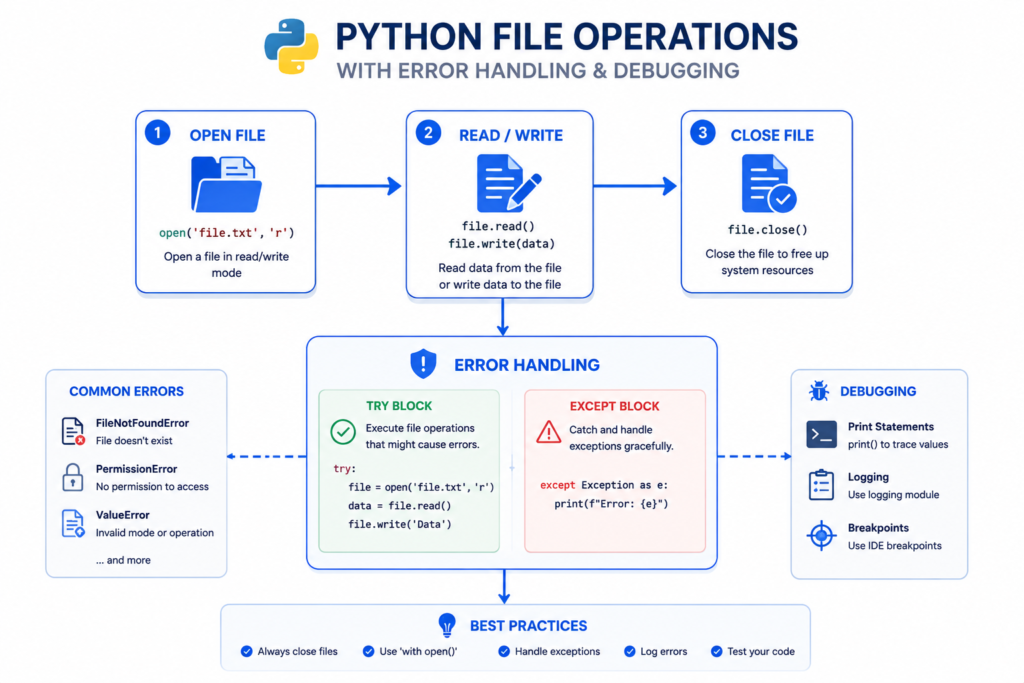
Reading and Writing Files in Real Projects
File handling is the bridge between your Python script and the real world. Once you can read and write files, you can build tools that process actual data — not just test variables.
Key file handling concepts to master:
- open() with context managers (with statement) — always use this pattern
- Reading: read(), readline(), readlines() — know when to use each
- Writing and appending — understand the difference between ‘w’ and ‘a’ modes
- Working with CSV files using the csv module
- Basic JSON reading and writing — critical for working with APIs
Build a log analyzer: take a text file of server logs, read it with Python, count how many times each error type appears, and write a summary to a new file. This single project covers everything in Phase 4.
Understanding Exceptions Without Fear
Error handling is the skill most beginners actively avoid — usually because errors feel like failures rather than feedback. That’s the wrong framing.
In production code, exception handling is what separates fragile scripts from robust applications. A program that crashes on unexpected input is not a working program.
- try/except — the basic pattern every Python file should use
- except SpecificError vs bare except — always catch specific errors when possible
- finally blocks — code that always runs, regardless of what happened
- raise — how and when to deliberately throw your own errors
- Creating custom exceptions for your own applications
Debugging Skills That Save Hours
Debugging is a skill you’ll use every single day as a developer. Learning it properly in Phase 4 saves you enormous amounts of time throughout the rest of your python learning roadmap.
From my experience, beginner developers waste 60–70% of their debugging time because they don’t have a systematic process. Here’s the one I use:
- Read the error message — all of it, including the line number and type
- Locate the line in your code — don’t guess, find it
- Print the values of variables just before the error
- Check your assumptions — what did you think the variable contained?
- Use the VS Code debugger with breakpoints for complex bugs
| ✅ Phase 4 Key Takeaways |
| • Always use context managers (with open()) for file operations • Never use bare except — always specify the error type • Build the log analyzer project before moving to Phase 5 • Debugging is a skill — practice it systematically |
Phase 5: Learn Git and GitHub Earlier Than Most People
I put Git in Phase 5 deliberately — earlier than most python roadmaps recommend it. Here’s why: every project you build from this point forward should be on GitHub. Not as an afterthought. Not eventually. From day one.
Why GitHub Matters for Python Developers
GitHub is not just version control — it’s your professional portfolio, your collaboration platform, and your proof of work. When a recruiter asks to see your GitHub profile, they’re asking to see your work history as a developer.
More practically: knowing Git saves you from losing code, lets you experiment without fear, and is required for any team-based development environment. It is not optional.
What you need to learn:
- git init, git add, git commit — the three commands you’ll use daily
- git push and git pull — syncing your local code with GitHub
- Branches — how to experiment without breaking working code
- README.md — every project needs one, it’s your project’s front page
Your First Python Portfolio Setup
- Create a GitHub account with a professional username
- Create your first repository: python-foundations
- Push your Phase 1–4 projects into organized folders
- Write a README for each project explaining what it does and what you learned
- Pin your three best repositories on your profile page
This portfolio will be useful from today. Even early projects with a good README show learning progression — and that is something recruiters actively look for.
Common Git Mistakes Beginners Make
- Committing everything in one giant commit — commit small, commit often
- Writing ‘fix’ or ‘stuff’ as commit messages — write descriptive messages
- Pushing API keys or passwords to public repos — use .gitignore
- Working entirely on the main branch — use feature branches
How Recruiters Evaluate GitHub Projects
What I’ve seen from speaking with hiring managers and technical recruiters:
- Consistent commit history over months signals genuine learning
- A README with clear problem statement, tech used, and how to run the project is a green flag
- Projects that solve a real problem — even a small one — outperform exercise collections
- Clean code and consistent naming conventions matter more than project complexity
| ✅ Phase 5 Key Takeaways |
| • Start using Git and GitHub from today — not eventually • Every project gets its own repo with a README • Commit small and often with descriptive messages • A real problem solved beats 10 tutorial projects every time |
Phase 6: Choose Your Python Career Path
This is the most important decision point in your python roadmap. Python is genuinely versatile — it works for web development, data analysis, AI, automation, and cybersecurity. But trying to learn all paths simultaneously is how you stall out indefinitely.
Choose one path. Go deep. Pivot later if needed, but pick one first.
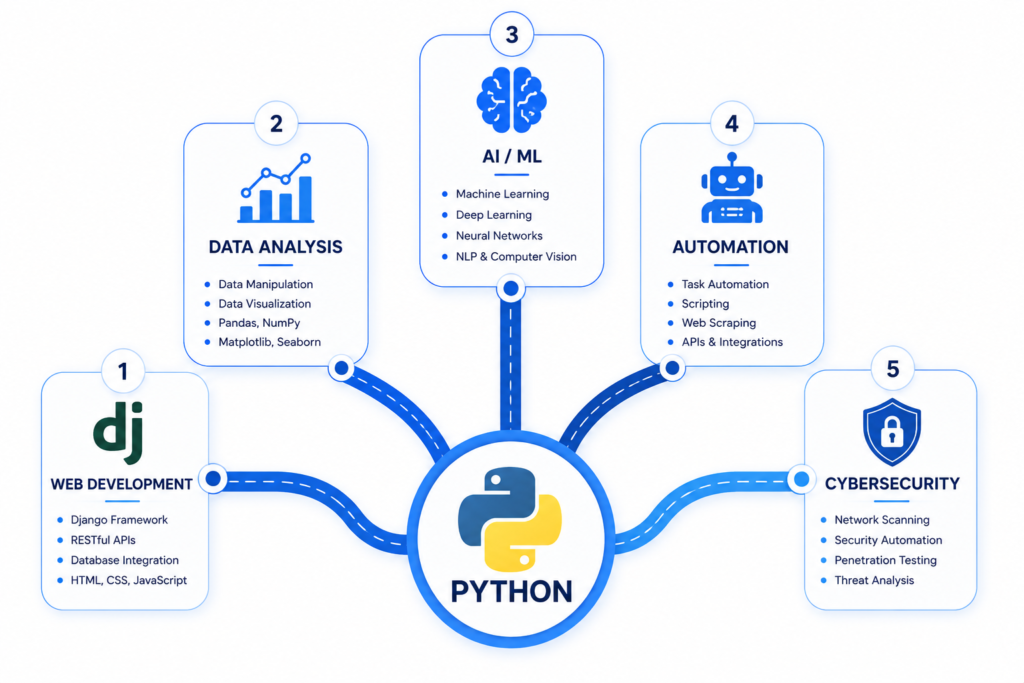
Python Roadmap for Web Development
If building websites and web applications is your goal, the Python web development path in 2026 looks like this:
- Flask — start here. Lightweight, minimal, teaches you how the web works
- Django — move here for full-featured web apps; covers ORM, auth, admin
- FastAPI — learn this for building modern REST APIs; great for backend roles
- HTML/CSS basics — you don’t need to be a frontend expert, but you need to understand the basics
- PostgreSQL + Django ORM — how your Python app talks to a database
Recommended first project: build a task management web app with user authentication using Django.
Python Roadmap for Data Analysis
Data analysis is one of the fastest career paths for Python beginners in 2026, especially for career switchers with domain expertise (finance, healthcare, marketing).
- pandas — the core library for data manipulation and analysis
- NumPy — numerical operations, especially important for ML prep
- Matplotlib and Seaborn — data visualization
- Jupyter Notebooks — the standard environment for exploratory analysis
- SQL — non-negotiable for data roles (see Phase 7 for more detail)
For a deeper guide on this path, read my complete data analyst roadmap for career growth — it covers the full progression from Python basics to job-ready analyst.
Python Roadmap for AI and Machine Learning
AI and ML are the most hyped Python career paths — and also the ones with the steepest prerequisites. Don’t jump here from Phase 1. Build through Phase 6 first.
- NumPy and pandas — essential prerequisites
- Scikit-learn — the gateway to applied machine learning
- Matplotlib / Seaborn — visualizing model performance
- TensorFlow or PyTorch — for deep learning (after scikit-learn)
- Hugging Face — for large language models and NLP work
If AI engineering is your goal, I cover the full path in my guide on how to become an AI engineer — including the Python skills that matter most for AI roles.
Python Roadmap for Automation
Automation is an underrated Python career path with massive demand in operations, QA, DevOps, and business analytics roles. If you have domain experience in any industry, automation may be your fastest route to Python income.
- os and shutil modules — file and directory operations
- schedule and time modules — running scripts on a timer
- requests — interacting with APIs and web services
- Selenium / Playwright — browser automation and testing
- openpyxl / xlrd — Excel automation (huge in enterprise environments)
Python Roadmap for Cybersecurity
Python is extensively used in cybersecurity for scripting, tool development, penetration testing automation, and log analysis. This is a specialized path that requires additional security knowledge beyond Python.
- socket and subprocess modules — network programming basics
- requests and BeautifulSoup — web interaction and scraping
- scapy — packet manipulation and network analysis
- hashlib and cryptography — encryption and hashing
- Learn the security fundamentals alongside the Python skills
Phase 7: The Python Developer Skills That Actually Matter in 2026
These are the skills that separate beginner Python learners from Python developers who are actually employable in 2026. Most python roadmaps either skip these or bury them at the end. I’ve moved them forward because they matter too much to be an afterthought.
APIs and Real-World Integrations
APIs are how modern software communicates. Whether you’re doing data analysis, building a web app, or writing automation scripts, you’ll interact with APIs constantly. Understanding how to work with them is one of the most practical skills in the python developer roadmap.
- HTTP methods: GET, POST, PUT, DELETE — what each does and when
- The requests library — Python’s standard tool for API calls
- Authentication: API keys, OAuth tokens, Bearer headers
- JSON parsing — every API returns JSON; you need to handle it confidently
- Rate limiting — how to handle API limits without breaking your scripts
Build a project that pulls data from a public API (weather, news, GitHub, Spotify) and does something useful with it. This is an immediate portfolio upgrade.
SQL Skills Every Python Developer Should Learn
I cannot stress this enough: SQL is not optional for most Python career paths. Data analysts, backend developers, and even many automation roles require SQL knowledge.
If you’re new to SQL, start with my complete SQL roadmap guide — it’s designed to get you from zero to confident in the fundamentals. Then come back to this phase.
For Python specifically, learn:
- SQLite for local projects — built into Python, no setup required
- SQLAlchemy — Python’s ORM for database interactions
- pandas + SQL — reading SQL query results directly into DataFrames
- PostgreSQL basics — for production applications
Virtual Environments and Dependency Management
This is a topic almost every beginner tutorial skips — and it’s one that causes enormous headaches later.
A virtual environment is an isolated Python environment for each project. Without it, installing packages for one project can break another. It’s a 5-minute setup that saves hours of debugging.
- python -m venv venv — create a virtual environment
- source venv/bin/activate (Mac/Linux) or venv\Scripts\activate (Windows)
- pip install package_name — now installs only to this project
- pip freeze > requirements.txt — document your dependencies
- requirements.txt — every real project has this; recruiters check for it
Writing Cleaner and More Professional Python Code
Python has strong style conventions (PEP 8) and readability is considered a core feature of the language. Writing messy Python code when cleaner options exist is a red flag in code reviews.
- PEP 8 — the style guide every Python developer should read at least once
- Black — the auto-formatter that enforces style without debate
- Type hints — increasingly expected in professional Python codebases
- Docstrings — how you document what your functions do
- List comprehensions — Pythonic way to transform lists (but don’t overuse them)
Beginner vs Advanced Developer Mindset
| Mindset Area | Beginner Approach | Advanced Developer Approach |
| Code organization | One big script file | Functions, modules, packages |
| Error handling | Ignores or prints errors | Proper try/except with logging |
| Variable naming | x, y, temp, stuff | Descriptive, self-documenting names |
| Testing | Manual testing by running | Unit tests with pytest |
| Documentation | No comments at all | Docstrings and README for every project |
| Dependencies | Global pip installs | Virtual environments per project |
| ✅ Phase 7 Key Takeaways |
| • Learn to work with APIs — it’s one of the most transferable Python skills • SQL is not optional for data and backend paths — learn it alongside Python • Always use virtual environments — it’s a professional habit, not advanced knowledge • Write code for the person who reads it, not just the machine that runs it |
Phase 8: Build Real Projects Instead of Endless Tutorials
Projects are where your python roadmap becomes real. Everything you’ve learned in Phases 1–7 has been building toward this — writing Python code that solves actual problems that real people have.
Here’s what I’ve seen: beginners who spend 80% of their time on tutorials and 20% on projects stall. Beginners who flip that ratio — 20% learning, 80% building — progress dramatically faster.
Beginner Python Projects That Build Confidence
- Number Guessing Game — uses conditionals, loops, and input
- Simple Calculator — functions, error handling, and user interaction
- To-Do List App (command line) — file handling, data structures, CRUD operations
- Weather CLI — API calls, JSON parsing, formatted output
- Word Frequency Counter — file reading, dictionary usage, sorting
Each project here specifically reinforces the skills from earlier phases. Build all five before calling yourself a Python beginner who’s ready for intermediate work.
Intermediate Projects That Impress Recruiters
- Web Scraper — scrapes job listings or news headlines and stores them in CSV
- Budget Tracker (with file persistence) — full CRUD with file or SQLite storage
- REST API with FastAPI — serves data from a JSON file or database
- Data Dashboard — pandas + Matplotlib analysis of a real public dataset
- Automation Script — automates a repetitive task from your own life
These projects demonstrate that you can build something genuinely useful — which is exactly what employers want to see.
Portfolio Projects for Different Career Paths
| Career Path | Ideal Portfolio Project | Key Skills Demonstrated |
| Web Development | Full-stack task manager with Django + PostgreSQL | Django, ORM, auth, deployment |
| Data Analysis | EDA on a public dataset with visualization report | pandas, Matplotlib, Jupyter, SQL |
| AI / ML | Classification model with accuracy metrics + writeup | scikit-learn, NumPy, model evaluation |
| Automation | Email/file automation tool with scheduling | os, schedule, smtplib, openpyxl |
| Cybersecurity | Port scanner or log analyzer tool | socket, subprocess, regex, file I/O |
What Makes a Python Project Stand Out
What I’ve seen actually differentiate projects in hiring contexts:
- A clear problem statement in the README — what does this solve and for whom?
- Installation instructions that work — test your own setup guide
- Error handling that doesn’t crash on unexpected input
- Clean commit history that shows thinking and iteration
- A live demo if possible — even a screenshot or GIF of it working
| ✅ Phase 8 Key Takeaways |
| • Build before you feel ready — readiness comes from building, not studying • Every project needs a README with problem statement and instructions • Build projects that align with your chosen career path from Phase 6 • Quality over quantity — one excellent project beats five tutorial clones |
Recommended Python Learning Path by Timeline
One of the most common questions I get is: how long will this take? The honest answer depends on your daily time investment — but here’s the framework I’ve seen work for most people.
30-Day Beginner Learning Path
| Week | Focus | Deliverable |
| Week 1 | Phase 1 — Foundations | 5 working Python scripts |
| Week 2 | Phase 1 cont. + start Phase 2 | 10 problem-solving challenges |
| Week 3 | Phase 2 + Phase 3 | Phonebook + duplicate remover projects |
| Week 4 | Phase 4 + Phase 5 | Log analyzer on GitHub with README |
90-Day Intermediate Progression
| Month | Focus | Goal |
| Month 1 | Phases 1–5 (foundations + Git) | 5 projects on GitHub |
| Month 2 | Phase 6 — chosen career path tools | 3 path-specific projects |
| Month 3 | Phase 7 + Phase 8 | 1 polished portfolio project + API project |
6-Month Developer-Level Roadmap
- Months 1–2: Complete Phases 1–5 thoroughly
- Month 3: Phase 6 — deep dive into chosen path
- Month 4: Phase 7 — API integration, SQL, virtual environments
- Month 5: Phase 8 — build 3 real projects for portfolio
- Month 6: Polish portfolio, apply to jobs, contribute to open source
Realistic Time Expectations
| 💡 Pro Tip: Time Investment Reality Check |
| • 1 hour/day → Job-ready Python skills in 9–12 months • 2 hours/day → Job-ready in 5–6 months • 4+ hours/day → Job-ready in 3–4 months (with full commitment) • The roadmap order matters more than the speed. Rushing foundations to get to ‘the good stuff’ is the most common way beginners add 6 months to their timeline. |
Tools and Resources That Actually Help
Every resource recommendation in this section is based on what I’ve seen produce real results — not what has the best marketing or the most YouTube views.
Best Free Platforms to Learn Python
| Platform | Best For | Quality | Cost |
| Python.org Official Docs | Reference and official tutorials | Excellent | Free |
| freeCodeCamp | Beginner video + exercises | Very Good | Free |
| Kaggle Learn | Data science Python track | Excellent | Free |
| Exercism.io | Problem solving with mentorship | Excellent | Free |
| Replit | Browser-based practice | Good | Free tier |
When roadmap.sh Python Is Useful
Roadmap.sh Python is a community-maintained visual skill map that shows every technology and concept in the Python ecosystem. It’s a useful reference tool for getting a bird’s-eye view, especially when choosing a career path.
However, I don’t recommend following roadmap.sh Python as your primary learning guide. It shows you what exists — not what order to learn it in, how long to spend on each topic, or what actually matters for jobs. Use it as a reference alongside a structured guide like this one.
YouTube vs Courses vs Documentation
| Resource Type | Best Used For | Weakness |
| YouTube | Concept explanations, seeing code in action | No structured curriculum |
| Paid Courses | Guided path with exercises | Passive watching trap |
| Documentation | Reference when building real projects | Not beginner-friendly as a starting point |
| Books | Deep conceptual understanding | Slow; hard to practice alongside |
| Practice Platforms | Building problem-solving skills | Needs foundation first |
The Most Effective Practice Resources
- Codewars — problem solving, gamified progression
- LeetCode — necessary for technical interviews (after intermediate level)
- Kaggle — real datasets, notebooks, competitions for data path
- GitHub — the resource nobody thinks of as a learning resource, but it’s the best place to read how real Python projects are structured
If you’re on the data path, my guide on the best data analytics tools covers the full toolkit you’ll need alongside Python.
Common Python Learning Mistakes That Waste Months
I’ve collected these from years of watching beginners get stuck in the same patterns. Every mistake here has cost real people real months of progress.
Learning Syntax Without Building Projects
Syntax knowledge without project experience is like knowing every word in a language but never having a conversation. You can recite the rules but you can’t communicate.
The fix: for every new concept you learn, immediately build a small program that uses it. The program doesn’t have to be useful — it just has to make you apply the syntax in a real context.
Consuming Too Many Courses
This is the single most common mistake I see. Someone buys five Python courses on Udemy and works through all of them — and still can’t build anything without guidance.
More input is not the solution. More output is. Pick one structured course for foundations, and then stop consuming and start building. The learning curve after that is in the projects.
If you’re deciding which course to start with, check my guide on data analyst courses for beginners — it covers the courses that actually produce results for people on the data path.
Skipping Problem Solving
Phase 2 exists because problem solving is what makes Python skills transferable. Skipping it feels efficient — you get to the ‘interesting’ topics faster. But you arrive at those topics without the cognitive foundation to use them.
Every beginner who skips Phase 2 ends up back there eventually. The ones who do it proactively save themselves 3–6 months of confusion.
Copy-Pasting Code Without Understanding
Copying code you don’t understand is worse than writing bad code you do understand. Bad code you understand can be improved. Code you copy-pasted exists as a black box that breaks unpredictably and teaches you nothing.
Rule: never paste code into your project that you couldn’t re-explain line by line. If you can’t explain it, you haven’t learned it.
Waiting Too Long Before Building Real Applications
The perfect moment to start building never comes. There’s always one more concept to learn, one more tutorial to finish, one more thing you feel you need to understand before you’re ‘ready.’
You’re ready after Phase 4. Seriously. The fastest learners I’ve ever seen started building their first real project after two weeks. The code was messy. The projects were simple. But they learned 10x more per hour than the people still watching tutorials.
Beginner vs Advanced Python Learning Strategy
Your learning strategy should evolve as you progress through the python roadmap. What works in Phase 1 actively hurts you in Phase 7. Here’s how to calibrate your approach.
What Beginners Should Ignore Initially
- Object-Oriented Programming (OOP) in depth — learn the basics, skip design patterns for now
- Decorators and metaclasses — advanced Python that you won’t use until later
- Async programming — important eventually, but not for beginners
- Testing frameworks (pytest) — valuable, but learn to write working code first
- Cloud deployment — Phase 8 project territory at earliest
Advanced Concepts Worth Learning Later
- OOP deeply: classes, inheritance, polymorphism, dunder methods
- Decorators and closures — once functions feel natural
- Context managers with the __enter__/__exit__ protocol
- Generators and iterators — for memory-efficient data processing
- Concurrency: threading, asyncio, multiprocessing
- Design patterns — after you’ve seen why the messy version is painful
The Right Progression Order
Here’s the golden rule of python progression: master the thing that makes the next thing make sense. Don’t learn pandas before you understand lists and dictionaries. Don’t learn Django before you understand functions and HTTP basics. Don’t learn machine learning before you understand NumPy.
The python learning path works because each phase builds on the previous one. Trust the sequence.
Python Roadmap FAQ
How Long Does It Take to Learn Python?
The honest answer: 3–12 months to become job-ready, depending on your daily time investment and career path choice. Data analysis paths tend to be faster to employability than ML or full-stack web development. 2 hours/day consistently is enough to reach an intermediate level in 5–6 months using this roadmap.
Can I Learn Python Without a Computer Science Degree?
Absolutely — and thousands of people do it every year. Python’s readable syntax and massive community make it one of the most accessible programming languages for self-learners. What matters is your portfolio and your ability to solve problems in a technical interview. A degree helps but is not a requirement.
Which Python Field Pays the Most?
As of 2026, Machine Learning Engineering and AI Engineering are the highest-paying Python roles, with senior positions regularly exceeding $150,000 in major markets. Data Engineering is close behind. Web development and automation roles are more accessible to beginners and offer strong earning potential from a lower experience baseline.
Is Python Still Worth Learning in 2026?
Yes — unambiguously. Python is the #1 language for data science, a dominant force in web development and automation, and the primary language of the AI/ML ecosystem. Its usage has grown every year for the past decade. If anything, Python’s value has increased with the AI boom — the majority of AI tooling is built in or for Python.
Should I Learn Python Before AI?
Yes. Python is the gateway to AI and ML — there’s no shortcut around it. I cover the full transition in my guide on how to become an AI engineer, including exactly where Python skills hand off to ML-specific knowledge.
Is Python Enough to Get a Job?
Python alone is not enough — but Python plus domain knowledge (SQL for data, Django for web, scikit-learn for ML), a real portfolio, and the ability to solve problems in an interview is absolutely enough to get a job. The ‘Python alone’ framing is the wrong question. The right question is: Python plus what?
Final Action Plan: What to Do After Reading This Roadmap
Reading a python roadmap is not the same as following one. Here’s how to make sure this guide actually changes how you learn, starting today.
Your First 7 Days Learning Plan
- Day 1: Install Python and VS Code. Write your first 3 Python scripts.
- Day 2: Variables, data types, input. Build a simple user profile program.
- Day 3: Conditionals. Build a grade calculator that gives letter grades.
- Day 4: Loops. Write 5 different loop programs from scratch.
- Day 5: Functions. Refactor your previous programs to use functions.
- Day 6: Create your GitHub account and push everything from days 1–5.
- Day 7: Start Phase 2. Solve your first 5 problems on Exercism.io.
Seven days. Seven concrete actions. This is how you make a roadmap real.
The Most Important Skill to Focus On
If I had to name the single most important skill in this entire python roadmap, it’s problem solving — Phase 2. Everything else in Python depends on your ability to decompose a problem into steps a computer can execute.
You can learn syntax in a week. You can learn a framework in a month. Problem solving builds over years — start now.
How to Stay Consistent Without Burning Out
- Set a minimum daily commitment you can keep even on bad days — 20 minutes counts
- Track your progress publicly — a GitHub contribution graph is powerful motivation
- Join a learning community — the Python subreddit, Discord servers, or local meetups
- Take breaks when you plateau — rest is part of learning, not a failure
- Celebrate shipping, not studying — every project completed is a milestone
What Your Next Project Should Be
Right now, before you close this guide, decide on your first project. Not a tutorial project — a real one. Here’s my recommendation based on where you are:
- Complete beginner: Build a quiz program that asks 5 questions and scores the user
- After Phase 3: Build a contact book using dictionaries with save/load from a file
- After Phase 5: Push it to GitHub with a proper README
- After Phase 6: Build the portfolio project for your chosen career path
| 🚀 Your Python Roadmap Starts Now |
| You have the map. The next step is to open VS Code and write your first line of Python — today, not tomorrow. Resources to bookmark right now: • Python documentation • GitHub: — create your account today • Exercism.io — start your first problem-solving challenge If data is your path: read the complete data analyst roadmap If AI is your goal: read the AI engineer guide, If SQL is your next step: start here |
Related Guides You’ll Find Useful
Based on where your Python learning takes you, these guides will be your next steps:
Data Analyst Path: Data Analyst Courses for Beginners
Career Planning: Data Analyst Roadmap for Career Growth
Certifications: Data Analyst Certifications Worth Getting
SQL Foundation: Complete SQL Roadmap
SQL Practice: How to Learn SQL Language
AI Career: How to Become an AI Engineer
Prompt Engineering: Prompt Engineering Roadmap
Tools: Best Data Analytics Tools