If you have ever searched how to learn SQL language and ended up more confused than when you started, you are not alone. I have been there. When I first tried learning SQL, I watched hours of YouTube tutorials, read documentation that felt like a foreign language, and still could not write a working query without copying someone else’s code.
Here is the truth: most SQL guides waste your time. They throw syntax at you without context, skip the mental models that make SQL actually click, and leave you staring at a blank screen wondering why nothing works.
What actually works is a structured, practice-first approach — and that is exactly what this guide delivers. Whether you are starting from absolute zero or picking it back up after a failed attempt, I am going to walk you through how to learn SQL from scratch, in the right order, with the right resources.
By the end of this guide, you will know exactly what to do, what to skip, and how to go from complete beginner to job-ready SQL writer faster than you think.
Why You Can Trust This Guide
I have spent years helping beginners break into data careers, studying SQL learning patterns, and testing which resources actually produce results versus which ones just feel productive. Everything in this guide is based on what I have seen work in real-world learning situations — not theory, not recycled advice from a blog that has never touched a database.
| What Makes This Guide Different: Covers the full learning journey from zero to job-readyIncludes a 30-day roadmap with daily structureAddresses the specific mistakes that slow most beginners downUses realistic examples — not oversimplified toy datasetsIncludes guidance on PL/SQL, SQL + Python, and career paths |
Why Most Beginners Struggle to Learn SQL
The Biggest Mistake New SQL Learners Make
From my experience, the number one mistake beginners make is treating SQL like a reading exercise. They read syntax. They watch someone else write queries. They take notes. And then they open a blank SQL editor and freeze.
SQL is a doing skill. You cannot absorb it passively. The moment you try to recall a JOIN from memory without having typed it dozens of times yourself, it falls apart. Passive learning feels productive but produces almost zero real capability.
Why Watching Tutorials Alone Does Not Work
Tutorials create what I call the tutorial illusion — the feeling that you understand something because you watched someone else do it. You follow along, nod your head, and think it clicked. Then you try to replicate it from scratch and realize you retained almost nothing.
This is not a YouTube problem. It is a learning design problem. Tutorials are useful for orientation and inspiration, but they are terrible as your primary learning method for SQL.
What Actually Works for Learning SQL Faster
Here is what I have seen consistently work for people who actually become competent SQL writers:
- Write queries yourself, from scratch, every single day
- Use real datasets that have meaning — not just tables called ‘table1’ and ‘table2’
- Make mistakes, read the error messages, and fix them yourself
- Build something — even a tiny project — that uses SQL to answer a real question
- Review your own queries the next day and ask if there is a cleaner way to write them
The Fastest Way to Learn SQL in 2026
Learn SQL Concepts in the Right Order
Most courses teach SQL in the order it was invented, not the order that makes sense to a learner. I recommend a different sequence based on what concepts depend on each other:
- Database fundamentals — understand what a database is and how tables relate
- Basic SELECT queries — pull data from one table
- Filtering and sorting — WHERE, ORDER BY, LIMIT
- Aggregation — COUNT, SUM, AVG with GROUP BY
- Joins — combine data from multiple tables
- Subqueries and CTEs — write more complex logic
- Window functions and optimization — advanced real-world patterns
Practice Queries Every Day
Consistency beats intensity when learning SQL. Twenty minutes of focused query practice every day outperforms a four-hour binge session once a week. The goal is to build query-writing muscle memory — and that requires repetition across many days, not cramming.
Build Small Real-World Projects
Projects force you to combine concepts in ways tutorials never do. Even something as simple as analyzing a dataset of 500 sales records using nothing but SQL will teach you more than 10 hours of watching someone else do it. I cover this in detail in the step-by-step section below.
Use Interactive SQL Platforms Instead of Passive Videos
Platforms like SQLZoo, Mode Analytics, and LeetCode’s SQL section force you to write working queries before you move forward. That immediate feedback loop — write query, see if it works, fix it — is the fastest learning mechanism available for SQL.
What You Need to Understand Before Learning SQL
SQL Is Not a Traditional Programming Language
This is one of the most important mental shifts to make early. SQL does not work like Python or JavaScript. You are not writing instructions that run step by step. You are writing descriptions of what data you want, and the database engine figures out how to retrieve it.
This declarative nature makes SQL conceptually simpler in many ways. You say what you want, not how to get it. Once that clicks, the whole language starts to make more sense.
Why SQL Is Easier Than Most Coding Languages
SQL reads almost like English. SELECT the customer name FROM the orders table WHERE the total is greater than 100. That sentence is almost exactly what a valid SQL query looks like. The syntax is consistent, the learning curve is manageable, and you can start doing useful things within your first week of practice.
Compared to learning Python, JavaScript, or Java, SQL has dramatically less syntax to memorize, no object-oriented concepts to wrestle with, and immediate visual feedback when a query returns data.
How Databases Actually Work in Real Applications
Every application that stores data uses a database. When you log into a website, your credentials are checked against a database. When you place an order, that transaction is written to a database. When a data analyst pulls a report, they are querying a database.
SQL is the language that lets you talk to those databases. Understanding this gives your learning context and motivation — you are not learning abstract syntax, you are learning the tool that powers real systems.
How Easy Is It to Learn SQL Really?
What Makes SQL Beginner-Friendly
From my experience, SQL is one of the most accessible technical skills a non-programmer can learn. The reasons are:
- English-like syntax that mirrors how you would ask for data in plain language
- Immediate feedback — run a query and instantly see the result
- No environment setup headaches — online platforms let you practice in a browser
- Forgiving error messages that usually tell you exactly what went wrong
- Consistent grammar across most database systems
Parts That Usually Feel Difficult at First
Being honest here: a few areas feel genuinely hard until they suddenly click.
- SQL JOINs — combining multiple tables trips up almost every beginner at some point
- GROUP BY with HAVING — the logic feels backwards until you practice it enough
- Subqueries — knowing when and how to nest queries takes time
- NULL handling — SQL treats NULL in ways that surprise most people
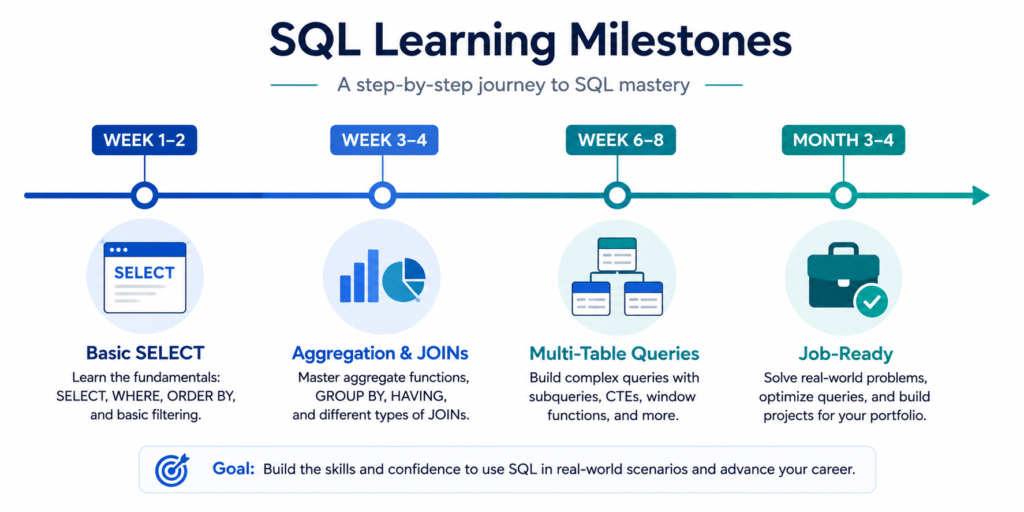
Realistic Timeline to Become Comfortable With SQL
Based on what I have seen from learners who practice consistently:
| Timeframe | What You Can Do |
| 1–2 weeks | Write basic SELECT queries, filter and sort data |
| 3–4 weeks | Use aggregation functions, GROUP BY, simple JOINs |
| 6–8 weeks | Write multi-table JOINs, subqueries, and basic analysis |
| 3–4 months | Handle real datasets, write clean queries for job scenarios |
How Long It Takes to Become Job-Ready
With consistent daily practice (roughly an hour a day), most beginners can reach a job-ready SQL level in 3 to 4 months. That assumes you are not just watching tutorials — you are writing queries, working through real datasets, and building at least one small project.
If you want to understand the full journey, my data analyst roadmap covers exactly what skills to build and in what order for a career in data.
Step 1 — Learn Core Database Fundamentals First
Tables, Rows, Columns, and Relationships
Before you write a single SQL query, you need to understand what you are querying. A database is a structured collection of related data organized into tables. A table is like a spreadsheet: it has columns (which define what type of data is stored) and rows (which represent individual records).
For example, a simple e-commerce database might have a Customers table with columns like customer_id, name, and email. Each row is one customer. The relationship between tables is what makes relational databases powerful — and understanding that relationship is what makes SQL feel logical instead of arbitrary.
Primary Keys and Foreign Keys Explained Simply
A primary key is a column that uniquely identifies each row in a table. In the Customers table, customer_id is the primary key — no two customers share the same ID.
A foreign key is how one table references another. An Orders table might have a customer_id column that refers to the primary key in the Customers table. This is what creates the relationship between tables, and it is exactly what SQL JOINs exploit.
Understanding Relational Databases Without Confusion
The word relational does not mean the tables are related to each other in a vague sense. It means the tables have defined, structured relationships via keys. That structure is what allows you to pull data from multiple tables simultaneously with a JOIN.
Once you genuinely understand this — not just intellectually but in your gut — everything about SQL starts to make sense. I recommend drawing out a simple three-table schema by hand before you write your first JOIN. It changes how you see the query.
Step 2 — Master the Essential SQL Queries
SELECT, WHERE, ORDER BY, and LIMIT
These four clauses are the foundation of almost every SQL query you will ever write. Here is what each does:
| Clause | Purpose | Example |
| SELECT | Choose which columns to return | SELECT name, email |
| WHERE | Filter rows based on a condition | WHERE country = ‘USA’ |
| ORDER BY | Sort the result set | ORDER BY created_at DESC |
| LIMIT | Restrict the number of rows returned | LIMIT 50 |
Filtering Data Like Real Analysts
Real analysts do not just pull raw data — they filter it to answer specific questions. Learning to combine WHERE conditions with AND, OR, and NOT is one of the most practically useful skills you can develop early.
For example, finding customers who signed up in the last 90 days AND spent more than $200 AND have not placed an order in the last 30 days. That is a business-relevant query that uses nothing more than basic WHERE filtering with date arithmetic.
Common Query Patterns Beginners Must Practice
- Find all records where a column is NULL
- Use BETWEEN for date or numeric ranges
- Use IN to match against a list of values
- Use LIKE for partial string matching
- Combine multiple conditions with AND and OR correctly
Step 3 — Learn Data Aggregation and Grouping
COUNT, SUM, AVG, MIN, and MAX
Aggregate functions are what transform SQL from a data retrieval tool into a data analysis tool. Instead of pulling individual rows, you collapse them into summaries.
- COUNT(*) — how many rows match a condition
- SUM(column) — total value of a numeric column
- AVG(column) — average value
- MIN(column) / MAX(column) — smallest or largest value
These functions are used in almost every real analytical query. Learning them early unlocks a massive amount of practical capability.
GROUP BY and HAVING Without Confusion
GROUP BY tells SQL to collapse rows into groups and calculate aggregate functions for each group. The most common source of confusion: GROUP BY comes after WHERE and before ORDER BY in query structure, but it applies logically after the filtering step.
HAVING is like WHERE but for aggregated results. You use it when you want to filter based on the result of an aggregate function — for example, only showing product categories where total sales exceed $10,000.
Mistakes That Break Aggregation Queries
| Common Aggregation Mistakes: Selecting non-aggregated columns not in the GROUP BY clauseUsing WHERE instead of HAVING to filter aggregated resultsForgetting that COUNT(*) includes NULL values while COUNT(column) does notGrouping by a column with many unique values when a broader grouping was intended |
Step 4 — Understand SQL Joins the Practical Way
INNER JOIN Explained With Real Examples
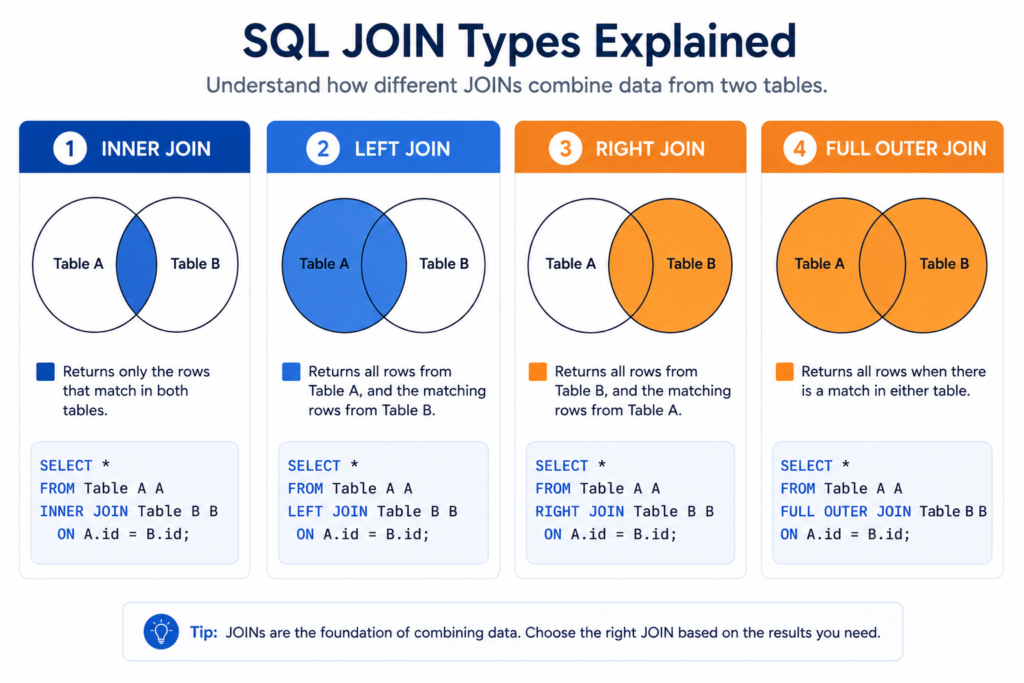
An INNER JOIN returns only the rows where there is a match in both tables. If you join a Customers table to an Orders table on customer_id, you get only customers who have placed at least one order. Customers with no orders are excluded.
This is the most commonly used JOIN type and the one you should master first. Practice it until writing the syntax is completely automatic.
LEFT JOIN vs RIGHT JOIN Simplified
A LEFT JOIN returns all rows from the left table, plus any matching rows from the right table. If there is no match, the right table columns come back as NULL.
In practice: if you LEFT JOIN Customers to Orders, you get all customers — including those who have never placed an order (their order columns will be NULL). This is extremely useful for identifying gaps in data.
RIGHT JOIN is the same logic reversed. In practice, most SQL writers just flip the table order and use LEFT JOIN because it is more readable.
Why Most Beginners Struggle With Joins
The mental model is the problem. Most beginners think of a JOIN as gluing tables together side by side. But it is really more like asking the question: for each row in table A, find all matching rows in table B.
Once you draw a simple Venn diagram or sketch out the matching logic on paper before writing the query, JOINs stop feeling mysterious.
The Join Practice Framework That Actually Helps
- Start with a two-table JOIN using a clear, obvious key (like customer_id)
- Run the query and inspect the result — count the rows, check for unexpected NULLs
- Switch from INNER JOIN to LEFT JOIN and observe how the result changes
- Add a third table to the JOIN and compare the result
- Filter the joined result with a WHERE clause
Step 5 — Practice Real SQL Scenarios
Sales Analysis Queries
Sales data is one of the best practice domains for SQL because it naturally contains the relationships and analytical questions that matter in real jobs. With a simple sales database (products, customers, orders, order_items), you can practice:
- Total revenue by product category for a given month
- Top 10 customers by lifetime spend
- Month-over-month sales growth
- Products with declining sales for two consecutive quarters
- Customer segments by purchase frequency
Customer and Order Database Practice
A customer-orders schema is the most commonly used practice schema for SQL interviews and real job tasks. I recommend building one yourself using a free tool like SQLiteOnline or DB Browser for SQLite. Create three tables — Customers, Orders, OrderItems — populate them with about 100 rows each, and spend a week writing every kind of query against it.
Beginner-Friendly Data Analysis Tasks
- Find the average order value per customer
- Identify customers who have not ordered in the last 60 days
- Calculate the percentage of total revenue each product contributes
- Find the most popular product in each product category
- List all customers who placed more than 3 orders in a single month
Real SQL Questions Used in Interviews
SQL interviews almost always include these types of questions:
- Second highest salary or Nth highest value queries
- Consecutive rows with the same value
- Running totals and cumulative sums
- Duplicate record detection
- Self-joins for hierarchical data like employee-manager relationships
These patterns are also covered in detail as part of the SQL roadmap I put together specifically for people targeting data roles.
The Best Resources to Learn SQL From Scratch
Interactive Platforms That Make SQL Easier
| Platform | Best For | Cost |
| SQLZoo | Absolute beginners, small interactive exercises | Free |
| Mode SQL Tutorial | Business analytics context, real-ish datasets | Free |
| LeetCode SQL | Interview prep, progressively harder challenges | Free/Paid |
| DataLemur | Data analyst interview SQL questions | Free |
| W3Schools SQL | Quick syntax reference and simple practice | Free |
Best YouTube Channels for SQL Beginners
- Alex The Analyst — practical, beginner-friendly with real project walkthroughs
- Corey Schafer — clean, structured SQL fundamentals playlist
- techTFQ — advanced SQL patterns explained clearly
- Data with Mo — covers SQL from a data analytics perspective
Free SQL Courses Worth Your Time
- Khan Academy Intro to SQL — genuinely beginner-friendly
- CS50’s Introduction to Databases with SQL (Harvard, free on edX)
- Google Data Analytics Certificate (Coursera) — includes SQL module
- Stanford’s Introduction to Databases (free audit on edX)
If you want structured course options with quality filters, I reviewed the best data analyst courses for beginners including which ones cover SQL most effectively.
Books That Explain SQL Clearly
- Learning SQL by Alan Beaulieu — the most readable SQL book I have come across
- SQL Antipatterns by Bill Karwin — teaches you what not to do, which is invaluable
- Practical SQL by Anthony DeBarros — excellent for data analysis use cases
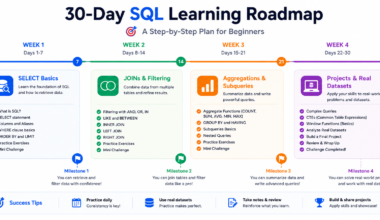
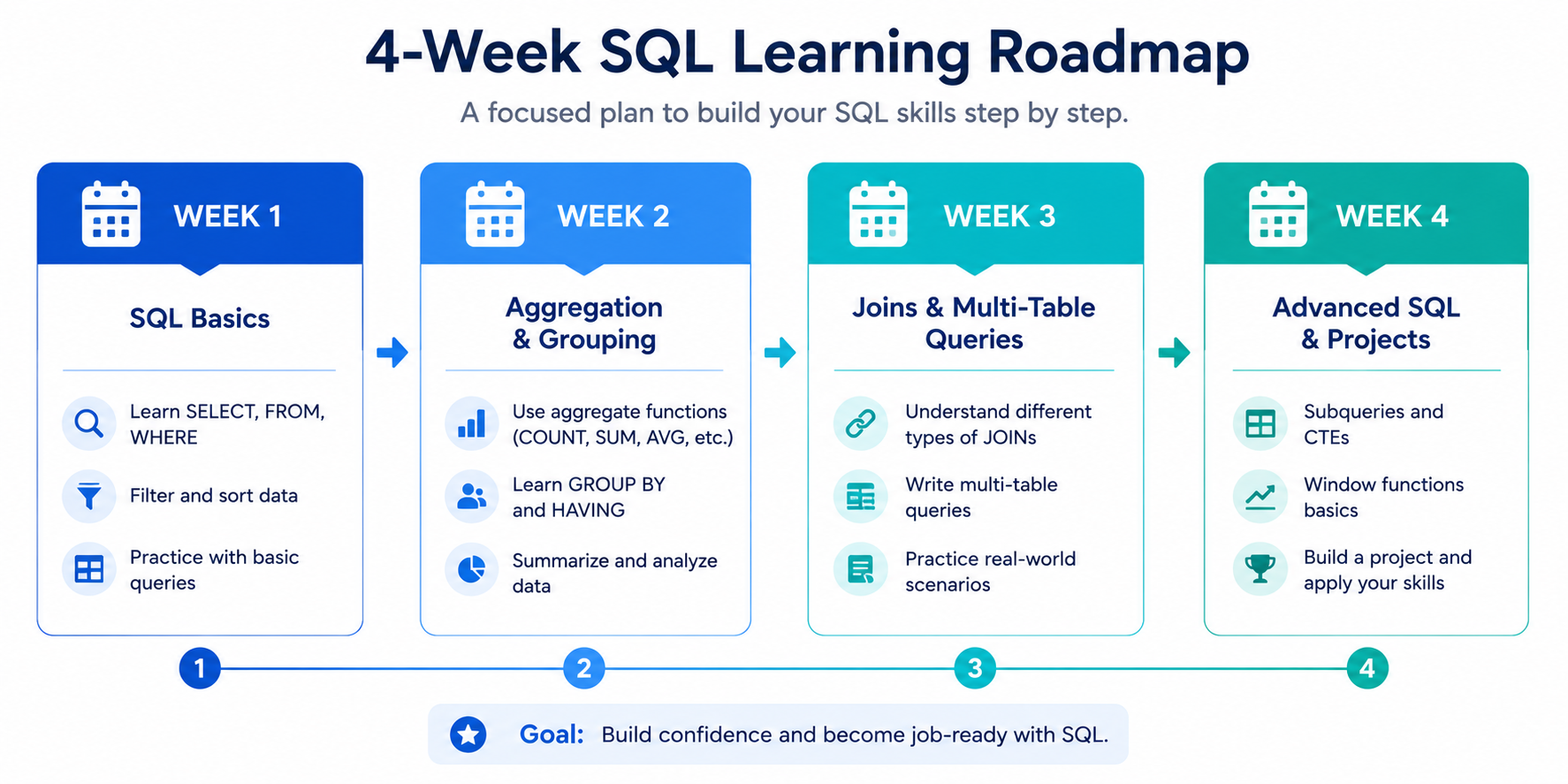
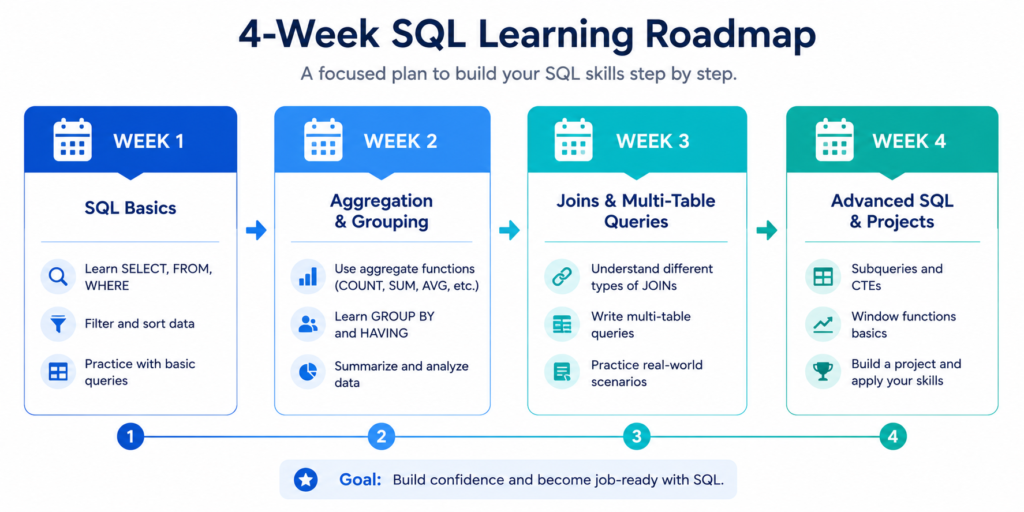
The 30-Day SQL Learning Roadmap
Week 1 — Database Basics and Simple Queries
- Day 1–2: Understand relational databases, tables, keys, and relationships
- Day 3–4: Install DB Browser for SQLite or use SQLZoo online — write your first SELECT query
- Day 5–6: Practice SELECT with WHERE, AND, OR, IN, BETWEEN, LIKE
- Day 7: Review and write 10 filtering queries from scratch without copying
Week 2 — Filtering, Sorting, and Aggregation
- Day 8–9: ORDER BY, LIMIT, OFFSET — practice sorting and pagination queries
- Day 10–11: COUNT, SUM, AVG, MIN, MAX — write five aggregation queries per day
- Day 12–13: GROUP BY and HAVING — practice with at least three different grouping scenarios
- Day 14: Build a small analysis of a sales CSV dataset using only what you know so far
Week 3 — Joins and Intermediate Queries
- Day 15–16: INNER JOIN practice — write ten JOIN queries on a two-table schema
- Day 17–18: LEFT JOIN practice — identify rows with no matching records
- Day 19–20: Multi-table JOINs — three-table queries combining customers, orders, products
- Day 21: Complete five LeetCode SQL easy problems and review your answers
Week 4 — Projects, Optimization, and Practice Challenges
- Day 22–24: Build a simple sales analysis project — answer five real business questions using SQL
- Day 25–26: Introduction to subqueries and CTEs
- Day 27–28: Practice ten SQL interview questions from DataLemur or LeetCode medium
- Day 29–30: Review your weakest areas, rewrite queries you got wrong, create a personal SQL cheat sheet
What Jobs Can You Get After Learning SQL?
Data Analyst
Data analysts use SQL every single day. It is the primary tool for extracting, cleaning, and querying data from production databases. If you want to become a data analyst, SQL is not optional — it is the first skill you need to build. Most entry-level data analyst job postings list SQL as the top required skill.
I put together a detailed guide on data analyst certifications that walks through which credentials are worth pursuing alongside your SQL skills.
Business Intelligence Analyst
BI analysts combine SQL with tools like Power BI or Tableau to build dashboards and reports. SQL is used to pull and transform data, while the BI tool handles visualization. This is one of the highest-demand hybrid roles in the data space right now.
If BI is your target, my guide on becoming a business intelligence developer gives you a full career roadmap.
Data Engineer
Data engineers build and maintain the pipelines that move data around. SQL is foundational but is typically combined with Python and cloud tools. Advanced SQL — window functions, query optimization, and database design — becomes critical at this level.
Backend Developer
Backend developers who work with relational databases write SQL to read and write application data. Knowing SQL makes you a stronger developer even if your primary language is Python, JavaScript, or Java.
Database Administrator
DBAs manage, optimize, and maintain databases. This role goes deep into SQL — performance tuning, indexing strategies, stored procedures, and administration commands. It requires advanced SQL knowledge well beyond what a beginner needs.
What to Learn After Basic SQL
Advanced SQL Concepts
Once you are comfortable with JOINs and aggregation, the next level includes:
- Window functions — ROW_NUMBER, RANK, LAG, LEAD for advanced analytics
- CTEs (Common Table Expressions) — cleaner, more readable complex queries
- Subqueries in SELECT and FROM clauses
- Query optimization and understanding execution plans
- Indexes and how they affect query performance
PL/SQL for Oracle Databases
PL/SQL is Oracle’s procedural extension of SQL. It adds programming constructs like loops, conditionals, and stored procedures. You only need PL/SQL if you are working specifically with Oracle databases — it is not required for general SQL work.
SQL + Power BI
Combining SQL with Power BI is one of the most employable skill stacks in data analytics right now. SQL handles data extraction and transformation; Power BI handles the dashboard and visualization layer.
I cover this combination in detail in my guide to Power BI courses for beginners, which includes both the SQL and the BI skills you need.
SQL + Python
Python and SQL are the two most common tools in any data analyst or data scientist’s toolkit. Python handles data manipulation and machine learning; SQL handles data retrieval from databases. Learning both opens far more doors than either skill alone.
SQL for Data Engineering
At the data engineering level, SQL is used in tools like dbt (data build tool), BigQuery, Snowflake, and Databricks. The SQL itself is advanced — heavy use of CTEs, window functions, and transformation logic — combined with pipeline orchestration tools.
How to Learn PL/SQL After SQL Basics
Difference Between SQL and PL/SQL
SQL is declarative — you describe what data you want. PL/SQL is procedural — you write step-by-step logic with variables, loops, and error handling. PL/SQL wraps SQL inside a programming environment specific to Oracle databases.
When You Actually Need PL/SQL
You need PL/SQL if you are working at a company that uses Oracle Database and your role involves writing stored procedures, triggers, or complex database-side logic. For most data analyst roles, general SQL is sufficient — PL/SQL is a specialist skill.
Beginner PL/SQL Concepts That Matter Most
- DECLARE block — defining variables
- BEGIN…END block — the execution body
- IF/THEN/ELSE conditional logic
- FOR LOOP and WHILE LOOP for iterative processing
- CURSOR — iterating over query results row by row
- Exception handling — managing errors gracefully
Common PL/SQL Learning Mistakes
- Trying to learn PL/SQL before SQL fundamentals are solid
- Using PL/SQL logic for things that plain SQL can handle more efficiently
- Ignoring Oracle-specific documentation and using generic SQL references instead
- Not practicing in an actual Oracle environment (free Oracle XE or Oracle Live SQL)
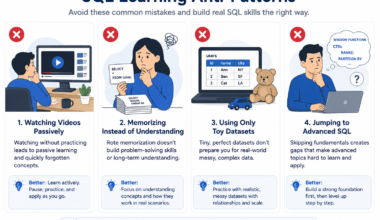
Mistakes That Slow Down SQL Learning
Memorizing Syntax Instead of Practicing
Syntax memorization is the least efficient use of your learning time. SQL syntax is consistent and Google-able in 10 seconds. What you cannot Google your way through is the ability to look at a data problem and know which SQL pattern to reach for. That only comes from practice.
Learning Advanced Concepts Too Early
Window functions and query optimization are genuinely important — but not in your first month. Jumping to advanced topics before you have automaticity with basic SELECT, JOIN, and GROUP BY queries creates a fragile understanding that collapses under real job pressure.
Ignoring Real Databases
Practicing only on the tiny sample databases included in tutorials is limiting. Real databases have messy data, inconsistent formatting, NULL values everywhere, and relationships that are not always obvious. The sooner you practice with a real or realistic dataset, the faster you build job-ready skills.
Practicing With Tiny Fake Examples
A table with 10 rows tells you nothing about how queries behave at scale. Find free datasets on Kaggle, Data.gov, or Google Dataset Search and practice against data that has at least a few thousand rows. Query behavior — especially performance — only becomes visible at real scale.
Not Building Projects
Projects are the single most powerful signal to a hiring manager that you can actually use SQL. A GitHub repository with three SQL analysis projects — complete with schema, data, queries, and findings — is worth more than any certificate when you are applying for your first data role.
Beginner SQL vs Advanced SQL Skills
What Beginners Actually Need First
| Skill Level | Skills to Focus On |
| Beginner | SELECT, WHERE, ORDER BY, LIMIT, basic JOINs, GROUP BY, COUNT/SUM/AVG |
| Intermediate | Multi-table JOINs, subqueries, CTEs, CASE WHEN, date functions |
| Advanced | Window functions, query optimization, indexing, stored procedures |
Skills That Matter for Real Jobs
Based on what I have seen in job descriptions and hiring conversations, the SQL skills that actually come up in interviews and on the job are: writing multi-table JOINs, using GROUP BY with aggregate functions, filtering with complex WHERE conditions, and increasingly — window functions for ranking and running totals.
Advanced Topics You Can Ignore Initially
- Database partitioning and sharding
- Execution plan optimization (important eventually, not now)
- Replication and high-availability setup
- Stored procedure optimization
- PL/SQL or T-SQL specific syntax (unless your role requires it)
A Simple Daily SQL Practice Routine
20-Minute Learning Session
Spend the first 20 minutes every day learning one new concept. Not a whole chapter — just one idea. Read how it works, find two examples, understand the edge cases. Keep a personal cheat sheet where you write the concept in your own words.
20-Minute Query Practice
Spend the next 20 minutes writing queries from scratch based on what you have been learning this week. No copying from tutorials. Write the query, run it, see what happens, fix errors. Set yourself a specific question to answer — do not just practice syntax in a vacuum.
20-Minute Project Work
Spend the final 20 minutes working on your ongoing project. Even if it is just a dataset you found on Kaggle and three business questions you are trying to answer, keep building. The project work is what makes everything else stick.
Weekly Review Strategy
Every Sunday, spend 30 minutes reviewing everything from the week. Read your cheat sheet. Rewrite your most complex query from memory. Fix the queries that did not work. Identify the one concept that still feels shaky and target it first the following week.
| 🎯 RECOMMENDED NEXT STEP If you are a complete beginner, start with Week 1 of the 30-day roadmap above. If you already know basic SELECT queries but struggle with JOINs, jump to Step 4 in the framework. Either way, open a SQL editor today and write at least three queries before you close this tab. That first session is the most important one. |
Frequently Asked Questions
Can I Learn SQL Without Coding Experience?
Yes — completely. SQL is one of the most accessible technical skills for non-programmers. I have seen people with zero coding background become confident SQL writers in 6–8 weeks with consistent practice. You do not need to know Python, JavaScript, or any programming language before learning SQL.
Is SQL Enough to Get a Job?
For entry-level data analyst roles, SQL combined with Excel or a BI tool like Power BI is often sufficient. For data engineer or data scientist roles, SQL needs to be paired with Python and cloud tools. SQL alone will get you far, but knowing what to pair it with matters.
My guide on data analytics tools covers the full toolkit most data roles expect.
Should I Learn SQL or Python First?
If your goal is data analysis, learn SQL first. It has a faster learning curve, you can do useful things with it within a week, and it is the skill most often tested in data analyst interviews. Python adds more power later, but SQL is the more immediate door-opener.
What Is the Best Database for Beginners?
SQLite is the easiest starting point — no server setup, runs locally, and the SQL you write is standard enough that it transfers to other systems. PostgreSQL is the best production-grade database for beginners because it is free, widely used in industry, and has excellent documentation.
Is SQL Still Worth Learning in 2026?
Yes — more than ever. SQL has been the most consistently in-demand data skill for over a decade, and that has not changed. Cloud data warehouses like BigQuery and Snowflake run on SQL. BI tools query SQL. Data engineering pipelines are built on SQL. The surface area of SQL has only expanded.
Can I Learn SQL for Free?
Absolutely. Between SQLZoo, Mode’s SQL Tutorial, Khan Academy, and the Harvard CS50 SQL course, you have everything you need to reach an intermediate SQL level without spending a dollar. Paid platforms add structure and community but are not required.
What Is the Difference Between SQL and MySQL?
SQL is the language. MySQL is one specific database system that uses SQL. Other database systems that use SQL include PostgreSQL, Microsoft SQL Server, Oracle Database, and SQLite. The core SQL you learn transfers across all of them, with minor syntax differences.
Do Data Analysts Use SQL Every Day?
In most data analyst roles, yes — SQL is used daily or near-daily. It is the primary way analysts extract data from company databases, run ad hoc queries, and build the data sets that feed into dashboards and reports.
Your Next Step to Learning SQL Faster
The Skills to Focus on First
If you walk away from this guide with one thing: focus on the basics first and practice them until they are automatic. SELECT, WHERE, GROUP BY, and INNER JOIN. Those four skills cover 80% of real-world SQL use cases. Master them before you touch anything advanced.
The Best Way to Stay Consistent
Consistency is the only thing that separates the people who learn SQL from the people who try to learn SQL. Sixty days of one hour per day beats a one-week intensive every time. Set a non-negotiable daily practice window — even 20 minutes is enough to maintain momentum.
A Practical Beginner Action Plan for the Next 30 Days
- Today: Set up your SQL environment (SQLiteOnline or DB Browser for SQLite — free, five minutes)
- Day 1–7: Complete Week 1 of the 30-day roadmap — database basics and simple SELECT queries
- Day 8–14: Complete Week 2 — filtering, sorting, and aggregation
- Day 15–21: Complete Week 3 — JOINs and intermediate queries
- Day 22–30: Complete Week 4 — build your first SQL project and practice interview questions
- Day 31 onwards: Keep practicing daily, add a new concept each week, start your second project
If you want to understand where SQL fits in a full data career, start with my data analyst roadmap — it gives you the complete picture of what to learn and in what order.
And if you are interested in pairing SQL with BI tools, check out the business intelligence analytics certification guide — it covers the certifications that actually open doors in the BI field.
| Your SQL Learning Action Plan — Start Today Open SQLiteOnline.com right now — it runs in your browser, no setup requiredWrite your first SELECT query: SELECT * FROM your_table_name;Spend 20 minutes writing filtering queries using WHEREBookmark this guide and come back to the 30-day roadmap each weekCommit to 60 consecutive days of at least 30 minutes of SQL practice |
SQL is not the hardest skill you will ever learn. It is one of the most rewarding. The moment your first JOIN query returns exactly the data you needed — and you wrote it yourself from scratch — something clicks. That click is worth every frustrated hour that comes before it.