If you’ve been searching for the best data analyst courses for beginners, you already know the problem — there are hundreds of options and almost no honest guidance on what actually works.
I’ve been through this exact frustration. When I first started exploring data analytics, I wasted months jumping between courses that promised career transformation but delivered little more than certificate PDFs and forgettable video lectures. The reality? Most beginner data analytics courses teach you tools. Very few teach you how to think like an analyst and build the portfolio that gets you hired.
In this guide, I’m breaking down the 15 best data analyst courses for beginners based on real-world value — not affiliate rankings. I’ll show you which courses build actual job-ready skills, which certifications employers care about, and how to go from zero to interview-ready in 90 days.
Whether you’re an absolute beginner, a career switcher, or someone who’s watched too many YouTube tutorials without real progress — this is the guide I wish I had.
| 🛡️ Why You Can Trust This Guide |
| I’ve personally evaluated 20+ data analytics courses and platforms over the past 3 years. I’ve spoken with hiring managers, junior analysts, and bootcamp graduates about what actually matters. Every recommendation here is based on curriculum quality, job relevance, instructor expertise, and community support — not commission rates. I update this guide every quarter to reflect platform changes and market demand shifts. |
Why Most Beginners Struggle to Learn Data Analytics
The Overwhelm Problem With Too Many Courses
Here’s the hard truth: the biggest reason beginners fail isn’t lack of intelligence or effort — it’s decision paralysis. Google ‘data analytics courses for beginners’ and you’ll find 50 million results. Every platform claims to be the best. Every instructor promises you’ll be job-ready in 8 weeks.
From my experience reviewing hundreds of learner journeys, the overwhelm almost always leads to one of two traps: either you buy three courses and finish none, or you finish one course but have nothing to show for it when you apply for jobs.
The fix isn’t finding a perfect course. It’s understanding what you actually need to learn first — and committing to finishing before moving on.
What Beginners Actually Need to Learn First
Most data analysis training for beginners starts with Python or Tableau. That’s backwards. Here’s what I’ve seen work consistently:
- SQL first — It’s the universal language of data. Every analyst role requires it.
- Excel fundamentals — Still expected in 80% of analyst job descriptions.
- Basic statistics and data thinking — How to ask the right questions.
- One visualization tool (Power BI or Tableau) — Not both, just one.
- A real project or two — More valuable than any certificate alone.
The beginner data analytics courses that skip this order often look impressive but leave you under-prepared for actual work.
The Fastest Path From Beginner to Job-Ready
I’ve mapped out what consistently works across multiple learner cohorts. The fastest path isn’t the cheapest or the most prestigious — it’s the most structured with the most applied practice.
What actually works is a 90-day focused approach: 30 days on foundations (SQL + Excel), 30 days on projects, and 30 days on portfolio and job prep. I’ll walk through this in detail in the action plan section below.
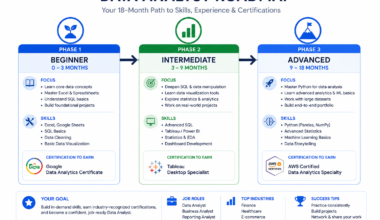
For a complete skill-by-skill breakdown of what to learn and when, I’ve also put together a detailed data analyst roadmap for beginners — it’s a great complement to this guide.
Best Beginner Data Analyst Courses at a Glance
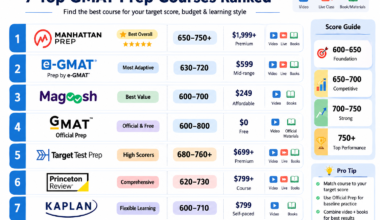
If you’re short on time, here are my top picks before we dive into full reviews:
| Category | Best Pick | Cost | Time to Complete |
| Best Overall | Google Data Analytics Certificate | $49/mo (Coursera) | ~6 months |
| Best Free Course | freeCodeCamp Data Analysis | Free | Self-paced |
| Best Certification | Google / IBM Data Analyst Cert | $49/mo | 3–6 months |
| Best for Career Switchers | IBM Data Analyst Professional Certificate | $49/mo | 3–5 months |
| Best Hands-On Platform | DataCamp | $25–35/mo | Ongoing |
| Best Budget Option | Udemy (Jose Portilla) | $12–20 (sale) | 20–30 hrs |
| Best for Busy Professionals | LinkedIn Learning | $27–40/mo | Short modules |
Best Overall Beginner Course
Google Data Analytics Professional Certificate on Coursera is my top pick for most beginners. It’s structured, beginner-friendly, taught by Googlers with real-world context, and recognized by major employers. It covers spreadsheets, SQL, Tableau, and R — giving you a well-rounded foundation without assuming any prior experience.
Best Free Data Analytics Course
freeCodeCamp’s Data Analysis with Python certification is the best completely free option. The content is solid, project-based, and self-paced. The trade-off is that you need more self-discipline since there’s no deadline structure.
Best Certification for Beginners
Between Google and IBM, Google wins for brand recognition and structured learning. IBM wins for Python + SQL depth. If you’re unsure, go Google first — you can always add IBM later.
Best Course for Career Switchers
IBM Data Analyst Professional Certificate is specifically designed for people coming from non-technical backgrounds. It emphasizes practical tools (Python, SQL, Excel, Cognos) and builds up gradually with no assumed prior knowledge.
Best Hands-On Learning Platform
DataCamp is the best platform if you learn by doing. Every lesson includes immediate interactive exercises. The browser-based coding environment means no setup friction — you just learn and practice.
What Beginners Should Learn Before Choosing a Course
Core Skills Every Data Analyst Needs
Before you invest time or money in any data analysis course for beginners, understand the core skill stack employers actually hire for:
- SQL — Querying databases is the #1 required skill in job postings.
- Excel / Google Sheets — Pivot tables, VLOOKUP, data cleaning.
- Data visualization — Power BI or Tableau (pick one).
- Basic Python or R — Growing importance, especially for automation.
- Statistics fundamentals — Mean, median, distributions, hypothesis basics.
- Communication — Presenting data insights clearly to non-technical stakeholders.
SQL vs Excel vs Python — What Matters Most First
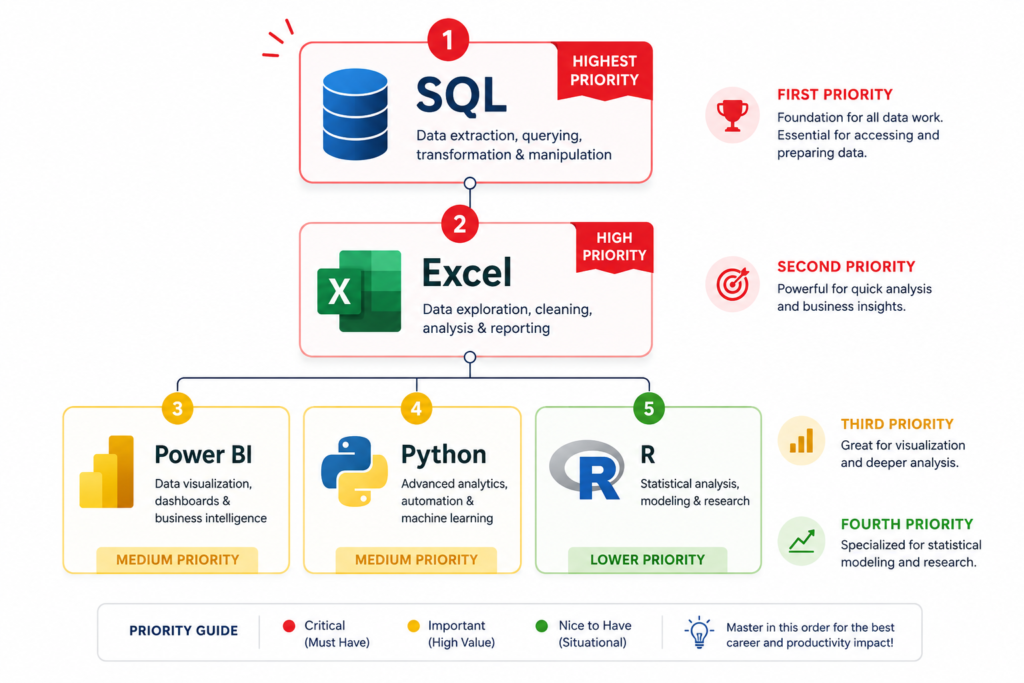
This is one of the most common questions I hear from beginners, and here’s my honest answer after seeing dozens of hiring outcomes:
| Tool | Priority | Why It Matters | When to Learn It |
| SQL | 🔴 Critical | Required in 90%+ of analyst job postings | Month 1 — learn this first |
| Excel | 🔴 Critical | Expected in almost every entry-level role | Month 1 — alongside SQL |
| Power BI / Tableau | 🟡 High | Key for dashboards and visual reporting | Month 2 |
| Python | 🟡 High | Valuable but not always required at entry level | Month 2-3 |
| R | 🟢 Medium | More common in academic/research contexts | Optional |
Do You Need Math or Coding Experience?
No — and this is where a lot of beginners scare themselves away unnecessarily. You don’t need a math degree or coding background to start. Basic arithmetic, logical thinking, and the willingness to Google errors are genuinely sufficient for 90% of beginner data analytics content.
What matters more is curiosity and consistency. I’ve seen non-technical professionals from education, marketing, and retail transition into analyst roles within 6–12 months by following a structured plan.
Beginner-Friendly Learning Order That Actually Works
- Learn Excel basics — data cleaning, pivot tables, basic formulas (2–3 weeks)
- Learn SQL fundamentals — SELECT, WHERE, JOIN, GROUP BY (4–6 weeks)
- Pick one visualization tool — Power BI or Tableau (3–4 weeks)
- Start Python basics — pandas, data manipulation (4–6 weeks)
- Build 2–3 portfolio projects using real datasets (4–6 weeks)
- Prepare resume, LinkedIn, and apply for entry-level roles
For a deeper dive into this exact sequence, check out my full data analyst learning roadmap.
Best Data Analyst Courses for Beginners Ranked
Here are the 15 best data analytics courses for beginners I’ve evaluated, ranked by overall value, job relevance, and beginner-friendliness.
1. Google Data Analytics Professional Certificate
| ⭐ Best Overall | Difficulty: Beginner | Platform: Coursera |
| Price: ~$49/month (Coursera Plus) | Financial aid available Duration: 6 months at 10 hrs/week (can be faster) Skills Covered: Spreadsheets, SQL, Tableau, R, data cleaning, visualization |
This is the course I recommend first to almost every beginner asking me about data analyst courses for beginners. Google built this for people with zero background — literally. The curriculum is well-sequenced, the exercises are practical, and the certificate carries real weight because of the Google brand.
Strengths: Beginner-friendly pacing, real-world case studies, includes a capstone project, employer consortium recognition. The community forums are active and helpful.
Weaknesses: R is taught instead of Python (Python is more in-demand). The SQL section could be deeper. Pace can feel slow if you have any technical background.
Career Value: High. This is one of the most recognized entry-level data analyst certifications. Multiple entry-level employers explicitly list it as a valued credential.
| 💡 Pro Tip |
| Apply for Coursera financial aid if cost is a barrier — Google offers it liberally and approval usually takes 2 weeks. You get the same certificate at zero cost. |
2. Microsoft Data Analyst Learning Path (Power BI Focus)
| Best for: Business Intelligence & Power BI | Platform: Microsoft Learn (Free) |
| Price: Free | Duration: 20–30 hours | Skills: Power BI, DAX, data modeling |
Microsoft Learn’s Data Analyst path is criminally underrated in beginner data analytics courses discussions. It’s completely free, well-structured, and teaches Power BI from the ground up — which is the dominant BI tool in corporate environments.
Power BI Focus: You’ll build real dashboards, connect to data sources, and learn DAX (Data Analysis Expressions). These are direct, job-applicable skills.
Business Analytics Angle: The content reflects how data is actually used in business settings — budgeting, KPI tracking, reporting. It’s practical from day one.
Certification Opportunities: After completing this path, you’re well-positioned for the PL-300 (Microsoft Certified: Power BI Data Analyst Associate) exam — a valuable credential for BI-focused roles.
3. IBM Data Analyst Professional Certificate
| Best for: Python + SQL learners | Platform: Coursera | Price: ~$49/month |
| Duration: 3–5 months | Skills: Python, SQL, Excel, IBM Cognos, data visualization |
IBM’s Professional Certificate is my second-favorite structured program for beginner data analytics courses. Unlike Google’s certificate, it teaches Python — which is more aligned with where the industry is heading.
Python + SQL Focus: You’ll write real Python code using pandas and NumPy, query databases with SQL, and build dashboards in IBM Cognos. The progression from Excel to Python is natural and well-paced.
Beginner Friendliness: IBM includes very clear explanations for non-technical learners. The labs use Jupyter Notebooks in the browser — no setup required.
Hands-On Learning Quality: Every module includes graded labs where you apply skills to real datasets. The final capstone project is portfolio-worthy.
4. Coursera Beginner Data Analytics Courses
Beyond Google and IBM, Coursera has a strong selection of data analysis courses for beginners:
- Meta Data Analyst Professional Certificate — Focuses on spreadsheets, SQL, Python, and statistics. Good for marketing-adjacent analyst roles.
- Duke University Data Analysis with Excel — Excellent for learners who want academic-quality Excel instruction.
- UC Davis SQL for Data Science — One of the best standalone SQL courses for beginners on the platform.
Best Specializations: Google (overall), IBM (Python focus), Meta (marketing data). Academic Quality: Consistently high — Coursera partners with top universities and tech companies.
5. Udemy Beginner Data Analytics Courses
| Best Budget Option | Price: $12–$20 during sales (frequent) |
| Best Instructors: Jose Portilla, Kirill Eremenko, Luke Barousse |
Udemy is where you go when budget is the primary constraint. The quality varies wildly, but the best instructors here are genuinely excellent.
My top Udemy picks for beginner data analyst courses:
- ‘Python for Data Science Bootcamp’ by Jose Portilla — Comprehensive, practical, constantly updated.
- ‘SQL Bootcamp’ by Jose Portilla — Best standalone SQL course on the platform.
- ‘The Complete SQL Bootcamp’ by Kalani Akana — Great for absolute beginners.
What to Avoid: Any course with no recent reviews, outdated tool versions, or instructors who can’t answer questions in Q&A. Always check the last update date.
| ⚠️ Common Mistake |
| Don’t buy Udemy courses at full price. They go on sale for $12–15 almost every week. Set a browser alert and wait — you’ll save 80–90%. |
6. DataCamp for Beginners
| Best Hands-On Learning Platform | Price: $25–35/month |
| Skills: Python, R, SQL, Power BI, Tableau, Machine Learning basics |
DataCamp is unique among data analytics tutorial platforms because every lesson includes immediate interactive coding exercises. You don’t just watch — you code alongside the instructor in your browser.
Interactive Learning: Each course breaks down into short video segments followed by hands-on exercises. The feedback is instant, which massively accelerates retention.
Practice Environment: DataCamp’s built-in coding interface means there’s no setup required. This removes one of the biggest friction points for beginners (environment setup).
Best for Hands-On Learners: If you find yourself falling asleep watching video lectures, DataCamp is your platform. The active recall embedded in every lesson keeps you engaged.
7. freeCodeCamp Data Analytics Tutorials
| Completely Free | Difficulty: Beginner to Intermediate |
| Skills: Python, NumPy, Pandas, data visualization, SQL basics |
freeCodeCamp’s Data Analysis with Python certification is one of the best free data analysis courses for beginners on the internet. The curriculum is rigorous, the projects are real, and the certificate is respected in the community.
Completely Free Learning: No hidden costs, no premium tiers. You get everything for free — forever.
Project-Based Approach: You complete 5 data analysis projects to earn the certification. These aren’t toy exercises — they’re portfolio-worthy projects you can show employers.
Self-Paced Advantages: Learn at your own speed. No cohort schedule, no deadline pressure. The trade-off is you need to supply your own discipline and motivation.
8. LinkedIn Learning Data Analytics Courses
| Best for: Professional Development & Short Modules | Price: ~$27–40/month |
| Skills: Excel, SQL, Power BI, data storytelling, business analytics |
LinkedIn Learning isn’t my primary recommendation for data analysis training for beginners, but it has a specific use case: short, focused lessons you can fit into a busy schedule.
Professional Development Angle: The content leans toward business application — data storytelling, stakeholder communication, Excel dashboards. These soft skills are underrated in most beginner courses.
Short Learning Modules: Most courses run 1–4 hours. Great for skill gaps but not for deep foundational learning.
Certification Usefulness: LinkedIn Learning certificates appear directly on your LinkedIn profile, which adds visibility. They’re not a substitute for Google or IBM certifications, but they’re a nice addition.
9–15. Additional Courses Worth Considering
| Course | Platform | Focus | Best For |
| Excel Skills for Business | Coursera / Macquarie | Excel mastery | Excel-focused roles |
| SQL for Data Science | UC Davis / Coursera | SQL foundations | SQL beginners |
| Tableau Training | Tableau Public (free) | Tableau basics | Visualization focus |
| Khan Academy Statistics | Khan Academy (free) | Statistics basics | Math-averse beginners |
| Kaggle Learn | Kaggle (free) | Python + ML basics | Project-focused learners |
| Excel to MySQL (Duke) | Coursera | Business analytics | Career switchers |
| Statistics for Data Science | edX / MIT | Stats & probability | Analytical depth |
Free vs Paid Data Analytics Courses — What Actually Matters
When Free Courses Are Enough
Free data analysis courses for beginners are enough when:
- You’re exploring whether data analytics is right for you before committing.
- You’re self-disciplined and don’t need external deadlines.
- You’re building foundational skills (SQL, Excel) before investing in a paid program.
- You’re supplementing a paid course with free tools like Kaggle or freeCodeCamp.
When Paid Courses Make Sense
Paid courses are worth the investment when:
- You want structured curriculum with clear progression.
- You need a recognized certificate to add credibility to job applications.
- You want graded projects, mentor support, or community access.
- You’ve tried free resources and struggled with staying consistent.
The Biggest Mistakes Beginners Make When Buying Courses
- Buying 3+ courses before finishing one — course collection is not learning.
- Paying full price on Udemy — always wait for a sale.
- Prioritizing course brand over curriculum quality.
- Choosing a course because it’s cheap, not because it covers what you need.
What Employers Actually Care About
Here’s what I’ve consistently heard from recruiters and hiring managers:
| 📊 What Hiring Managers Actually Look For |
| 1. Can you write SQL queries? (Portfolio projects prove this — not certificates) 2. Can you tell a story with data? (Dashboards and presentations matter) 3. Do you have any real project experience? (GitHub, Tableau Public, portfolio sites) 4. How do you approach problems? (Be ready to walk through your thinking) The certificate is a door-opener. The skills and projects are what get you hired. |
Which Data Analyst Certifications Are Worth It for Beginners?
Certifications That Help Build Credibility
These certifications add real credibility to your resume at the beginner level:
- Google Data Analytics Professional Certificate — Widely recognized, beginner-appropriate.
- IBM Data Analyst Professional Certificate — Strong for Python + SQL focus.
- Microsoft PL-300 (Power BI Data Analyst) — Valuable for BI-heavy roles.
- CompTIA Data+ — Vendor-neutral, emerging recognition in enterprise environments.
Certifications That Employers Recognize Most
From the employer recognition perspective, the hierarchy looks like this:
- Google Data Analytics Certificate — Highest name recognition for entry-level.
- IBM Data Analyst Certificate — Strong with tech-forward companies.
- Microsoft PL-300 — Strong in enterprise/corporate environments.
- Tableau Desktop Specialist — Good for visualization-heavy roles.
Beginner Certifications With the Best ROI
Best return on time and money invested for a data analyst certification for beginners:
- Google Certificate + Portfolio = the most job-effective beginner combination I’ve seen.
- freeCodeCamp Data Analysis (free) + 5 projects = strong portfolio at zero cost.
- Microsoft Power BI Path (free) + PL-300 exam (~$165) = excellent for BI roles.
Certifications That Look Good but Add Little Value
Be cautious about these:
- Generic ‘Data Science’ certificates from unknown platforms — no employer recognition.
- Certificates from courses with no graded projects — no proof of skills.
- Paying for certifications before building any project portfolio — waste of money at this stage.
The Skills That Actually Help Beginners Get Hired
SQL Projects Beginners Should Build
SQL is the most in-demand skill for data analyst roles. Here are beginner SQL projects that stand out:
- Sales performance analysis using a sample retail database.
- Customer segmentation using RFM (Recency, Frequency, Monetary) analysis.
- COVID-19 data exploration using publicly available WHO datasets.
- E-commerce funnel analysis — from session to purchase.
Upload these to GitHub with clear README documentation. Recruiters do look.
Excel Skills Recruiters Still Expect
Despite all the Python enthusiasm, Excel is still expected in most entry-level analyst roles:
- Pivot tables and pivot charts.
- VLOOKUP / XLOOKUP / INDEX-MATCH.
- Conditional formatting and data validation.
- Power Query for data cleaning.
- Basic dashboard creation.
Power BI vs Tableau for Beginners
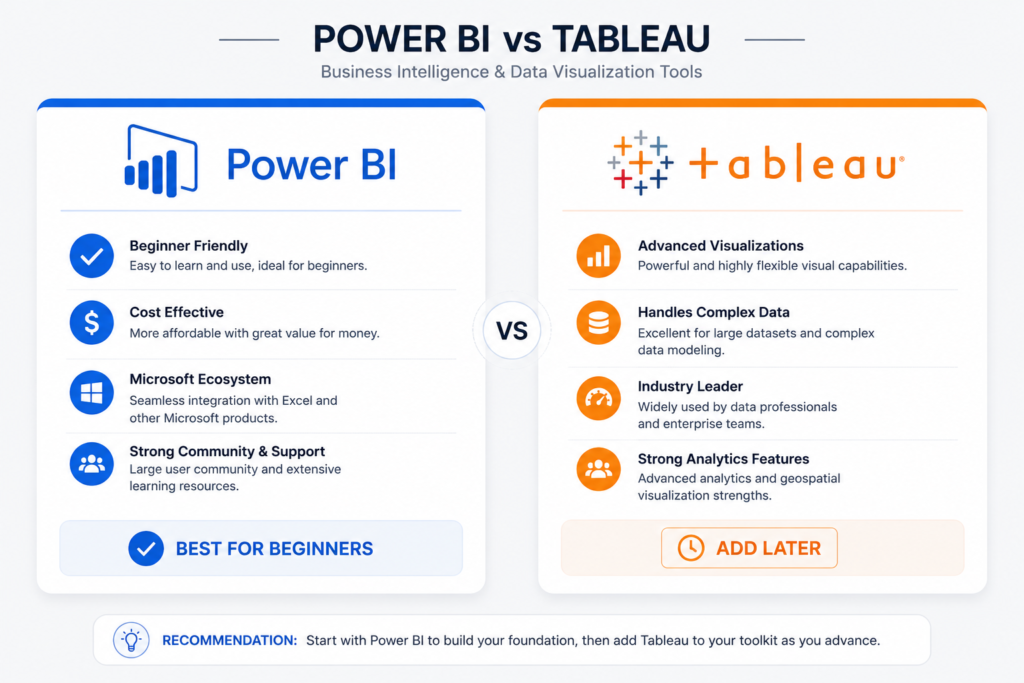
| Factor | Power BI | Tableau |
| Cost | Free (Desktop) | Free (Public only) |
| Job Market Demand | Higher (enterprise dominant) | Strong in mid-market |
| Learning Curve | Moderate | Steeper for beginners |
| Integration | Deep Microsoft ecosystem | Broad data connectors |
| Best For | Business/corporate roles | Agencies, consulting |
| My Recommendation | ✅ Start here as a beginner | Add later |
Portfolio Projects That Stand Out
A portfolio of 2–3 strong projects beats a folder of 10 mediocre ones. What makes a project stand out:
- Asks a real business question (not ‘explore this dataset’).
- Uses a publicly recognizable dataset (COVID, Netflix, Airbnb, World Bank).
- Includes clear commentary on your analytical decisions.
- Ends with actionable recommendations — not just charts.
How to Practice With Real Datasets
- Kaggle.com — Thousands of free datasets with community notebooks.
- Google Dataset Search — Indexes public datasets from across the web.
- Data.gov — US government open data portal.
- Our World in Data — Clean, reliable global datasets.
- Maven Analytics — Guided projects with business context.
Which Beginner Course Fits Your Learning Style?
Best Courses for Complete Beginners
If you’ve never touched data analysis before: Google Data Analytics Certificate. It assumes zero prior knowledge and builds systematically. The pace is gentle without being condescending.
Best Courses for Busy Professionals
If you have 5–10 hours per week: LinkedIn Learning + DataCamp combination. Short, focused sessions that fit around a full-time job. Set a daily 30-minute learning block and stay consistent.
Best Courses for Self-Taught Learners
If you’re disciplined and budget-conscious: freeCodeCamp + Kaggle Learn. Both are free, project-based, and high quality. Combine them with YouTube (Alex the Analyst’s channel is excellent) for a robust free curriculum.
Best Courses for Career Changers
If you’re transitioning from another career: IBM Data Analyst Professional Certificate. It’s specifically designed for career switchers, the pace accounts for working professionals, and the curriculum maps directly to entry-level job requirements.
Best Courses for Fast Job Preparation
If you need a job in 3–4 months: Google Certificate + DataCamp + 3 portfolio projects. This is the highest-velocity path I’ve seen produce actual hires. Intensive, but doable if you commit to 15–20 hours per week.
Mistakes That Slow Down Beginner Data Analysts
Watching Tutorials Without Building Projects
This is the single most common mistake. Tutorial videos feel productive — you’re absorbing information, taking notes, nodding along. But passive learning doesn’t transfer to job skills. The moment you close the video and try to replicate the analysis from scratch, you realize how little stuck.
The rule I give every beginner: for every 1 hour of tutorial, spend 2 hours building something. No exceptions.
Learning Too Many Tools at Once
Python + SQL + Tableau + Power BI + R + Spark. I see beginners trying to learn all of them simultaneously and making meaningful progress in none. Pick SQL and one visualization tool. Master those first. Add Python next. Everything else comes later.
Ignoring SQL Fundamentals
SQL is the language of data. Period. I’ve reviewed dozens of analyst portfolios and the ones that stood out — the ones that got callbacks — all demonstrated strong SQL skills. Yet many beginner data analytics courses deprioritize it in favor of flashier tools. Don’t fall for it. SQL first, always.
Spending Too Much on Certifications Early
A certification without a portfolio is a credential without proof. I’ve seen people spend $2,000+ on bootcamps and still struggle to get interviews because they had no projects. Spend the minimum necessary on learning materials, and invest your energy in building things you can show.
Skipping Portfolio Development
Your portfolio is your proof of skills. Employers can’t verify what you learned in a course — but they can see what you built. Two strong portfolio projects with clear documentation will outperform five certifications in most hiring conversations.
Once you’re ready to build your portfolio, revisit the skill roadmap in my data analyst roadmap guide for a structured project sequence.
Free Tools Beginners Should Start Using Immediately
Best SQL Practice Platforms
- SQLZoo — Beginner-friendly SQL practice with immediate feedback.
- Mode Analytics SQL Tutorial — Business-context SQL problems.
- LeetCode (SQL section) — Interview-prep level practice.
- W3Schools SQL — Quick reference and basic exercises.
Beginner-Friendly Excel Resources
- Microsoft Excel official training (support.microsoft.com) — Free and comprehensive.
- ExcelJet.net — Formula library with real-world examples.
- Chandoo.org — Practical Excel tutorials for analysts.
Free Power BI Practice Datasets
- Microsoft sample datasets (Adventure Works, Financial Sample) — Built into Power BI.
- Maven Analytics free datasets — Business context, pre-cleaned.
- Kaggle Power BI datasets — Community-shared BI projects.
Websites for Real Analytics Projects
- Kaggle.com — The go-to for datasets and community notebooks.
- DataWorld — Curated data for social good and business projects.
- Our World in Data (ourworldindata.org) — Clean global datasets.
- Maven Analytics Challenge — Monthly business analytics competitions.
Communities That Help Beginners Improve Faster
- r/dataanalysis (Reddit) — Active Q&A community for beginners.
- DataTalks.Club — Free courses, community, and job board.
- Kaggle Discussions — Dataset-specific help from practitioners.
- LinkedIn Data Analytics groups — Networking and job leads.
A Beginner-Friendly 90-Day Data Analytics Learning Plan
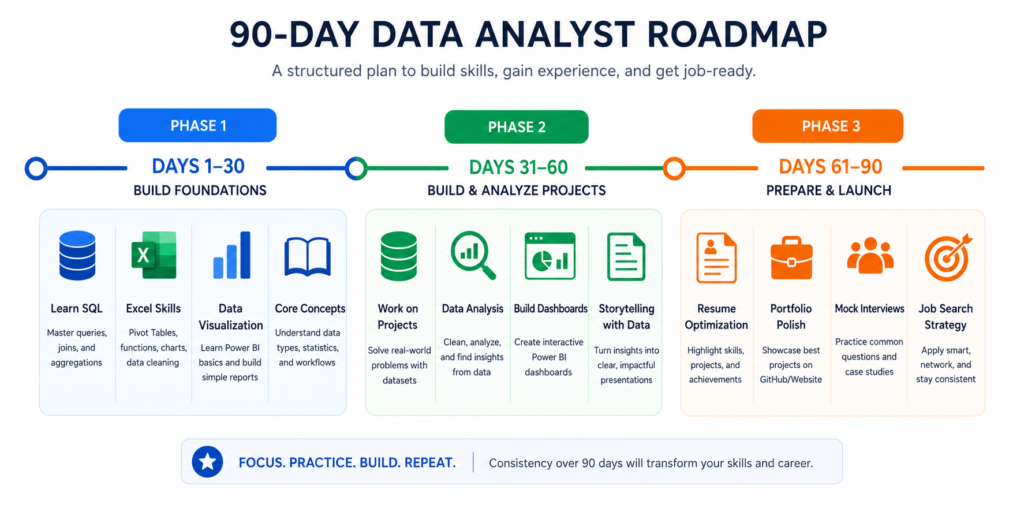
This is the exact plan I’d follow if I were starting from zero today. It assumes 10–15 hours per week of dedicated study.
Days 1–30: Learn Foundations
| 📅 Month 1 Goals |
| Week 1–2: Excel fundamentals — pivot tables, VLOOKUP, basic formulas Week 2–3: SQL basics — SELECT, WHERE, GROUP BY, JOINs (use SQLZoo + W3Schools) Week 3–4: Data cleaning in Excel + intro to Power BI End of Month 1: Complete Module 1–3 of Google or IBM certificate |
Focus areas: consistency over speed. Don’t move on until you can write a SQL JOIN without Googling it.
Days 31–60: Build Projects
| 📅 Month 2 Goals |
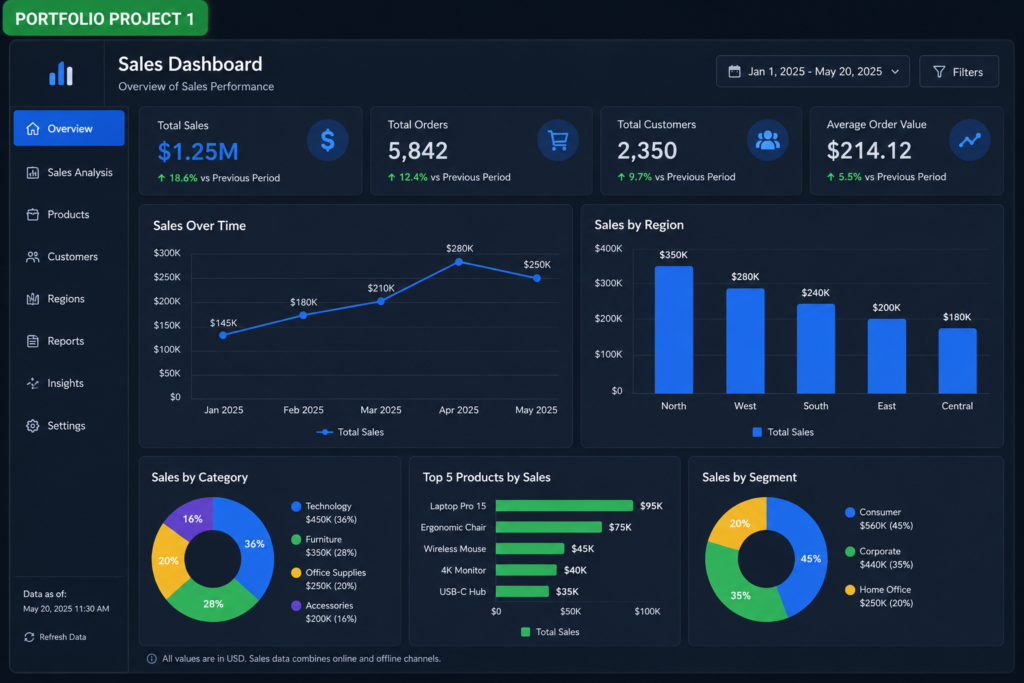
| Week 5–6: Build Project 1 — SQL analysis on a public dataset (Kaggle or data.gov) Week 6–7: Build Project 2 — Excel dashboard for a business scenario Week 7–8: Build Project 3 — Power BI dashboard with a storytelling narrative Start Python basics — pandas fundamentals (DataCamp or freeCodeCamp) |
By end of Day 60: You should have 2–3 shareable projects on GitHub or a portfolio site.
Days 61–90: Portfolio + Resume + Job Preparation
| 📅 Month 3 Goals |
| Week 9–10: Finalize portfolio — clean projects, write clear README files, host on GitHub Week 10–11: Resume + LinkedIn optimization — include projects, skills, certificate Week 11–12: Apply to 5–10 entry-level roles per week, tailor each application Practice SQL interview questions daily (30 min on LeetCode or Mode Analytics) |
Frequently Asked Questions
Can I Become a Data Analyst Without a Degree?
Yes — and this is more common than people assume. Employers increasingly evaluate candidates on demonstrable skills and portfolio projects, not degree credentials. Several entry-level analyst roles explicitly state ‘degree or equivalent experience.’ The Google and IBM certificates exist precisely for this pathway.
How Long Does It Take to Learn Data Analytics?
From zero to job-ready: 6–12 months with consistent effort. If you’re dedicating 10–15 hours per week, 6 months is achievable. If you’re fitting it around a full-time job at 5–7 hours per week, plan for 9–12 months. Speed is less important than consistency — showing up every day beats marathon sessions once a week.
Which Data Analytics Course Is Best for Absolute Beginners?
Google Data Analytics Professional Certificate on Coursera. It assumes no prior knowledge, covers the essential beginner toolkit (SQL, Excel, Tableau, R), and provides a recognized certificate. It’s the clearest, most employer-recognized path for true beginners.
Are Free Data Analytics Courses Worth It?
Yes — for building foundational skills. freeCodeCamp, Kaggle Learn, and Microsoft Learn are all high-quality free options. The limitation is they require stronger self-discipline and don’t carry the same employer name recognition as Google or IBM certificates. Use free resources to explore and supplement, then invest in one structured paid certificate.
Is Python Required for Entry-Level Data Analysts?
Not always, but increasingly yes. About 40–50% of entry-level analyst job postings mention Python. SQL and Excel are more universally required. My advice: learn SQL and Excel first, then add Python as your third major skill. Don’t let Python anxiety stop you from starting — it’s learnable.
What Is the Best Certification for Beginners?
Google Data Analytics Professional Certificate is the best first certification for most beginners. If you’re specifically targeting Python-heavy or BI roles, consider IBM (Python focus) or Microsoft PL-300 (Power BI focus) respectively.
Can I Learn Data Analytics While Working Full-Time?
Absolutely — I know people who’ve done it successfully. The key is scheduling dedicated blocks of time (30–60 minutes daily beats 4 hours on weekends) and choosing a platform that fits your pace. LinkedIn Learning and DataCamp’s short lesson format work especially well for busy professionals.
What Actually Matters Most When Starting Data Analytics
Focus on Skills Over Certificates
Certificates open doors. Skills determine whether you walk through them. Every hour you spend building a real project is worth more than an additional certificate. The hiring managers I’ve spoken with consistently say: show me what you’ve built, not just what you’ve passed.
Build Projects Earlier Than You Think
The most common regret I hear from self-taught analysts is: ‘I wish I’d started building projects sooner.’ Don’t wait until you feel ‘ready.’ Start your first project after 2–3 weeks of SQL learning. Messy early projects are better than no projects at all — they still show initiative and learning trajectory.
Start Simple and Stay Consistent
Consistency compounds. Thirty minutes of focused practice every day will outperform a frantic 6-hour Saturday session every week. Set a specific time block, eliminate distractions, and treat your learning schedule like a meeting you can’t cancel.
Your Best Next Step After Reading This Guide
You now have everything you need to make a smart, confident decision about where to start.
| ✅ Your Action Plan — Start Today |
| Step 1: Choose one course from this guide that matches your learning style and goals. Step 2: Bookmark the 90-day learning plan above and start Day 1 this week. Step 3: Set up your free tools — SQLZoo, Power BI Desktop, and a Kaggle account. Step 4: Commit to your first portfolio project by end of Month 1. Step 5: Follow the full roadmap to stay on track → |
For a complete skill-by-skill guide on what to learn in what order, visit my full Data Analyst Roadmap for Beginners — it’s the perfect next step after this guide.