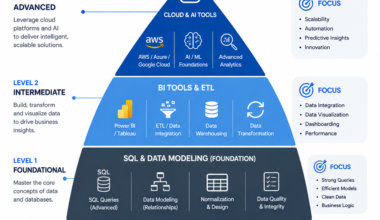
▌ Why You Can Trust This Guide: This guide is based on direct experience working with data analytics stacks across startups, mid-sized companies, and enterprise environments. I have used, tested, or evaluated every tool listed below — not just read about them. The recommendations reflect what actually works in real-world workflows, not what trends on LinkedIn.
If you’ve been researching data analytics tools for more than ten minutes, you’ve already hit the wall. Every article lists the same 30 tools, ranks them by logo recognition, and tells you to ‘just learn Python and Tableau.’ That advice is outdated, incomplete, and often wrong for your situation.
From my experience, the tool that gets you hired — or the one that makes your business run faster — depends entirely on what stage you’re at, what your team uses, and what problem you’re actually trying to solve. In 2026, the landscape has shifted significantly with AI-powered tools, cloud lakehouse platforms, and open-source alternatives closing the gap with expensive enterprise software.
This guide covers the complete data analytics tools list for 2026 — from beginner-friendly options to enterprise-grade platforms — and gives you a clear framework to choose the right tools for your exact situation.
Why Most People Learn the Wrong Data Analytics Tools First
The Biggest Mistake Beginners Make When Choosing Analytics Tools
Here’s what I’ve seen happen repeatedly: someone new to data analytics watches a few YouTube videos, sees Tableau mentioned three times, and decides that’s the tool to learn. Three months later, they’ve built beautiful dashboards but can’t write a SQL query to pull the data those dashboards need.
The mistake is starting with visualization tools before understanding data foundations. Dashboards and charts are the last mile. They mean nothing without clean, structured, queryable data underneath them. Most beginners get excited by the output without understanding the input pipeline.
▌ Common Mistake: Learning Tableau or Power BI before learning SQL is like learning to paint a house before learning what a wall is. The sequence matters enormously in analytics.
What Actually Matters in 2026 Instead of ‘Popular’ Tools
The analytics tools market in 2026 is not the same as it was even three years ago. The question is no longer just ‘which visualization tool should I use?’ — it’s about understanding an entire modern data stack.
What actually matters now:
- SQL proficiency — still the universal language of data, regardless of which platform you use
- Cloud platform knowledge — most enterprise data now lives in Snowflake, BigQuery, or Redshift
- Python for automation and modeling — beyond basic scripts
- AI-augmented workflows — knowing how to use AI tools to accelerate analytics
- dbt (data build tool) for transformation — this is the hidden skill most job listings quietly require
The Modern Analytics Stack Companies Are Really Using
Based on my observations across job listings, data team interviews, and real-world deployments, the modern analytics stack in 2026 typically looks like this:
| Layer | Common Tools | Purpose |
| Ingestion | Fivetran, Airbyte, Stitch | Moving raw data to cloud |
| Storage | Snowflake, BigQuery, Redshift | Cloud data warehouse |
| Transformation | dbt, Spark, SQL | Cleaning and modeling data |
| Visualization | Tableau, Power BI, Looker | Dashboards and reporting |
| AI / ML | Python, Databricks, SageMaker | Predictive analytics |
Quick Answer — The Best Data Analytics Tools by Category
If you’re short on time, here are the top picks across every category. I cover each in depth later in this guide.
Best Tool for Beginners
Excel or Google Sheets → then SQL (via Mode, BigQuery sandbox, or DBeaver). These two give you 80% of what most business analytics roles require.
Best Tool for Dashboards & Visualization
Power BI for Microsoft environments. Tableau for advanced, cross-platform visualization. Google Looker Studio if you need free dashboards tied to Google Analytics or Sheets.
Best Tool for Big Data Analytics
Apache Spark — the industry standard for distributed processing. Databricks provides a managed environment to run Spark at scale without infrastructure headaches.
Best AI Data Analytics Tool
Microsoft Copilot in Power BI is the most production-ready AI analytics tool right now. ChatGPT with Advanced Data Analysis is the best for exploratory analysis. Databricks’ AI/BI tools are increasingly strong for technical teams.
Best Open-Source Analytics Tool
Apache Superset for dashboards. Metabase for business intelligence without needing a developer. Jupyter Notebook for Python-based analysis.
Best Real-Time Analytics Tool
Apache Kafka combined with a streaming database like Apache Flink or ClickHouse. For dashboards, Power BI and Tableau both support near-real-time refresh.
Best Tool for SQL Analytics
DBeaver (free, universal), or Mode Analytics for collaborative SQL. For cloud, BigQuery’s native editor or Snowflake’s Snowsight UI are the cleanest SQL environments.
Best Tool for Enterprise Analytics
Snowflake or Databricks for infrastructure. Tableau or Power BI for reporting. SAS still holds ground in heavily regulated industries like finance and healthcare.
The Complete Data Analytics Tools List for 2026
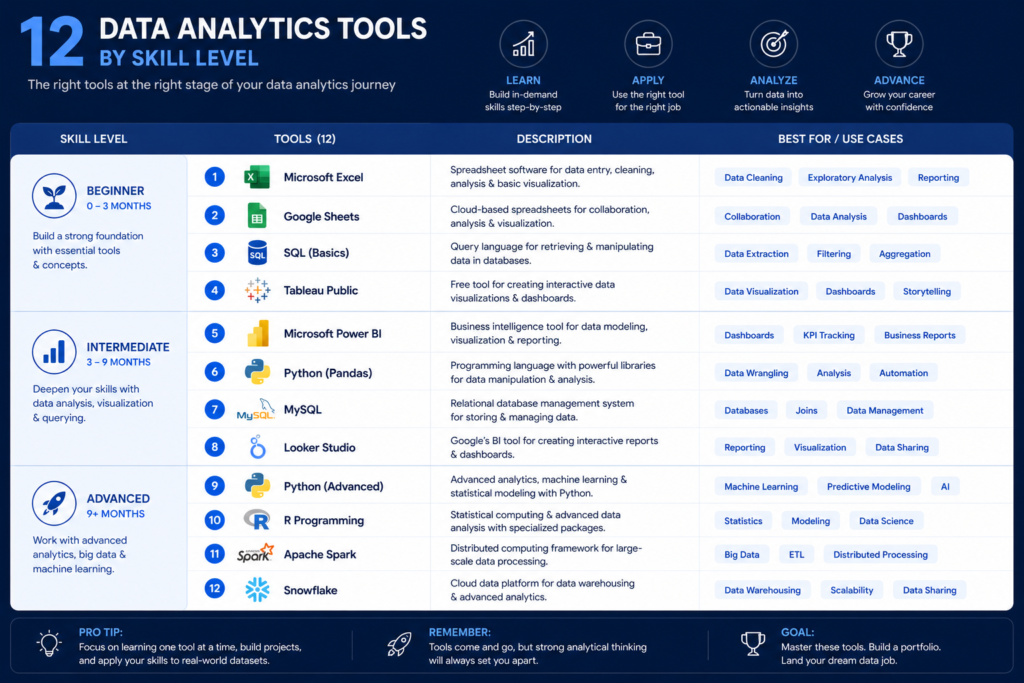
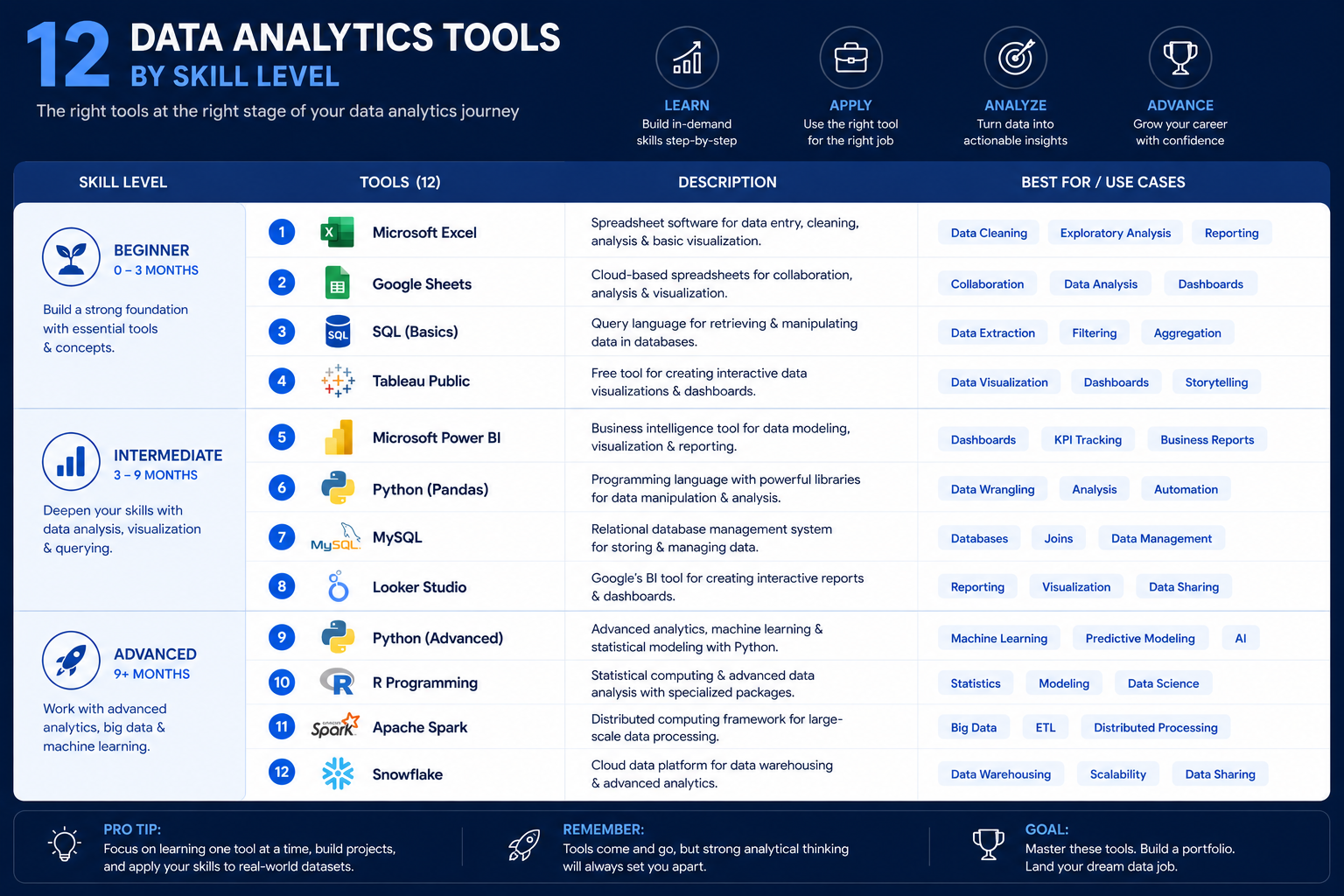
Excel — Still the Fastest Business Analytics Tool
I know what you’re thinking — ‘Excel in 2026?’ Yes. Excel is still used by more data professionals than any other single tool. It’s universally installed, endlessly flexible, and most business stakeholders communicate in spreadsheets. Learning Power Query, PivotTables, and advanced formulas in Excel gives you skills that transfer directly into every other analytics tool.
Excel’s strength: rapid ad-hoc analysis, client-facing reports, financial modeling. Its weakness: it breaks at scale, lacks version control, and has no native integration with cloud data warehouses.
▌ Pro Tip: Learn Excel’s Power Query feature before jumping to Python for data cleaning. It’s drag-and-drop ETL that works on any dataset under 1 million rows.
SQL — The Foundation of Modern Analytics
If I could only recommend one skill for anyone entering data analytics, it would be SQL. Every major data platform — Snowflake, BigQuery, Redshift, Databricks — runs on SQL. Every BI tool queries data using SQL underneath. Every data analyst role in a 2026 job listing requires it.
SQL is not a ‘tool’ in the traditional sense — it’s a language that works across tools. Learn it in any environment (PostgreSQL, MySQL, SQLite) and it transfers everywhere. Intermediate SQL skills (window functions, CTEs, subqueries) are what separate junior analysts from mid-level ones.
If you’re building your foundation, I recommend starting with the resources in my guide on data analyst courses for beginners — it maps out exactly where SQL fits in the learning journey.
Python — The Most Powerful Analytics Language
Python is what you need when Excel and SQL reach their limits. It handles large datasets, statistical modeling, machine learning, API connections, and automation. Libraries like Pandas (data manipulation), Matplotlib/Seaborn (visualization), and Scikit-learn (machine learning) are the foundation of most data science workflows.
Python’s learning curve is steeper than SQL, but the payoff is significant. In 2026, Python proficiency is the most common differentiator between analytics roles that pay $70K and those that pay $120K+.
Power BI — Best for Microsoft Ecosystems
Power BI is Microsoft’s answer to Tableau, and in many environments it has surpassed it in adoption. If your organization runs on Microsoft 365, Azure, or SQL Server, Power BI is the default choice. Integration with Excel, Teams, and Azure Data Factory is seamless.
Its AI features — including Copilot — are advancing rapidly. Power BI is also significantly cheaper than Tableau for most licensing scenarios, which is why it dominates mid-market and enterprise environments.
Tableau — Best for Advanced Visualization
Tableau remains the gold standard for complex, interactive data visualization. Its drag-and-drop interface can produce visualizations that would take days to build in code. Tableau Server and Tableau Cloud enable large-scale deployment for enterprise teams.
Where Tableau struggles: cost (licensing is expensive), steep learning curve for complex calculations, and weaker AI integration compared to Power BI in 2026.
Google Looker Studio — Best Free Dashboard Tool
Looker Studio (formerly Data Studio) is Google’s free dashboard tool that connects natively to Google Analytics, Google Ads, BigQuery, and Sheets. For marketers, small businesses, and anyone in the Google ecosystem, it’s the best starting point for dashboards — completely free with no seat limits.
Its limitations: less powerful than Tableau or Power BI, limited data modeling capability, and the community connector ecosystem can be unreliable.
Apache Spark — Best for Big Data Analytics
Apache Spark is the dominant framework for processing large-scale datasets. It handles batch and streaming data, runs in-memory for speed, and integrates with Python (PySpark), Scala, R, and SQL. Most enterprise data engineering pipelines use Spark at some stage.
Learning Spark requires understanding distributed computing concepts, which is why it’s not a beginner tool. But for data engineers and analytics engineers working at scale, it’s unavoidable.
Databricks — Modern Lakehouse Analytics Platform
Databricks built the lakehouse concept — combining the flexibility of data lakes with the structure of data warehouses. In 2026, it’s one of the fastest-growing platforms in enterprise analytics. It provides managed Spark, Delta Lake storage, ML workflows, and increasingly powerful AI/BI capabilities in a unified environment.
Companies that need both large-scale data processing and machine learning in one platform choose Databricks. The learning curve is real, but so is the career demand — Databricks certifications are commanding premium salaries.
Snowflake — Cloud-Native Analytics Platform
Snowflake is the dominant cloud data warehouse platform. It separates storage and compute, meaning you can scale query performance independently of storage costs. Its SQL interface is familiar, its sharing features are industry-leading, and its ecosystem of integrations (dbt, Fivetran, Sigma, Streamlit) is mature.
Most mid-to-large organizations use Snowflake as their primary analytical data store. Snowflake SQL knowledge is a high-value skill in 2026 job markets.
SAS — Traditional Enterprise Analytics
SAS has been in enterprise analytics since the 1970s. It’s still heavily used in banking, insurance, pharmaceuticals, and government — industries where regulatory compliance requires validated, auditable analytical processes. SAS’s analytics capabilities are deep, but its licensing cost is prohibitive outside enterprise settings.
If you’re targeting finance or healthcare analytics roles, SAS skills may still be required. For most other tracks, it’s less critical than it was five years ago.
R Programming — Best for Statistical Analysis
R is built specifically for statistical computing and is used heavily in academic research, biostatistics, econometrics, and data science roles that require advanced statistical modeling. Libraries like ggplot2 (visualization), dplyr (data manipulation), and caret/tidymodels (ML) are best-in-class.
R vs Python is a common debate. In 2026, Python has won the general analytics market, but R remains dominant in statistics-heavy academic and research contexts. If your role involves clinical trials, survey analysis, or econometric modeling, learn R.
KNIME — No-Code Analytics Workflow Tool
KNIME is an open-source platform that lets you build end-to-end analytics pipelines through a visual node-based interface — no code required. It’s popular in pharmaceutical research, financial analytics, and organizations that want analytics capability without heavy Python dependency.
KNIME is underrated in most ‘tools list’ guides. Its ability to connect to databases, run ML models, and produce reports in a single workflow is genuinely powerful for business analysts who don’t code.
AI Data Analytics Tools That Are Changing the Industry
How AI Is Replacing Manual Reporting Workflows
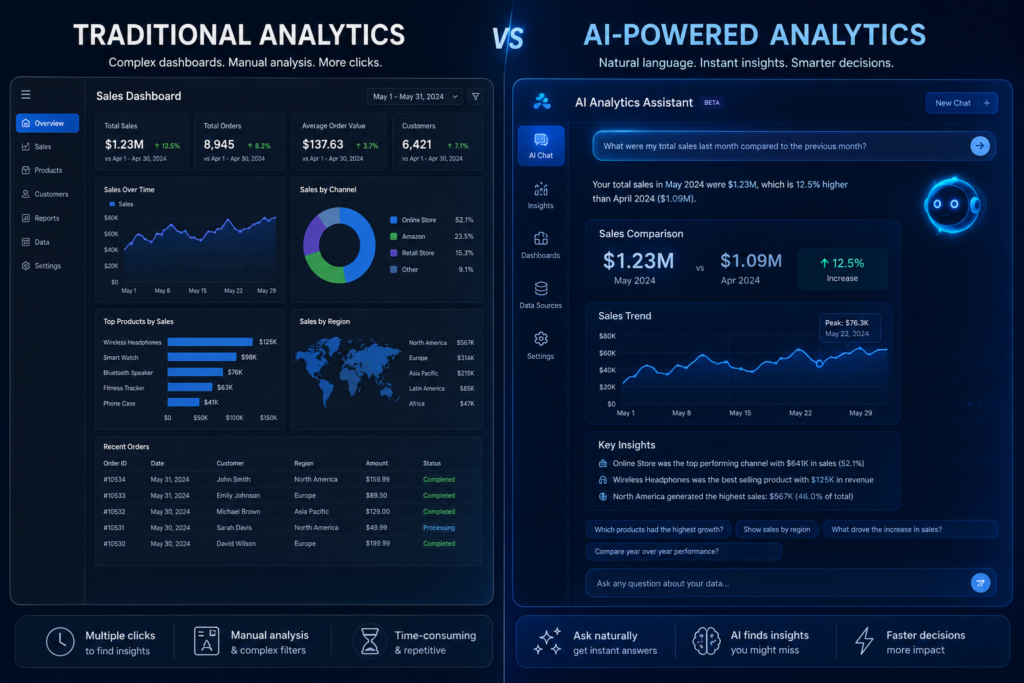
Here’s what I’ve seen in 2026: teams that previously spent 40% of analyst time on routine reporting have cut that to under 15% using AI tools. Automated summaries, anomaly detection, and natural language querying are no longer experimental features — they’re in production at thousands of companies.
The shift is not ‘AI replacing analysts.’ It’s AI eliminating the lowest-value tasks so analysts can focus on interpretation, strategy, and complex modeling.
ChatGPT for Data Analytics
ChatGPT’s Advanced Data Analysis (ADA) feature lets you upload CSV files, run Python analysis, generate charts, and get statistical summaries — all through natural language. For exploratory data analysis, it’s faster than writing code from scratch.
What it’s genuinely good at: cleaning messy data, generating starter code, explaining statistical concepts, and producing quick charts. Where it falls short: working with large databases, maintaining analytical consistency across sessions, and production-level accuracy.
Microsoft Copilot in Power BI
Copilot in Power BI is the most practically deployed AI analytics feature in 2026. It generates DAX measures from plain English descriptions, creates report summaries, and suggests visual types based on your data. For Power BI users, it genuinely accelerates dashboard development.
From my experience, the DAX generation alone saves intermediate Power BI developers 30–40% of the time they’d spend on complex calculations.
AI-Powered SQL Generation Tools
Tools like Text-to-SQL features in Databricks, BigQuery, and standalone tools like EverSQL or AI2SQL let non-technical users generate queries from plain English descriptions. This is making SQL access more democratic — business users can get data without writing code.
The risk: generated SQL is often inefficient or incorrect on complex schemas. Human review is still required. These tools assist, they don’t replace SQL expertise.
Predictive Analytics Platforms Businesses Are Adopting
Platforms like DataRobot, H2O.ai, and Amazon SageMaker Canvas are enabling what’s called AutoML — automated machine learning where business analysts can build predictive models without data science expertise. These are growing rapidly in sales forecasting, churn prediction, and demand planning.
What AI Still Cannot Replace
From everything I’ve observed, AI tools still cannot replace: domain expertise and business context, judgment about which questions are worth asking, the ability to communicate insights to non-technical stakeholders, and ethical oversight of automated decisions.
▌ Key Takeaway: AI is the fastest-advancing layer in the analytics stack. Learn how to use AI tools as accelerators — not alternatives to fundamental analytics skills.
Open Source Data Analytics Tools That Actually Compete With Paid Software
Apache Superset
Superset, originally built at Airbnb, is a full-featured BI platform that rivals Tableau Lightweight in capability. It connects to virtually every database, supports complex visualizations, and runs entirely on your own infrastructure. Large organizations including Twitter and Airbnb have used it in production.
The trade-off: self-hosting requires DevOps skill. The setup is not trivial.
Metabase
Metabase is the best open-source tool for making SQL databases accessible to non-technical business users. Its interface is clean, setup is fast, and the free tier is genuinely usable. Startups and small businesses use it as a Tableau alternative without the licensing cost.
Where it falls short: complex visualizations, enterprise security, and large-scale performance compared to paid alternatives.
Jupyter Notebook
Jupyter Notebook (now JupyterLab) is the standard environment for Python and R data analysis. It’s not a BI tool — it’s an interactive computing environment where analysts write code, run it, and see results inline. Every data science team uses it for exploratory analysis and model development.
Grafana
Grafana is the dominant open-source platform for real-time metrics visualization. It was built for infrastructure monitoring but has expanded into general analytics dashboarding. Its ability to connect to time-series databases like InfluxDB, Prometheus, and Elasticsearch makes it the tool of choice for operational analytics and DevOps teams.
Why Open Source Tools Are Growing Fast in 2026
Three reasons: cost pressure (SaaS licensing is expensive at scale), data sovereignty concerns (companies want their data on their own infrastructure), and the quality gap between open-source and commercial tools has narrowed dramatically in the last three years.
Hidden Limitations Most Guides Ignore
- Open-source tools require maintenance, updates, and internal expertise to run
- Security patching is your responsibility, not a vendor’s
- Enterprise support is limited or requires paid tiers
- Integration quality varies — some connectors are community-maintained and unreliable
- Total cost of ownership (staff time) can exceed SaaS licensing costs
▌ Pro Tip: For small teams, Metabase’s cloud-hosted option gives you open-source pricing with managed infrastructure. It’s the best of both worlds for teams without DevOps resources.
Best Data Analytics Tools for Beginners
The Easiest Starting Path in 2026
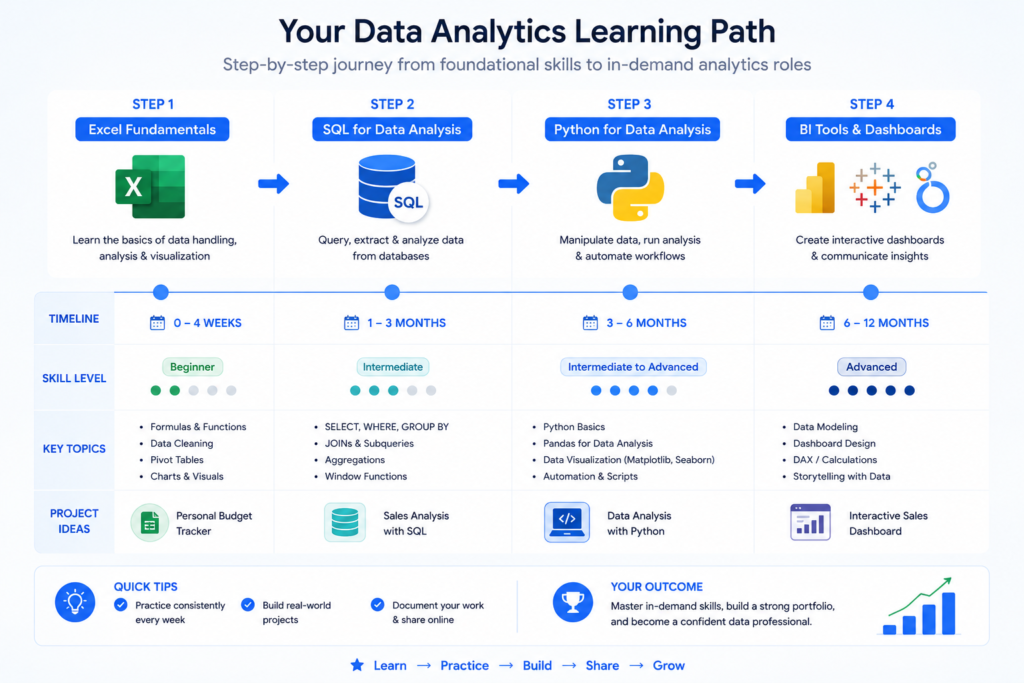
I’ve helped people transition into analytics from teaching, accounting, marketing, and engineering. The path that consistently works fastest is:
- Start with Excel — learn PivotTables, VLOOKUP/XLOOKUP, and Power Query
- Move to SQL — use Mode’s free tier or BigQuery sandbox with public datasets
- Add a BI tool — Power BI (free Desktop version) or Looker Studio
- Learn basic Python with Pandas — focus on data cleaning and analysis, not web development
This sequence takes roughly 4–6 months of consistent learning to job-ready competence, depending on your starting point.
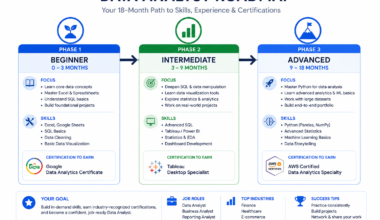
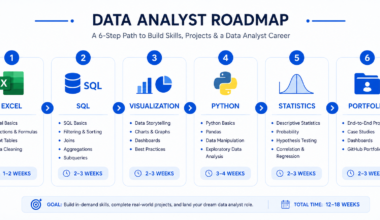
For a detailed curriculum breakdown, check my data analyst roadmap for career growth — it maps each skill to specific job titles and salary levels.
Tools You Should Learn First vs Later
| Learn First | Learn Later | Skip Until Advanced |
| Excel / Google Sheets | Python (Pandas) | Apache Spark |
| SQL (PostgreSQL/MySQL) | Tableau / Power BI | Databricks |
| Looker Studio (free) | dbt (data modeling) | SAS |
| Basic statistics | R (if statistics-heavy role) | Hadoop |
Beginner-Friendly Analytics Stack
Here’s the zero-cost beginner stack I recommend for 2026:
- Google Sheets (free, cloud-based, shareable)
- BigQuery sandbox (free SQL environment with public datasets)
- Looker Studio (free dashboards connected to BigQuery)
- Python via Google Colab (free, no installation required)
Free Tools to Start Learning Immediately
Every tool in the beginner stack above is free. Additional free resources worth using: Mode Analytics free tier (SQL practice with real datasets), Kaggle Notebooks (Python + datasets), and DBeaver Community Edition (universal SQL client connecting to any database).
Common Beginner Mistakes That Slow Career Growth
▌ Common Mistakes: Trying to learn all tools at once; following trends instead of fundamentals; skipping statistics; building dashboards before understanding the data behind them; not working on real projects.
Big Data Analytics Tools Companies Use at Scale
What Makes Big Data Different From Traditional Analytics
Traditional analytics — Excel, SQL on a single database, Tableau — works fine for data that fits in a single machine’s memory. Big data begins when your data volume, velocity, or variety exceeds what a single server can process.
In practice, ‘big data’ in most companies means: datasets over 1TB, data arriving faster than it can be processed in batches, or data from dozens of heterogeneous sources that need to be combined in real time.
Apache Hadoop vs Apache Spark
| Factor | Apache Hadoop | Apache Spark |
| Processing model | Disk-based (MapReduce) | In-memory |
| Speed | Slow for interactive queries | Up to 100x faster than Hadoop |
| Use case | Batch processing, cold storage | Streaming, ML, real-time |
| Ease of use | Complex setup | Easier with PySpark |
| 2026 status | Declining in new deployments | Dominant standard |
Databricks vs Snowflake
This is the most common comparison in enterprise analytics teams right now. They’re not identical — they serve different primary purposes:
| Criteria | Databricks | Snowflake |
| Primary strength | ML + data engineering + Spark | SQL analytics + data sharing |
| Best for | Data engineers, data scientists | Data analysts, business teams |
| AI capabilities | Industry-leading (Unity Catalog, AI/BI) | Growing, newer |
| SQL experience | Good (Databricks SQL) | Excellent (Snowsight UI) |
| Cost model | Compute-heavy workloads | Storage + compute separation |
Real-Time Streaming Analytics Platforms
For streaming data, the core platforms are: Apache Kafka (event streaming backbone), Apache Flink (stateful stream processing), Apache Spark Streaming (micro-batch), and ClickHouse (real-time OLAP database). In managed cloud form, AWS Kinesis, Google Pub/Sub, and Azure Event Hubs provide the same capabilities.
Cloud Analytics Platforms Dominating Enterprise Data Teams
In 2026, the three cloud providers dominate enterprise analytics infrastructure: AWS (Redshift, Athena, EMR), Google Cloud (BigQuery, Vertex AI, Looker), and Microsoft Azure (Synapse Analytics, Azure ML, Power BI Premium). Your cloud ecosystem often determines your analytics tool stack more than any individual preference.
Real-Time Data Analytics Tools That Businesses Use for Instant Decisions
Why Real-Time Analytics Became Critical
The shift toward real-time analytics accelerated because of e-commerce (fraud detection in milliseconds), logistics (delivery tracking), and financial services (algorithmic trading). What was once a specialized capability is now a baseline expectation in many industries. In 2026, waiting hours for a nightly batch report is no longer acceptable for operational decisions.
Kafka for Streaming Analytics
Apache Kafka is the backbone of most real-time data pipelines. It handles millions of events per second, distributes data across consumers, and provides durable message storage. Kafka is not an analytics tool itself — it’s the data highway that feeds real-time analytics systems.
Kafka Connect integrates with databases, cloud storage, and analytics platforms. Kafka Streams and ksqlDB enable stream processing directly within the Kafka ecosystem.
Real-Time Dashboards With Power BI & Tableau
Both Power BI and Tableau support near-real-time dashboard refresh. Power BI’s DirectQuery mode bypasses data caching and queries the source directly. Tableau’s live connection mode does the same. For true real-time (sub-second), specialized tools like Grafana or ClickHouse-backed dashboards are more appropriate.
Event-Driven Analytics Architecture Explained Simply
An event-driven architecture treats every user action — a click, a purchase, a login — as an event that triggers downstream analytics. Instead of pulling data in batches, analytics systems subscribe to event streams and update continuously. This is what enables ‘real-time’ features like personalization, fraud alerts, and dynamic pricing.
Common Real-Time Analytics Challenges
- Data quality issues are amplified — errors propagate instantly instead of being caught in batch validation
- Infrastructure cost is higher — streaming systems require 24/7 compute
- Late-arriving data complicates analysis — events don’t always arrive in sequence
- Debugging is harder than batch pipelines
Beginner vs Advanced Analytics Tool Stack
Tools Beginners Actually Need
The short list for someone entering analytics: Excel, SQL, Google Looker Studio (or Power BI Desktop free), and basic Python. Everything else is a distraction at this stage.
Tools Data Analysts Use Daily
A working data analyst in 2026 typically uses: SQL (daily, in Snowflake/BigQuery/Redshift), a BI tool (Tableau or Power BI for dashboards), Python or Excel for ad-hoc analysis, and increasingly AI tools for query generation and report summarization.
Tools Analytics Engineers Use Behind the Scenes
Analytics engineers — the role that builds the data models underlying analyst work — use: dbt (transformation), Snowflake or Databricks (platform), Git (version control), YAML and Jinja templating, and CI/CD pipelines. This role is growing rapidly and commands strong salaries.
For a deeper breakdown of these roles and their required skills, see my data analyst certifications guide which covers which credentials align with each career track.
Tools Data Scientists Prefer
Data scientists primarily use Python (Pandas, Scikit-learn, TensorFlow/PyTorch), Jupyter notebooks, R for statistical modeling, and cloud ML platforms like AWS SageMaker, Google Vertex AI, or Databricks MLflow.
Enterprise vs Startup Analytics Stack
| Criteria | Enterprise Stack | Startup Stack |
| Data warehouse | Snowflake / Databricks | BigQuery / Redshift Serverless |
| Ingestion | Fivetran, Matillion | Airbyte (open source), Singer |
| Transformation | dbt Cloud (paid) | dbt Core (free) |
| Visualization | Tableau / Power BI Premium | Looker Studio / Metabase |
| ML / AI | Databricks, SageMaker | Python + Colab / Weights & Biases |
| Cost | $50K–$500K+/yr | $0–$20K/yr |
How to Choose the Right Data Analytics Tools
Based on Career Goals
Business Analyst → Excel, SQL, Power BI. Data Analyst → SQL, Python, Tableau or Power BI. Analytics Engineer → dbt, SQL, Snowflake or Databricks. Data Scientist → Python, R, cloud ML platforms. Data Engineer → Spark, Kafka, Airflow, Databricks or Snowflake.
Based on Company Size
Solo / freelance: Google Sheets, Looker Studio, Python. Small business (under 50 people): Metabase or Power BI Desktop, BigQuery sandbox, Excel. Mid-market (50–500): Power BI or Tableau, Snowflake or BigQuery, dbt Core. Enterprise (500+): Snowflake or Databricks, Tableau or Power BI Premium, full dbt Cloud deployment.
Based on Budget
- $0: Google Sheets, Looker Studio, BigQuery sandbox (free tier), Python, Jupyter, Metabase (self-hosted)
- Under $100/month: Power BI Pro, Metabase Cloud Starter
- $100–$1,000/month: Tableau Creator, Snowflake pay-per-use, dbt Cloud Team
- $1,000+/month: Databricks, Tableau Server, enterprise Snowflake, SAS
Based on Technical Skills
No code: Google Looker Studio, Metabase, KNIME, Excel. Some code (SQL): Mode, BigQuery, Power BI with DAX. Full code: Python stack, Databricks, dbt, Spark.
Based on Cloud Ecosystem (Azure, AWS, Google Cloud)
| Cloud | Warehouse | BI Tool | ML Platform |
| Microsoft Azure | Synapse Analytics | Power BI | Azure ML |
| AWS | Redshift | QuickSight | SageMaker |
| Google Cloud | BigQuery | Looker / Looker Studio | Vertex AI |
Mistakes That Kill Analytics Productivity
Using Too Many Tools Together
I’ve seen data teams that had six different BI tools, three data warehouses, and two transformation frameworks running simultaneously. The result: inconsistent metrics, duplicated work, and constant firefighting. Standardize on fewer tools and use them deeply.
Learning Visualization Before SQL
This is the most common mistake and the one that most delays career progress. If you can’t query your data effectively, your visualizations will always be limited by what someone else has already prepared for you.
Ignoring Data Modeling
Data modeling — designing how tables relate, defining metrics consistently, building reusable transformation layers — is the unsexy skill that makes everything else work. Without it, your dashboards will contradict each other and your analysis will be constantly questioned.
Choosing Tools Based Only on Trends
Every year there’s a new ‘tool that’s going to replace everything.’ Some of them actually do (dbt disrupted a significant portion of what data engineers used to do manually). Most don’t. Evaluate tools based on your specific use case, team skills, and infrastructure — not what’s trending on Twitter.
Underestimating Automation & AI
The analysts who will be least valuable in five years are those who still manually pull data, format reports, and send them via email every week. Automation with Python, dbt, and AI tools is not optional anymore — it’s a baseline expectation in most analytics roles.
Practical Learning Framework for 2026
30-Day Beginner Roadmap
- Week 1: Excel fundamentals — PivotTables, VLOOKUP, basic formulas
- Week 2: SQL basics — SELECT, WHERE, GROUP BY, JOIN using free online resources
- Week 3: SQL practice — work through 20+ real queries on public BigQuery datasets
- Week 4: First dashboard — connect BigQuery to Looker Studio, build a 3-metric dashboard
90-Day Job-Ready Analytics Plan
- Month 1: SQL to intermediate level (window functions, CTEs, subqueries)
- Month 2: Python basics — Pandas for data cleaning, Matplotlib for charting
- Month 3: Power BI or Tableau — build 3 portfolio dashboards from public datasets
For structured course recommendations at each stage, see my guide on data analyst courses for beginners.
Portfolio Projects That Prove Real Skills
- Sales performance dashboard using public retail dataset (SQL + Power BI or Tableau)
- Customer churn analysis with Python (Pandas + Scikit-learn)
- Marketing attribution model using Google Analytics data in BigQuery
- Real estate price analysis using Zillow public data
- Job market analytics from LinkedIn or Indeed public datasets
Certifications That Still Matter
In 2026, the certifications that carry real weight:
| Certification | Tool | Best For |
| Google Data Analytics Certificate | SQL, Tableau, R | Career switchers |
| Microsoft Power BI Data Analyst (PL-300) | Power BI | Microsoft environments |
| Snowflake SnowPro Core | Snowflake | Cloud analytics engineers |
| Databricks Certified Associate | Databricks + Spark | Data engineers |
| dbt Fundamentals (free) | dbt | Analytics engineers |
For a deeper analysis of which certifications deliver ROI, read my data analyst certifications guide.
Free Resources Worth Using
- Mode Analytics SQL Tutorial — best free SQL course for analysts
- Kaggle Learn — free Python, SQL, and ML courses with practice datasets
- dbt Learn — free official dbt courses
- BigQuery sandbox — free SQL environment with 10GB/month free processing
- Google Looker Studio Gallery — example dashboards to learn from
Frequently Asked Questions
What are the best data analytics tools for beginners?
For beginners, start with Excel or Google Sheets to understand data structure, then learn SQL in BigQuery or Mode’s free tier. Add Google Looker Studio for free dashboards. This zero-cost stack covers 80% of what entry-level analyst roles require.
Which data analytics tools are most in demand?
According to 2026 job market data, SQL remains the most universally required skill. Python and Power BI are the two fastest-growing tool requirements. Snowflake and dbt are the most in-demand for analytics engineer roles specifically.
Are open-source analytics tools good enough?
For most use cases, yes. Metabase and Apache Superset are production-ready. Jupyter Notebook is the industry standard for data science. Grafana is used in production by major companies globally. The main gap vs paid tools is in ease of setup, enterprise support, and some advanced features.
Which AI data analytics tools are worth learning?
Microsoft Copilot in Power BI is the most immediately practical for analysts. ChatGPT Advanced Data Analysis is worth knowing for exploratory work. AI-powered SQL generation features in Databricks and BigQuery are worth exploring. AutoML platforms like DataRobot are valuable for predictive analytics roles.
What tools do analytics engineers use?
Analytics engineers primarily use dbt (data modeling and transformation), Snowflake or Databricks (cloud data platform), SQL, Git for version control, and Python for more complex transformations. This role is the fastest-growing in analytics and commands strong compensation.
Is Python required for data analytics?
Not always. Many successful data analysts never write Python — they use SQL, Excel, and BI tools exclusively. Python becomes necessary for automation, machine learning, complex statistical analysis, and roles at companies where the data stack relies on it. For most business analyst and BI analyst roles, SQL and a BI tool are sufficient.
Which analytics tools are used for big data?
Apache Spark is the standard for processing large-scale data. Databricks provides a managed Spark environment. Snowflake handles large-scale SQL analytics efficiently. For streaming big data, Apache Kafka combined with Flink or Spark Streaming is the common architecture.
Final Action Plan — What You Should Learn Next
The tools exist. The resources are free or affordable. What determines whether you succeed is having a clear, sequenced plan — and sticking to it. Here’s exactly what I recommend based on where you are right now.
Best Tool Stack for Beginners
- Excel / Google Sheets (master PivotTables and formulas)
- SQL via BigQuery sandbox (free, real cloud environment)
- Google Looker Studio (free dashboards)
- Python basics via Google Colab (no setup required)
▌ Micro CTA: Start with the BigQuery public datasets today — they’re free and immediately give you real data to query. No downloads, no setup, no excuses.
Best Tool Stack for Career Growth
- SQL at intermediate level (window functions, CTEs, optimization)
- Power BI (most employable BI tool in 2026)
- Python with Pandas (data cleaning and analysis)
- dbt fundamentals (free course, extremely high job market value)
Best Tool Stack for Enterprise Jobs
- Snowflake or Databricks (platform knowledge)
- Tableau or Power BI Premium (enterprise BI tools)
- dbt Cloud (enterprise transformation)
- Python (automation and ML)
- Spark / PySpark (for data engineering track)
Best Tool Stack for Freelancers & Consultants
- Excel (universal client language)
- Looker Studio (free deliverables for smaller clients)
- Power BI (most common client request)
- Python (automation and custom reporting)
- Metabase (self-hosted BI for budget-conscious clients)
The One Skill That Connects All Analytics Tools Together
SQL. It’s not glamorous, it doesn’t make great LinkedIn posts, and it won’t get you followers on TikTok. But in ten years of observing analytics careers, the single most consistent predictor of professional success in data is SQL mastery.
Every tool in this list — Tableau, Power BI, Databricks, Snowflake, dbt — either runs on SQL or works best when you understand it deeply. Master SQL first. Everything else is an extension of that foundation.
▌ Final CTA: Your next step: pick one starting point from the beginner stack, spend 30 minutes with it today, and commit to 30 consecutive days of practice. Analytics is a skill built through repetition, not consumption. Read less, do more.
Ready to build the skills behind the tools? My complete data analyst roadmap for career growth lays out the exact progression from zero to job-ready — including what to learn, in what order, and which resources are worth your time.