Table of Contents
- What Is ChatGPT Prompt Engineering?
- Why ChatGPT Prompt Engineering Matters
- Core Principles of ChatGPT Prompt Engineering
- Types of Prompt Engineering Techniques
- Step-by-Step Guide to Learn Prompt Engineering
- Advanced ChatGPT Prompt Engineering Strategies
- Best Practices for Prompt Engineering AI
- Future of Prompt Engineering and AI Skills
- Conclusion: Start Your Prompt Engineering Journey
- FAQ
If you have ever typed something into ChatGPT and gotten a confusing or off-target response, you are not alone. The good news? The problem is usually not the AI — it is the prompt. That is exactly where chatgpt prompt engineering comes in. In this guide, I will walk you through everything you need to know, from the basic idea of what a prompt is to advanced strategies that professionals use every day. Whether you are a student, a content creator, or someone working in business analytics, this guide will help you unlock the real power of AI.
What Is ChatGPT Prompt Engineering?
Let me start with a simple definition. Prompt engineering is the process of writing and refining the instructions you give to an AI model so it produces the best possible output. Think of it as learning how to talk to a very smart assistant who takes your words very literally. The better your instructions, the better the result.
In the world of AI, the term prompt engineering AI refers to the skill of crafting inputs that guide large language models — like ChatGPT — to give accurate, useful, and structured responses. It is not about coding. It is about communication.
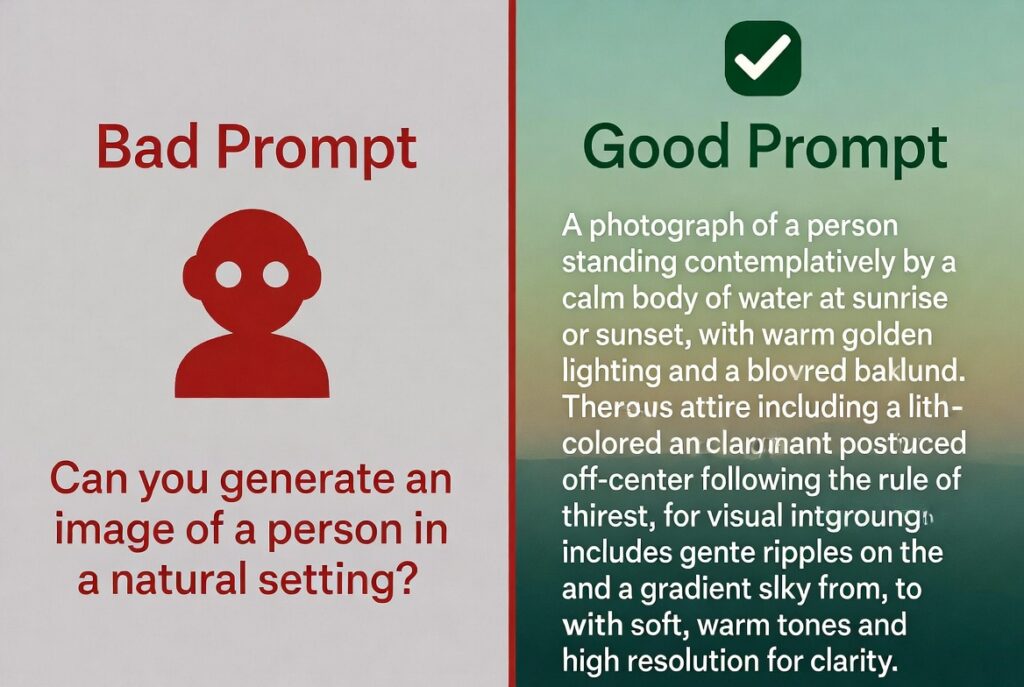
For example, here is a before-and-after prompt comparison:
| Vague Prompt (Before) | Optimized Prompt (After) |
| Write something about marketing. | Act as a senior marketing strategist. Write a 300-word introduction for a blog post targeting small business owners about the benefits of social media marketing in 2026. Use a friendly, conversational tone. |
| Summarize this report. | Summarize the following financial report in 5 bullet points. Focus on revenue growth, key risks, and the top recommendation for investors. Keep each point under 20 words. |
See the difference? The second prompt gives ChatGPT a role, a goal, a format, and a target audience. That is the essence of prompt engineering for ChatGPT.
How ChatGPT Interprets Prompts
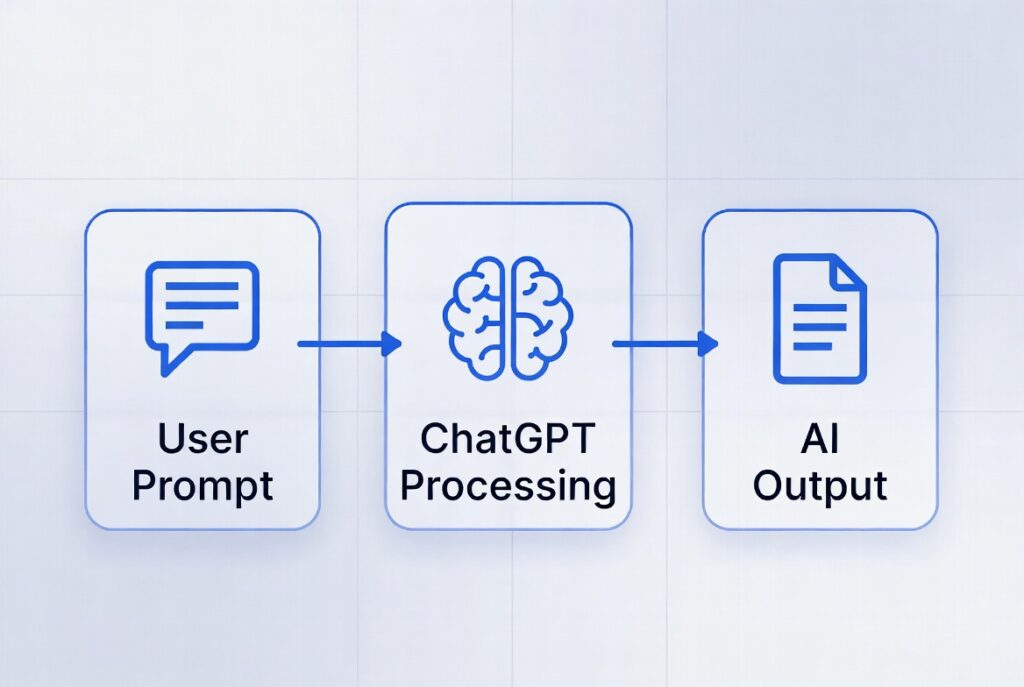
Here is a simple way to think about it. ChatGPT follows an input-process-output flow:
- Input: The prompt you write
- Processing: ChatGPT analyzes context, intent, and wording
- Output: The response it generates based on your input
A great real-life analogy: imagine asking a waiter for ‘something good.’ You might get a random dish. However, if you say ‘I would like a vegetarian pasta with no mushrooms, medium spice, and a small portion,’ you get exactly what you want. ChatGPT works the same way. Wording matters more than you might think.
Why ChatGPT Prompt Engineering Matters
So why should you invest time learning this skill? The short answer is productivity. A well-designed prompt can save you hours. Moreover, as AI tools become more embedded in business workflows, being good at prompt engineering will set you apart.
Here are some real benefits of learning prompt engineering for ChatGPT:
- You get more accurate and relevant responses on the first try.
- You save time by avoiding back-and-forth corrections.
- You produce higher-quality content, code, and analysis.
- You reduce hallucinations — where AI makes things up.
- You can automate repetitive tasks more effectively.
According to a 2025 McKinsey report, companies using AI-assisted workflows report up to 40% improvement in content production speed. Furthermore, roles specifically labelled ‘prompt engineer AI’ are growing rapidly across tech, marketing, and data sectors.
I have personally seen how the right prompt can transform a 10-minute task into a 2-minute task. If you are interested in building broader AI skills, check out my guide on AI skills for 2026 — it covers everything from ML to generative AI tools.
Real-World Applications of Prompt Engineering AI
Let me break down where people are actually using these skills today:
- Content Creation: Bloggers and marketers use prompt engineering AI to draft articles, social media posts, and email campaigns in minutes.
- Data Analysis: Analysts use ChatGPT to summarize datasets, spot trends, and generate narrative reports from raw numbers.
- Coding Assistance: Developers prompt ChatGPT to write functions, debug errors, and explain complex logic.
- Automation Workflows: Businesses use prompts to automate customer support responses, internal documentation, and reporting.
For those of you working in analytics, data analysis with AI is one of the biggest opportunities right now. The right prompt can turn a wall of numbers into a clear, readable insight in seconds.
Core Principles of ChatGPT Prompt Engineering
Now let us get into the foundations. These are the core ideas you need to understand before writing better prompts:
- Clarity: Be specific about what you want. Vague prompts lead to vague answers.
- Context: Give ChatGPT background information. Who is the audience? What is the purpose?
- Role Assignment: Tell ChatGPT to act as an expert. ‘Act as a financial advisor…’ works much better than ‘Tell me about investments.’
- Format Instructions: Specify the structure. Do you want a list? A table? A paragraph? Say so.
- Iteration: Do not expect perfection on the first try. Refine and improve your prompts over time.
Therefore, before you type your next ChatGPT message, ask yourself: Am I being clear? Have I given enough context? Have I told it what format I want?
Common Mistakes Beginners Make
When I first started with prompt engineering for ChatGPT, I made all of these mistakes. You probably will too — and that is totally fine. However, knowing them upfront can speed up your learning curve.
- Vague prompts: ‘Write an article’ tells ChatGPT nothing about tone, length, topic, or audience.
- Overloading instructions: Cramming 10 different tasks into one prompt confuses the model and splits its focus.
- Ignoring formatting: Not specifying whether you want a list, a paragraph, or a table often leads to an unhelpful wall of text.
- No role assignment: Skipping ‘Act as…’ means you miss the chance to prime the model’s perspective.
- Not iterating: Giving up after one bad response instead of refining the prompt step by step.
Types of Prompts Engineering Techniques
There are several well-known techniques in prompts engineering. Each one is useful in different situations. Let me walk you through the main ones:
- Instruction-Based Prompts: You give a clear command. Example: ‘List 5 marketing strategies for a SaaS startup.’
- Role-Based Prompts: You assign a persona. Example: ‘Act as a senior UX designer and review this app interface.’
- Few-Shot Prompting: You provide examples so the AI learns the pattern. You give it 2-3 sample inputs and outputs, then ask it to follow the pattern.
- Chain-of-Thought Prompting: You ask the AI to reason step by step. Example: ‘Think step by step and explain how you would solve this math problem.’
Examples of Effective ChatGPT Prompt Engineering
Here are some practical, real-world prompt templates you can use right now:
| Use Case | Optimized Prompt Template |
| Blog Introduction | Act as an SEO content writer. Write a 100-word introduction for a blog post about [topic]. Target audience: [audience]. Tone: conversational. Include the keyword ‘[keyword]’ naturally. |
| Data Summary | You are a data analyst. Summarize the following dataset in 5 key bullet points. Focus on trends, anomalies, and top recommendations: [paste data here]. |
| Code Explanation | Act as a senior developer. Explain the following Python code in simple terms that a non-technical manager can understand: [paste code]. |
| Email Draft | Write a professional but friendly follow-up email to a client who has not responded in 5 days. Keep it under 100 words. Tone: warm, not pushy. |
These templates are reusable and highly effective. Save them in a document — you will thank yourself later.
Step-by-Step Guide to Learn Prompt Engineering
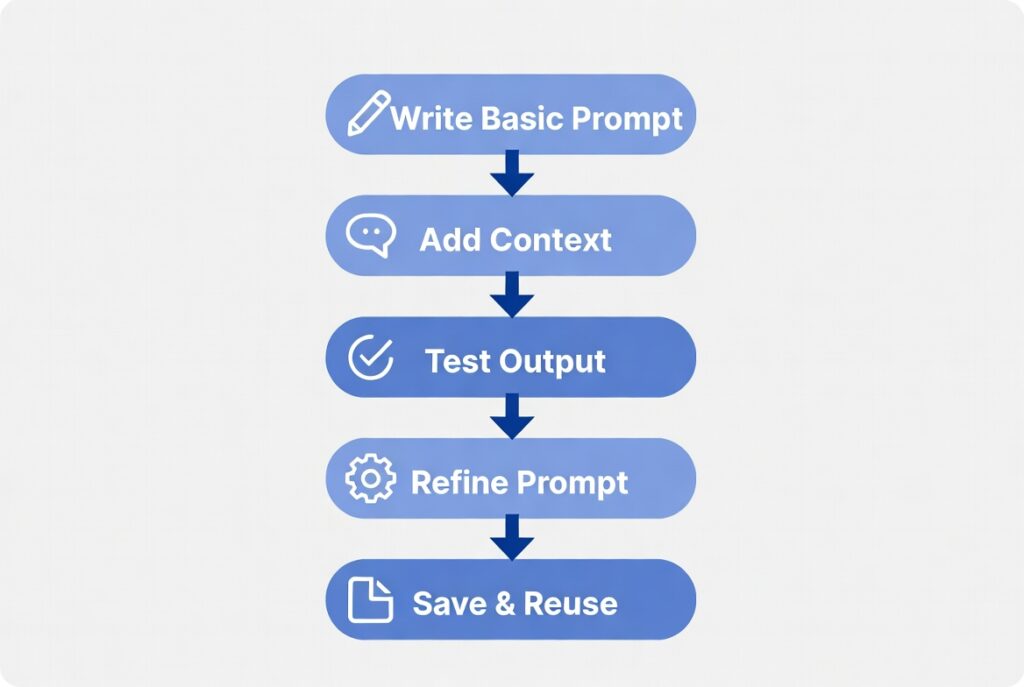
Ready to start? Here is a simple, practical roadmap I would recommend for any beginner:
- Start with simple prompts. Get comfortable giving ChatGPT basic instructions. Ask it to summarize an article, explain a concept, or write a short paragraph.
- Add context and constraints. Once you are comfortable, start adding details: audience, tone, format, and word count.
- Test and refine outputs. Compare different versions of your prompt. Change one thing at a time and see how the output shifts.
- Save your best prompts. Build a personal library of prompts that work well for your use cases.
- Share and learn from communities. Join online forums, prompt libraries, and AI groups to discover new techniques.
Furthermore, do not rush this process. Even experienced prompt engineers iterate constantly. The goal is to develop a habit of thoughtful, structured communication with AI.
Tools to Learn Prompt Engineering Faster
Here are some tools and resources that I genuinely find helpful:
- PromptBase: A marketplace where you can explore and buy high-performing prompts across many categories.
- OpenAI Playground: A free sandbox where you can test different models and parameters in real time.
- FlowGPT: A community-driven prompt library with thousands of user-submitted templates.
- Reddit r/ChatGPT and r/PromptEngineering: Active communities sharing tips, prompts, and real-world use cases.
Also, if you are just getting started with AI tools in general, my article on Free AI Tools: Top 10 Picks for Students & Pros in 2026 has a great list of beginner-friendly platforms you can explore for free.
Advanced ChatGPT Prompt Engineering Strategies
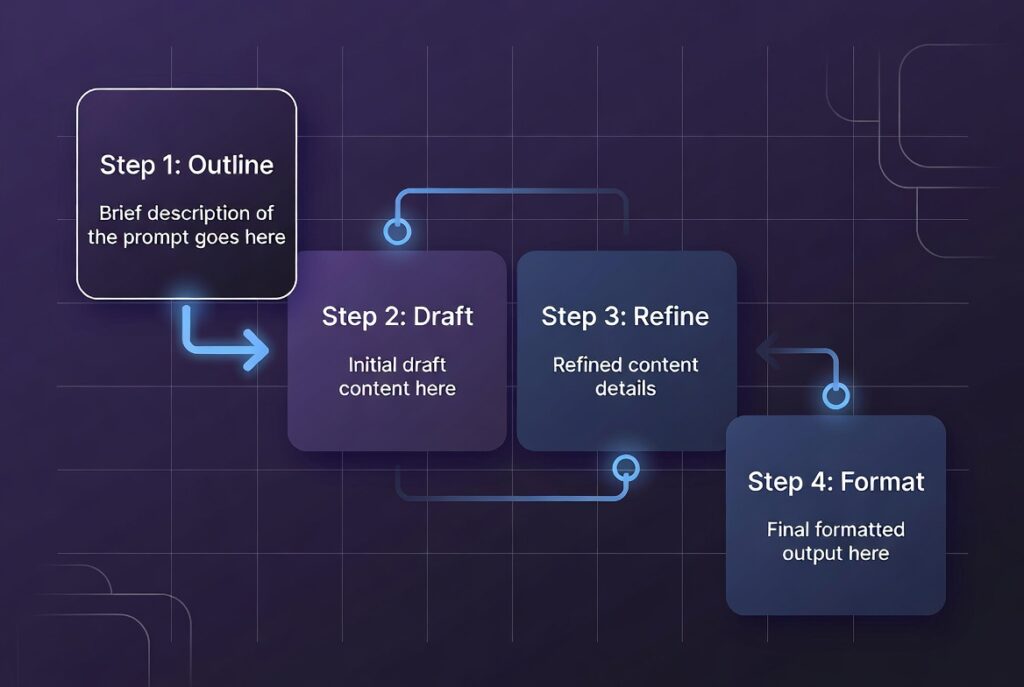
Once you have the basics down, it is time to level up. These advanced techniques are what separate good prompt engineers from great ones:
- Prompt Chaining: You break a complex task into smaller steps. Each output feeds into the next prompt. For example, first you ask ChatGPT to create an outline, then you ask it to write each section separately.
- Output Formatting: You tell ChatGPT to respond in a specific format — JSON, markdown tables, numbered lists, or structured reports. This is especially useful for developers and data analysts.
- Multi-Step Reasoning: You instruct the model to reason through a problem before giving an answer. This improves accuracy on complex tasks.
- Personalization Techniques: You include details about your specific audience, brand voice, or style guide so ChatGPT adapts its tone and language.
In addition, combining these techniques can create extremely powerful workflows. For instance, prompt chaining plus output formatting can produce structured reports or JSON data ready for use in your apps.
Prompt Engineering for ChatGPT in Professional Use
In professional settings, chatgpt prompt engineering is transforming how teams work. Here is how different fields are using it:
| Industry / Role | How They Use Prompt Engineering |
| Business Analytics | Summarize quarterly reports, generate KPI dashboards, and extract insights from large datasets. |
| Marketing Teams | Draft campaign copy, A/B test email subject lines, generate SEO-optimized blog outlines. |
| Software Developers | Generate boilerplate code, write unit tests, explain legacy code, and debug functions. |
| HR Professionals | Create job descriptions, draft interview questions, and generate onboarding documents. |
| Educators | Build lesson plans, create quiz questions, and simplify complex topics for students. |
Moreover, if you are in the education sector, I explored how AI is already changing classrooms in my earlier post on
Moreover, if you want to understand how AI fits into the bigger picture of learning, check out my post on How Machine Learning is Revolutionizing Learning. It gives great context for why prompt engineering skills are becoming essential even in academic settings.
Best Practices for Prompt Engineering AI
Here are the best practices I follow and recommend to anyone learning prompt engineering AI:
- Always start with the end goal in mind. Know what output you need before you write the prompt.
- Use constraints to focus the output. Specify length, tone, format, and scope.
- Test multiple variations. Change one variable at a time to understand what drives better results.
- Document what works. Keep a running log of your best-performing prompts.
- Use role prompting liberally. Assigning a persona to ChatGPT almost always improves the quality of the output.
- Avoid keyword stuffing in prompts. Clear, natural instructions outperform cluttered, repetitive ones.
Building a Prompt Engineering Workflow
To make this sustainable, I recommend building a personal prompt engineering workflow:
- Create a template library. Group prompts by category: writing, coding, research, data, and communication.
- Name and tag your prompts. Make them searchable so you can find them quickly.
- Test monthly. AI models get updated. A prompt that worked three months ago might need tweaking today.
- Share and collaborate. If you work in a team, a shared prompt library can massively boost collective productivity.
As a result, you will spend less time figuring out how to talk to AI and more time actually doing valuable work. That is the real payoff of mastering prompt engineering for ChatGPT.
Future of Prompt Engineering and AI Skills
Here is something exciting: the demand for people who can do chatgpt prompt engineering is growing fast. According to LinkedIn’s 2025 Jobs on the Rise report, ‘Prompt Engineer’ appeared as one of the fastest-growing job titles in both tech and non-tech sectors.
Furthermore, AI tools are evolving. Models like GPT-5 and Claude 4 are becoming better at understanding nuanced instructions. However, the people who know how to write those nuanced instructions will always have an edge.
Here is what I see coming in the next few years:
- Prompt engineering will become a standard skill, like knowing how to use Excel or Google Docs.
- Multimodal prompts — combining text, images, and data — will become the norm.
- AI agents that chain prompts automatically will change how workflows are designed.
- Industries like healthcare, law, and finance will hire prompt engineers to optimize AI outputs.
For a broader view of which AI skills matter most in the coming years, I highly recommend reading my piece on Top 7 AI Skills for 2026. It puts prompt engineering in context alongside skills like MLOps and Generative AI.
Conclusion: Start Your Prompt Engineering Journey
We have covered a lot of ground in this guide. To recap: chatgpt prompt engineering is the skill of writing clear, context-rich, structured instructions that help AI produce exactly what you need. It is not complicated, but it does take practice.
Here are the key takeaways:
- A great prompt includes a role, context, format instructions, and a clear goal.
- The most common beginner mistakes are vague prompts, overloading, and not iterating.
- Advanced techniques like prompt chaining and multi-step reasoning unlock serious productivity gains.
- Build a prompt library and refine it over time.
- This skill is only going to become more valuable as AI adoption grows.
My recommendation? Start small. Take one task you do repeatedly — writing a summary, drafting an email, or analyzing data — and try to write a proper prompt for it today. Then improve it tomorrow. That is how real prompt engineers develop their craft.
Frequently Asked Questions About ChatGPT Prompt Engineering
Q1. What exactly is prompt engineering, and do I need coding skills to learn it?
Prompt engineering is the practice of writing clear, structured instructions to get better, more useful responses from AI tools like ChatGPT. And no — you absolutely do not need any coding skills to get started. It’s a language skill, not a technical one. Anyone who can write a clear sentence can learn prompt engineering. Most beginners pick up the core techniques within a few hours of practice. The more you experiment, the faster you improve.
Q2. How is prompt engineering different from just typing a question into ChatGPT?
Typing a random question is what most people do. Prompt engineering, however, is about intentionally designing your input to control the output. A casual question gets a casual answer. A well-structured prompt — with a role, context, format instructions, and constraints — gets a precise, professional result. For example, compare “give me advice” with “you are a financial advisor; give me three specific tips for saving money on a $2,000 monthly salary, formatted as a numbered list.” The output quality difference is enormous.
Q3. What is the best way to learn prompt engineering for free?
There are several great free resources to get you started. Learn Prompting (learnprompting.org) is a free, open-source guide covering everything from beginner to advanced techniques. The r/PromptEngineering community on Reddit is active and full of real examples. You can also practice directly inside ChatGPT for free — simply try different prompt structures on the same task and compare results. Furthermore, prompt libraries like PromptHero and AIPRM give you pre-built templates you can study and adapt. Consistent daily practice, even just 20 minutes, is the fastest path forward.
Q4. What makes a prompt “good” vs. “bad”?
A good prompt has four key qualities: clarity (it says exactly what you want), context (it tells the AI who the audience is and why you need this), constraints (it sets limits like word count, tone, or format), and a role (it tells the AI what kind of expert to act as). A bad prompt is vague, gives no context, and leaves all the decisions to the AI. For example, “write about health” is a bad prompt. “You are a certified nutritionist. Write a 250-word intro for a beginner’s guide to intermittent fasting, in a friendly and encouraging tone” is a good one. The difference is structure.
Q5. What is a few-shot prompting and when should I use it?
Few-shot prompting means giving ChatGPT one or more examples of the output style you want before making your actual request. It’s one of the most reliable ways to get consistent formatting. For instance, if you want product descriptions written in a very specific voice, paste two examples first, then say “now write one for this product.” The AI uses your examples as a template and mirrors the structure, tone, and length. Therefore, use few-shot prompting whenever you need repeatable, consistent results — for content creation, data formatting, customer emails, and similar tasks.
Q6. What is chain-of-thought prompting and why does it produce better results?
Chain-of-thought prompting ChatGPT to reason step by step before giving a final answer, rather than jumping straight to a conclusion. This technique significantly improves accuracy for complex tasks — like solving multi-step problems, making decisions, or writing detailed strategies. You trigger it simply by adding phrases like “think through this step by step before answering” or “reason through the pros and cons first, then give me your recommendation.” As a result, the AI produces a more logical, thorough, and well-reasoned response every time. It’s one of the most powerful advanced techniques available.
Q7. Why does ChatGPT keep giving me generic or unhelpful answers?
This is almost always a prompt problem, not a ChatGPT problem. Generic answers usually happen for three reasons. First, your prompt is too vague — the AI fills in the gaps with the most common, safe response it can think of. Second, you’re not giving enough context about who you are, what the content is for, or what format you need. Third, you might not be iterating — you’re accepting the first response instead of following up with refinement instructions. The fix is simple: add more specificity, assign a role, and always follow up with instructions like “make this shorter,” “add more examples,” or “change the tone.” Iteration is the real skill.
Q8. Can I use the same prompt engineering techniques on other AI tools like Claude or Gemini?
Yes — and this is one of the best things about learning prompt engineering as a skill. The core principles transfer across all major AI models: clarity, context, role assignment, constraints, and iteration all work whether you’re using ChatGPT, Claude, Gemini, or Copilot. However, each model has its own strengths. Claude, for example, tends to be stronger at nuanced writing and following complex instructions, while Gemini integrates well with Google tools. Therefore, once you master the fundamentals on one platform, switching to another is mostly about noticing those small behavioral differences.
Q9. Is prompt engineering a real career, and is there demand for it in 2026?
Yes — prompt engineering has become a legitimate job title at many tech companies, startups, and AI labs. However, it’s evolving fast. As AI models get smarter, the most in-demand skills are shifting from writing individual prompts to designing prompt systems, workflows, and pipelines at scale. Additionally, prompt engineering knowledge is increasingly embedded into roles like content strategist, AI product manager, data analyst, and software developer. Even if you don’t pursue it as a dedicated career path, the skill makes you significantly more productive and valuable in almost any knowledge-work role in 2026 and beyond.
Q10. How do I build a personal prompt library and why does it matter?
A prompt library is simply a saved collection of your best-performing prompts, organized by category. It matters because great prompts are assets — once you find a prompt structure that consistently produces excellent results, you should save and reuse it rather than rebuilding it from scratch every time. You can build your library in Notion, Google Sheets, or even a plain text file. Organize prompts by category (writing, coding, analysis, email, etc.), include a short note on when to use each one, and review the library monthly to update anything that isn’t performing as well. Over time, this becomes one of your most valuable personal productivity tools.