

| ⚡ Quick AnswerFastest path to learning prompt engineering: grab the free Google or Anthropic course → practice every day for 2 weeks → pick a paid course for the cert → build a portfolio → start earning. Best free option: Google Prompt Engineering. Best paid: DeepLearning.AI on Coursera. Time to learn basics: 2–4 weeks with 30–60 minutes of daily practice. |
I get asked this all the time: can learning prompt engineering actually get you hired — or help you earn real money — in 2026?
The answer is yes. But only if you learn it the right way, from the right sources. I’ve spent the past two years testing AI tools, taking courses, and watching what actually works for real people — not just in theory.
AI tools like ChatGPT, Claude, and Gemini have gone from novelty to necessity. Companies are hiring prompt engineers. Freelancers are building entire businesses around AI automation. Content creators I know personally are publishing 3x faster than they were 18 months ago. And the skill at the center of all of this isn’t coding — it’s prompt engineering.
This guide covers everything you need: what prompt engineering actually is, which skills to learn first, the best courses (free and paid), and a step-by-step roadmap from zero to job-ready. Whether you want to switch careers, earn on the side, or just get way more out of AI tools — let’s get into it.
1. Who This Prompt Engineering Guide Is For
Before anything else — let me be straight about who’s going to get the most value from this guide. I wrote this with a specific type of person in mind.
This Guide Is Perfect For:
- Beginners with zero AI or technical background who want to start from scratch
- Students and job seekers adding a high-demand, future-proof skill to their resume
- Freelancers and bloggers who want to offer AI writing, automation, or prompt consulting services
- Content creators who want to use ChatGPT and Claude more professionally
- Career switchers transitioning from marketing, customer service, admin, or creative roles into AI
• Non-technical professionals who want to automate repetitive tasks without ever touching code
Who Should Look Elsewhere:
- Advanced ML engineers already working with model fine-tuning or transformer architectures
- Researchers looking for academic NLP literature and deep technical content
- Developers wanting to build custom AI models from scratch — this guide is about using models, not training them
| 📌 New to AI tools altogether? Start here: AI Courses for Beginners: Your Complete 2026 Guide |
2. Why Prompt Engineering Is One of the Most Valuable AI Skills in 2026
I’ll be honest — when I first heard “prompt engineering” a couple years back, I thought it was just a fancy term for typing better questions into ChatGPT. I was wrong. Very wrong.
This is now one of the most in-demand, highest-paid skill sets in the AI economy — and you genuinely don’t need a computer science degree to learn it. Let me show you the numbers.
The Demand Is Real
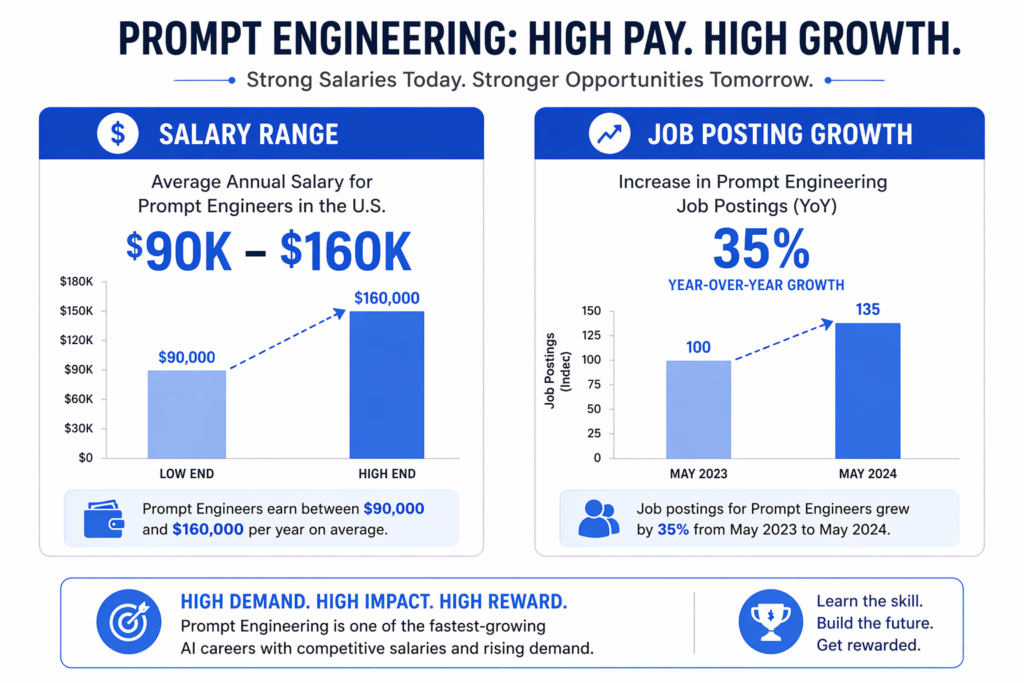
- LinkedIn reported a 35%+ increase in job postings mentioning ‘prompt engineering’ between 2024 and 2025
- Average salaries for prompt engineers in the US range from $90,000 to $160,000 per year
- Freelance prompt engineers on Upwork charge between $25 and $150 per hour
- Google, Microsoft, Anthropic, and startups across every industry now list this as a required or preferred skill
Real-World Use Cases in 2026
| Industry | How Prompt Engineering Is Used | Outcome |
| Content & Marketing | Drafting blogs, ad copy, email sequences with AI | 3–5x faster content production |
| Data & Analytics | Extracting insights from large datasets using AI | Hours of analysis in minutes |
| Customer Service | Building AI chatbot scripts and response frameworks | Reduced ticket volume, faster resolution |
| Education | Creating course content, quizzes, tutoring workflows | Personalized learning at scale |
| Software & Dev | Code generation, debugging, documentation prompts | Reduced development time |
| Related ReadTop 7 AI Skills for 2026 — Programming, MLOps, and Generative AI → bestcourseshub.com/top-7-ai-skills-for-2026-programming-mlops-and-generative-ai/ |
3. What Is Prompt Engineering? (And What It’s Not)
Here’s my go-to explanation when someone asks me this at a conference or a dinner party:
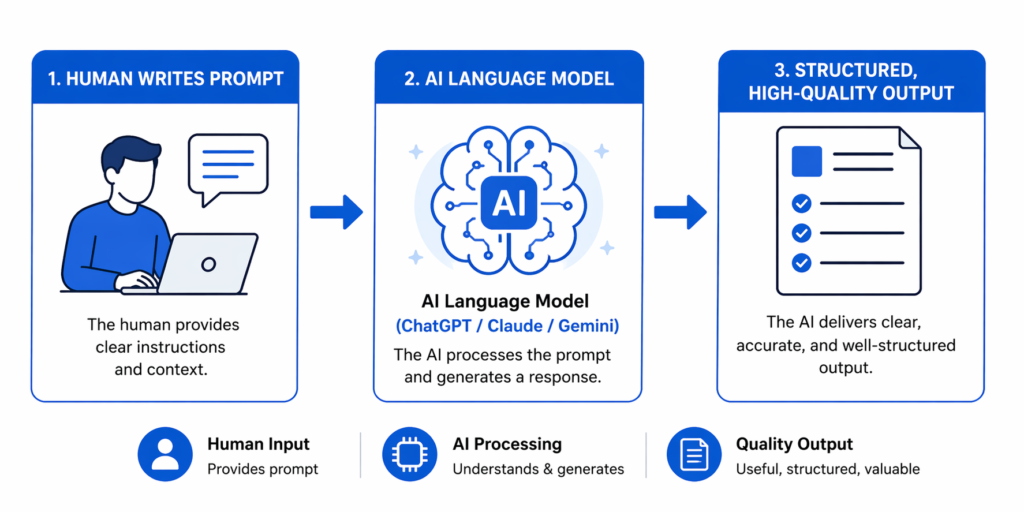
Prompt engineering is the practice of writing clear, structured instructions — called “prompts” — to get the best possible output from an AI language model like ChatGPT, Claude, or Gemini.
Think of an AI model as an incredibly capable assistant who can do almost anything — but only if you tell it exactly what you want, how you want it, and in what context. Prompt engineering is the skill of giving those instructions well. That’s it. Sounds simple, but the depth of it is what makes it genuinely valuable.
What Prompt Engineering IS:
- Writing structured, context-rich instructions for AI models
- Iterating and refining prompts to improve output quality
- Designing AI workflows for specific use cases — writing, coding, data analysis, automation
- Understanding how different AI models interpret and respond to instructions
Prompt Engineering Is NOT:
- It is NOT coding or programming (you don’t need to know Python — I can’t stress this enough)
- It is NOT AI model training — you’re using existing models, not building new ones
- It is NOT just “chatting with AI” — it’s a structured, learnable discipline
- It is NOT only for tech professionals — marketers, writers, and educators use it daily
4. What You Actually Need to Learn: The Skill Breakdown
This is where a lot of beginners get overwhelmed. They see a laundry list of techniques — chain-of-thought, few-shot, RAG, agent workflows — and freeze up. Here’s what I tell everyone: prompt engineering has layers, and you only need to learn them in the right order.
Core Skills — Beginner Level (Learn These First)
- Clear instruction writing: Give the AI a specific task, not a vague request
- Context setting: Tell the AI who you are, what the goal is, and who the audience is
- Output formatting: Specify format — bullet list, table, numbered steps, essay, code block
- Tone & style control: Formal, casual, technical, beginner-friendly — AI follows your lead
- Iterative prompting: Refine and re-prompt until you get what you need
Advanced Skills — Intermediate to Pro Level
- Role-based prompting: “You are a senior data analyst…” — framing the AI in a specific persona
- Few-shot prompting: Providing 2–3 examples inside the prompt to guide the model’s output style
- Chain-of-thought (CoT) prompting: Asking the AI to “think step by step” for complex reasoning tasks
- System prompt engineering: Writing persistent instructions that shape every response in a conversation
- Tool & API integration: Connecting prompts to Zapier, Make, or custom apps for automation
- Context window management: Structuring long conversations to keep the AI on track
Common Myths I’ve Heard a Hundred Times
| Myth | Reality |
| You need to know Python | Not for 90% of prompt engineering work — I don’t use it daily |
| You need an AI or CS degree | Most successful prompt engineers are completely self-taught |
| You need expensive tools | ChatGPT free tier and Claude free tier are more than enough to start |
| Prompt engineering is just writing nicely | It’s a structured discipline with measurable, repeatable outcomes |
5. Step-by-Step Learning Roadmap: Beginner to Job-Ready
This is the exact path I’d follow if I were starting from zero today. I’ve also watched dozens of people go through it — and the ones who follow the stages in order make the fastest progress. Don’t skip ahead.
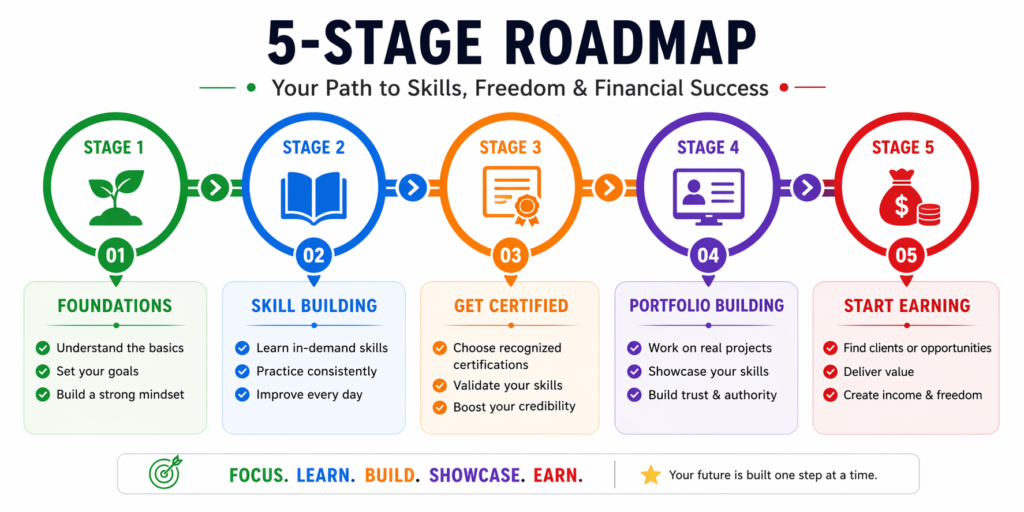
Stage 1 — Foundations (Week 1–2)
Goal: Understand the basics and start using AI tools immediately.
- Create free accounts on ChatGPT (OpenAI) and Claude (Anthropic)
- Read OpenAI’s official Prompt Engineering guide — free, short, authoritative
- Complete the Google Prompt Engineering course — free, beginner-friendly, takes ~3–4 hours
- Read Anthropic’s Prompt Engineering documentation — especially useful if you plan to use Claude
- Practice: Write 5 prompts per day on different topics. Don’t worry about perfection — just get familiar
Stage 2 — Skill Building Through Practice (Week 3–4)
Goal: Move from basic prompts to structured, reusable templates.
- Use prompt templates for blog writing, email drafting, and data summaries
- Practice iterative prompting: start with a vague prompt → refine → improve → compare outputs
- Learn role-based prompting: “You are a [role]… Your task is to…”
- Join communities: Reddit r/PromptEngineering and AI Discord servers for feedback
| See my full ChatGPT Prompt Engineering Guide for hands-on examples |
Stage 3 — Take a Structured Course & Get Certified (Month 2)
Goal: Get a recognized credential and learn advanced techniques with structure.
- Choose a paid course based on your budget and goals (see my comparison in Section 6)
- Complete all assignments and hands-on projects — don’t just watch the videos
- Earn a certificate to display on LinkedIn and your resume
- Start applying advanced techniques: few-shot, chain-of-thought, and system prompts
Stage 4 — Portfolio Building (Month 2–3)
Goal: Create proof of your skills that employers and clients can actually see.
- Build a Notion or GitHub portfolio with 10–15 real prompt examples across different use cases
- Include before/after comparisons: weak prompt → output vs. strong prompt → output
- Add 2–3 case studies showing a real problem you solved using prompt engineering
- Consider creating a free prompt template pack to share — it positions you as an expert immediately
Stage 5 — Apply, Freelance, or Monetize (Month 3+)
Goal: Turn your skills into income or a career.
- Apply for prompt engineer roles on LinkedIn, Indeed, and RemoteOK.com
- List services on Fiverr: ‘Custom AI Prompts’, ‘ChatGPT workflow setup’, ‘AI content writing’
- Apply on Upwork as an ‘AI Prompt Specialist’ or ‘AI Automation Consultant’
- Sell prompt template packs on PromptBase, Gumroad, or Etsy
| AI in Education and Machine Learning — how AI skills are reshaping careers |
6. Best Prompt Engineering Courses in 2026 (Free & Paid Compared)
I’ve gone through a lot of these personally, and I’ve talked to hundreds of people who’ve taken them. Here’s my honest take on each — what’s actually worth your time and what’s mostly hype.
Free Prompt Engineering Courses
1. Google Prompt Engineering Course (Free)
Part of Google’s AI Essentials learning path, this is my go-to recommendation for absolute beginners. It’s self-paced, takes roughly 3–5 hours to complete, and it’s backed by one of the most trusted names in tech. If you’re starting from zero, start here.
- Platform: Google (via Coursera or cloud.google.com/learn)
- Level: Beginner
- Certificate: Available with Google AI Essentials (paid upgrade) or free completion badge
- Best for: Anyone who wants a trusted, structured introduction from an industry leader
2. DeepLearning.AI — ChatGPT Prompt Engineering for Developers (Free)
Co-taught by Isa Fulford from OpenAI and Andrew Ng, this is genuinely one of the best free resources I’ve seen. It’s technical but accessible — you don’t need to be a developer to get a ton of value out of it. Andrew Ng is one of the clearest AI teachers in the world, full stop.
- Platform: DeepLearning.AI
- Level: Beginner to Intermediate
- Certificate: No (free version) — certificate available with paid Coursera plan
- Best for: Hands-on learners who want to understand how GPT models actually process prompts
3. Anthropic Prompt Engineering Guide (Free)
This isn’t a traditional course — it’s Anthropic’s official documentation on writing effective prompts for Claude. I read this cover to cover and learned things I hadn’t seen in any paid course. It’s dense with practical advice and real examples. Highly recommended if you’re using Claude regularly.
- Platform: Anthropic.com (docs.anthropic.com)
- Level: Beginner to Intermediate
- Certificate: None
- Best for: Claude users and anyone who wants first-party guidance on prompt structure
4. OpenAI Prompt Engineering Guide (Free)
OpenAI’s official documentation covers best practices for working with GPT models — specific techniques like chain-of-thought reasoning, few-shot prompting, and structured output generation. Bookmark this and come back to it regularly.
- Platform: platform.openai.com/docs
- Level: Beginner to Intermediate
- Certificate: None
- Best for: ChatGPT power users and developers integrating GPT via API
Paid Prompt Engineering Courses With Certificates
5. Prompt Engineering Specialization on Coursera (Paid)
Coursera offers multiple prompt engineering courses from DeepLearning.AI, IBM, and Vanderbilt University. You can audit many for free, but a certificate requires a paid plan (~$49/month). Worth it if you need a LinkedIn-ready credential.
- Platform: Coursera
- Price: Free to audit / ~$49/month for certificate
- Level: Beginner to Intermediate
- Certificate: Yes — shareable on LinkedIn
- Best for: Career changers who need a recognized, verifiable credential
6. Udemy Prompt Engineering Course (Paid)
Udemy has dozens of prompt engineering courses, and they go on sale constantly — I’ve picked them up for $15–$18. You get lifetime access, which I love. It’s hands down the best value if you’re budget-conscious and want practical, project-based content.
- Platform: Udemy
- Price: $15–$30 on sale (frequently discounted)
- Level: Beginner to Intermediate
- Certificate: Yes — Udemy completion certificate
- Best for: Budget-conscious learners who want lifetime access and practical content
7. IBM AI Prompt Engineering Professional Certificate (Coursera)
Part of IBM’s broader AI Engineering path on Coursera. If you’re targeting enterprise roles or mid-size companies, the IBM brand carries real weight with hiring managers. Worth the monthly cost if you’re serious about a job transition.
- Platform: Coursera (offered by IBM)
- Price: ~$49/month
- Level: Intermediate
- Certificate: Yes — IBM Professional Certificate
- Best for: Professionals targeting enterprise AI roles
Full Course Comparison Table
| Course | Platform | Price | Certificate | Level | Best For |
| Google Prompt Eng. | Google/Coursera | Free | Badge/Upgrade | Beginner | Absolute beginners, official content |
| ChatGPT Prompt Eng. for Devs | DeepLearning.AI | Free | No (free) | Beg–Mid | Hands-on GPT practice, Andrew Ng |
| Anthropic Guide | Anthropic.com | Free | None | Beg–Mid | Claude users, model behavior |
| OpenAI Prompt Guide | OpenAI Docs | Free | None | Beg–Mid | GPT-4 API users, developers |
| Coursera Specialization | Coursera | $49/mo | Yes ✓ | Beg–Int | Career changers, LinkedIn credential |
| Udemy Course | Udemy | $15–30 | Yes ✓ | Beg–Int | Budget learners, lifetime access |
| IBM AI Prompt Eng. | Coursera (IBM) | $49/mo | Yes ✓ | Intermediate | Enterprise job seekers |
7. Free vs Paid Prompt Engineering Courses — Which Should You Choose?
This is the most common question I get. My honest answer: it depends on what you’re trying to accomplish. Let me break it down plainly.
Choose Free Courses If:
- You’re a complete beginner who wants to test the waters before committing any money
- Your budget is tight right now — the free resources are genuinely excellent for foundations
- You only need the skills for personal productivity, not career advancement
- You plan to build a portfolio and let your work speak for itself
Choose Paid Courses If:
- You want a shareable certificate for your LinkedIn profile or resume
- You need structured learning with assignments, deadlines, and real feedback
- You’re targeting a specific job or freelance market and need credibility fast
- You want access to a community of learners and instructor Q&A
The Simple Decision Guide:
| Your Situation | Recommended Option | Estimated Cost |
| Just exploring AI / total beginner | Google or Anthropic free guide | $0 |
| Want hands-on practice + structure | DeepLearning.AI (free) + daily practice | $0 |
| Budget learner wanting a certificate | Udemy prompt engineering course | $15–30 (on sale) |
| Career changer / job seeker | IBM or Coursera Specialization | ~$49/month |
| Serious about AI career path | Andrew Ng series on DeepLearning.AI | Free + optional paid |
8. Common Mistakes Beginners Make With Prompt Engineering
I’ve watched a lot of people get frustrated and give up — and almost every time, it comes down to one of these five mistakes. They’re all completely avoidable once you know what to watch for.
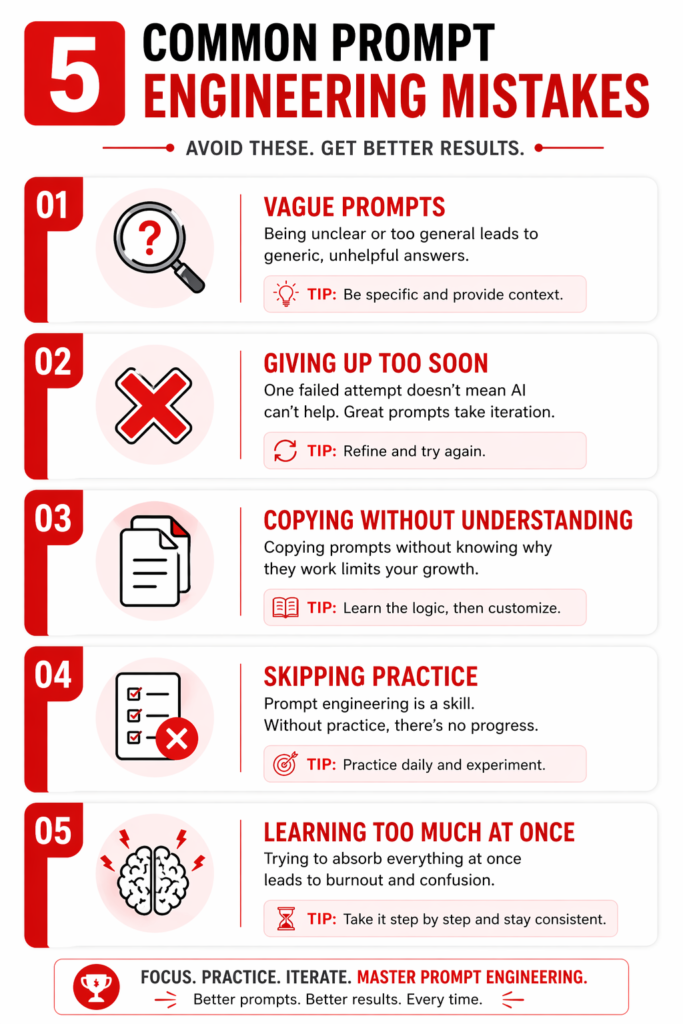
Mistake 1: Being Too Vague
“Write me a blog post about marketing” is not a prompt — it’s just a topic. The AI will produce something generic because you gave it nothing specific to work with. I see this constantly from beginners.
| 🚫 Weak Prompt: Write me a blog post about marketing. |
| ✅ Strong Prompt: You are an SEO content strategist writing for small business owners. Write a 1,000-word beginner’s guide on ’email marketing for local businesses in 2026′. Use H2/H3 headings, a friendly but professional tone, and include a 5-step action plan at the end. Target the keyphrase ’email marketing for small businesses’. |
Mistake 2: Giving Up After One Bad Output
Prompt engineering is iterative. The first output is almost never the best — and that’s completely normal. Professional prompt engineers expect to refine a prompt 3–5 times before hitting the target. If your first attempt fails, that’s not failure. That’s the process working exactly as it should.
Mistake 3: Copy-Pasting Prompts Without Understanding Them
I’m guilty of this in the early days. Using prompt templates without understanding why they work means you can’t adapt them when they fail. Before using any template, deconstruct it: What is the role? What is the instruction and What is the context? What is the output format? Once you understand the structure, you can build your own from scratch.
Mistake 4: Skipping Real-World Application
Watching videos and reading guides without applying the skills to real projects means you won’t retain what you’ve learned. The fastest way I’ve seen people improve is by solving a real problem — writing a real blog post, analyzing real data, automating a real workflow. Build something, even if it’s small.
Mistake 5: Trying to Learn Everything at Once
Chain-of-thought prompting, few-shot learning, API integration, agent workflows — these are advanced techniques that come later. Trying to learn them before you’ve mastered basic structured prompts wastes time and causes unnecessary confusion. Follow the roadmap in order. Master the foundations first. I can’t say this enough.
9. Real Prompt Engineering Examples in Action
The best way to understand this is to see it in action. Here are three real-world examples across different use cases — each showing the difference between a weak prompt and a strong one. These are based on actual use cases I’ve worked on.
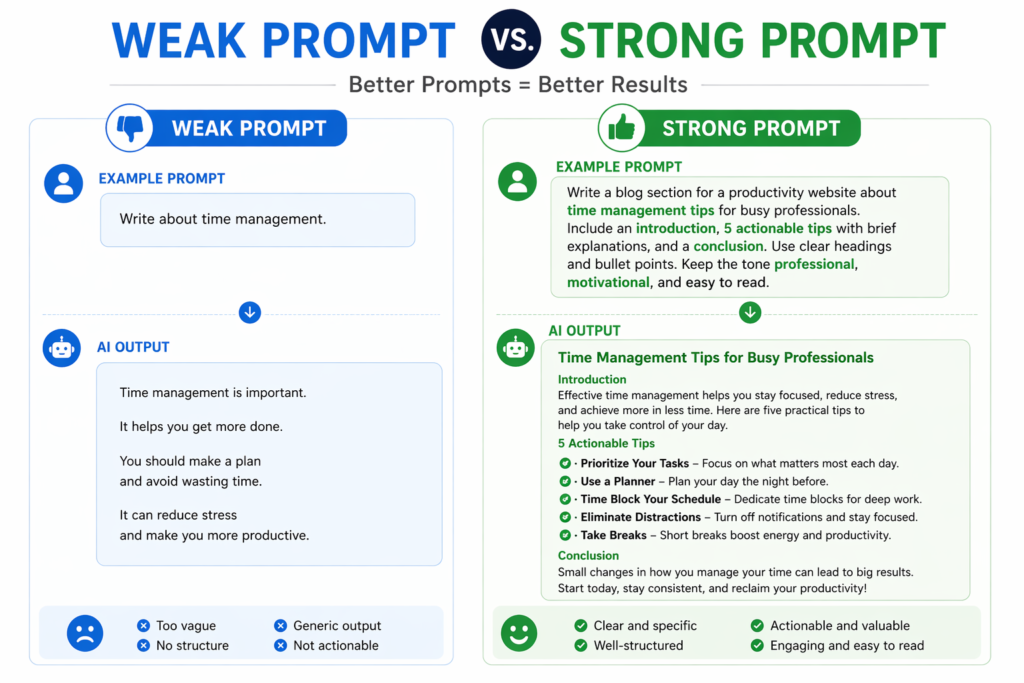
Example 1: Blog Writing (Content Creator Use Case)
| 🚫 Weak Prompt: Write a blog post about AI tools. |
| ✅ Strong Prompt: You are an SEO content strategist for BestCourseHub.com, a website that reviews online courses for professionals and students. Write a 1,200-word beginner’s guide titled ‘Best Free AI Tools for Students in 2026’. Use H2 and H3 headings, a friendly and encouraging tone, and bullet points where appropriate. Include a 5-item checklist at the end. Target the keyphrase ‘free AI tools for students’. Avoid jargon — the reader is a first-year college student. |
Result: A publish-ready article in the right format, length, and tone — rather than a generic 300-word response with no structure.
Example 2: Data Analysis (Business Professional Use Case)
| 🚫 Weak Prompt: Analyze my sales data. |
| ✅ Strong Prompt: You are a senior business analyst. I will provide a summary of monthly sales figures for Q1 2026 across three product categories: software, hardware, and consulting. Your task: 1. Identify the top 3 performance trends 2. Flag any significant anomalies or drops 3. Suggest 2 data-backed action items for Q2 Format your response as an executive summary with clear bullet points. Keep the total length under 300 words. |
Result: A focused, business-ready executive summary — not a rambling data dump that still requires human interpretation.
Example 3: Automation Workflow (Freelancer Use Case)
| 🚫 Weak Prompt: Help me automate my emails. |
| ✅ Strong Prompt: I run a freelance copywriting business and receive 10–20 client inquiry emails each week. Help me design a prompt workflow using ChatGPT that I can trigger with Zapier to: 1. Categorize each inquiry by project type (blog writing, email campaigns, social media) 2. Draft a personalized first response based on the project type 3. Create a follow-up reminder for 3 business days later Provide step-by-step instructions a non-technical user can follow. |
Result: A usable, step-by-step automation blueprint that saves me — and my clients — 2–3 hours per week.
| Go Deeper: Full ChatGPT Prompt Engineering Guide with more examples |
10. Best Tools to Practice Prompt Engineering
You don’t need expensive software to become a great prompt engineer. I’ve been doing this for years and my core stack is mostly free. Here’s what I actually use and recommend:
| Tool | Cost | Best For | Why It Helps |
| ChatGPT (Free/Plus) | Free / $20/mo | Beginners | Most widely used, huge community, excellent for general prompting across all use cases |
| Claude (Free/Pro) | Free / $20/mo | Long-form & nuanced | Exceptional instruction-following, best for detailed writing prompts and complex multi-step tasks |
| Google Gemini | Free / $19.99/mo | Research & productivity | Integrates with Google Workspace; ideal for prompts involving Docs, Sheets, and Gmail automation |
| OpenAI Playground | Pay-per-use | Advanced / Technical | Full parameter control — the best sandbox for learning how models actually behave |
| PromptBase | Free to browse | Inspiration & study | Marketplace of real, tested prompts — study what works and eventually sell your own |
| Notion AI | $10/mo | Writing & organization | Practice prompt-guided writing in a real-world productivity environment |
11. The Prompt Engineering Checklist — Use This Before Every Prompt
This is something I’ve refined over two years of daily prompting. Run through this checklist before submitting any important prompt. It takes 60 seconds and dramatically improves output quality every single time.
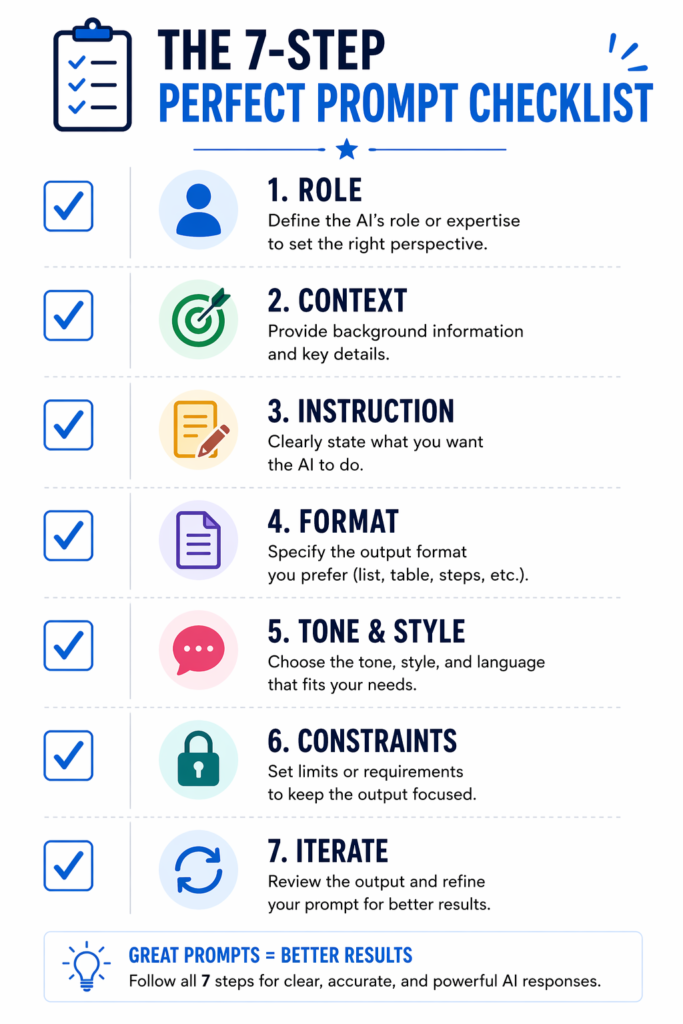
- ☐ ROLE: Have you told the AI who it is? (e.g., “You are a [role]…”)
- ☐ CONTEXT: Have you provided the relevant background? (What is this for? Who is the audience?)
- ☐ INSTRUCTION: Is your task instruction clear and specific? (Not ‘write something’ — ‘write a 500-word summary of…’)
- ☐ FORMAT: Have you specified the output format? (Bullet list, table, numbered steps, paragraph, code block?)
- ☐ TONE & STYLE: Have you set the tone? (Formal, casual, technical, friendly, expert-level?)
- ☐ CONSTRAINTS: Have you set any limits? (Word count, what to avoid, what NOT to include?)
- ☐ ITERATE: If the output isn’t right — did you refine and re-prompt instead of giving up?
12. How to Start Earning With Prompt Engineering in 2026
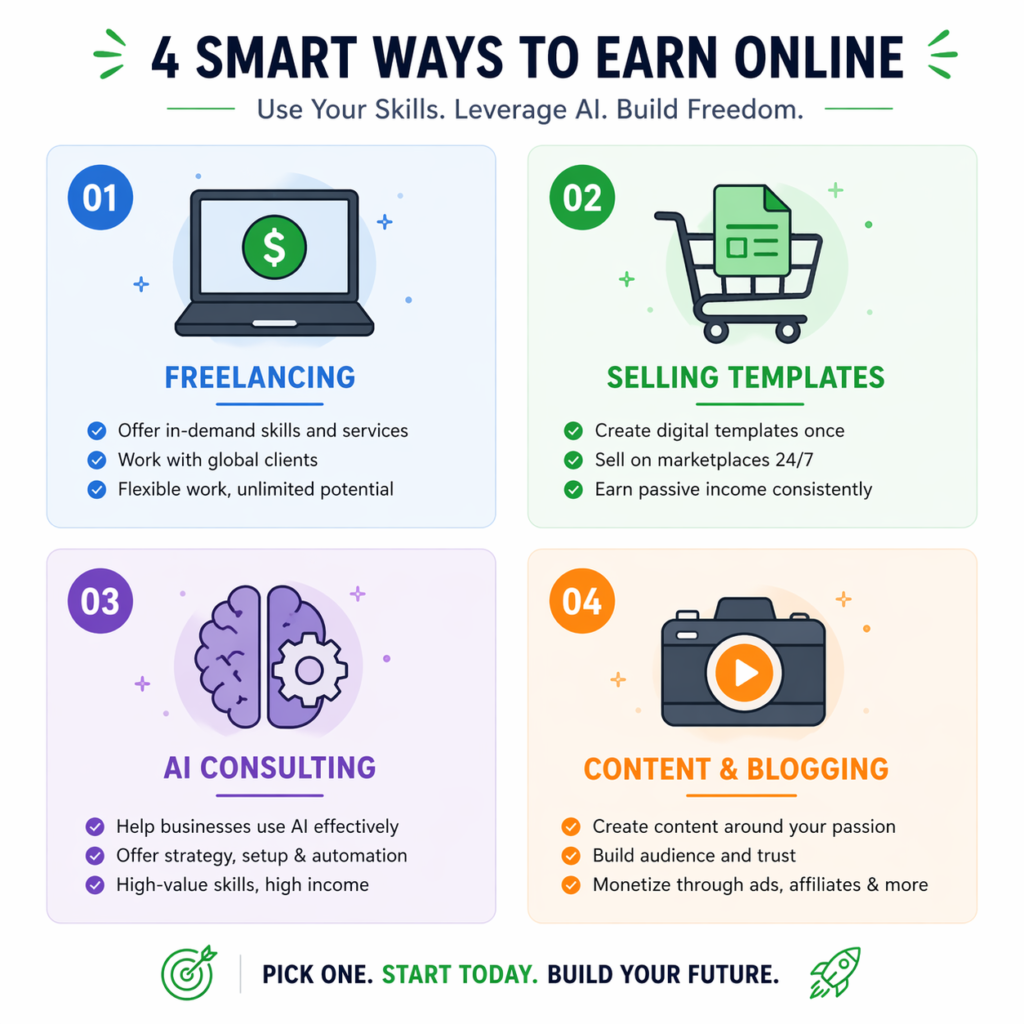
Here’s where I go further than most prompt engineering guides. Let’s talk about how to actually make money with this skill — because that’s the real reason most people are here.
Freelancing Platforms
- Upwork: List yourself as an ‘AI Prompt Engineer’ or ‘ChatGPT Automation Specialist’. Rates range from $25 to $150 per hour. Beginners typically start at $25–$40/hr and scale quickly with reviews.
- Fiverr: Create gigs for ‘Custom AI Prompts’, ‘ChatGPT Workflow Setup’, or ‘AI Blog Writing’. Gig pricing ranges from $25 for simple prompt packs to $200+ for full workflow builds.
Selling Prompt Templates
- PromptBase: List and sell individual high-quality prompts for $2–$10 each. A well-written prompt pack can earn $200–$500/month passively — I’ve seen this happen.
- Gumroad: Sell prompt eBooks and template packs targeting specific niches: prompts for teachers, prompts for marketers, prompts for real estate agents.
- Etsy: Surprisingly effective for selling digital prompt packs, especially in creative niches like Midjourney art prompts or writing templates.
AI Consulting
- Workflow audits: Offer to review and optimize a company’s existing AI prompt workflows — typically charged at $75–$200 per session
- AI implementation consulting: Help small businesses integrate ChatGPT or Claude into their customer service, content, or operations workflows
- Training sessions: Run workshops for marketing teams, content teams, or HR departments on how to use AI tools effectively
Content & Blogging
- AI-focused blog: Build a niche blog reviewing AI tools, courses, and prompt strategies. Monetize with affiliate links for Coursera, Udemy, Jasper, and Notion.
- YouTube tutorials: Create videos comparing prompt strategies or reviewing AI tools. Monetize with AdSense and affiliate links.
13. Frequently Asked Questions About Prompt Engineering Courses
These are the questions I get in my inbox and in comments most often. I’ve answered them as clearly and honestly as I can.
Q1: What is a prompt engineering course?
A prompt engineering course teaches you how to write effective instructions — called prompts — for AI language models like ChatGPT, Claude, and Gemini. Courses range from free beginner guides (like Google’s AI Essentials) to certified professional programs (like IBM’s AI Engineering certificate on Coursera). They cover role-based prompting, chain-of-thought reasoning, few-shot examples, and real-world application across writing, coding, data analysis, and automation.
Q2: Is prompt engineering hard to learn?
Not at all — and I say that as someone who’s taught it to dozens of non-technical people. It’s one of the most accessible AI skills available because it requires no coding or technical background. Most beginners can grasp the core concepts in 1–2 weeks with daily practice using free tools. Advanced techniques take 2–3 months of consistent effort to develop.
Q3: Are there free prompt engineering courses with a certificate?
Yes. Google’s AI Essentials course includes a shareable certificate. DeepLearning.AI’s ‘ChatGPT Prompt Engineering for Developers’ is free to complete (a certificate requires a paid Coursera plan). IBM offers a Professional Certificate through Coursera (~$49/month). Always verify current terms before enrolling, as platforms occasionally change their free/paid structure.
Q4: Which is the best prompt engineering course in 2026?
It depends on your goal. For who is beginners: Google Prompt Engineering (free, official, trusted). For who wants to career changers: IBM AI Prompt Engineering on Coursera (certified, enterprise-recognized). Hands-on learners on a budget: Udemy ($15–$30, lifetime access). Aspiring AI engineers: Andrew Ng’s DeepLearning.AI series.
Q5: Can I get a job as a prompt engineer?
Yes — and I’ve seen people do it in under 6 months starting from zero. Prompt engineering roles are growing rapidly at AI companies, tech firms, marketing agencies, and enterprise organizations. Entry-level roles typically require a portfolio of examples plus knowledge of AI tools. Roles are available full-time, freelance, and remote — check LinkedIn, Indeed, RemoteOK, and Wellfound.
Q6: How long does it take to learn prompt engineering?
You can learn the basics in 1–2 weeks with 30–60 minutes of daily practice. Reaching an intermediate level — usable for freelancing — takes 1–2 months. Becoming job-ready with a portfolio and certification typically takes 3–6 months, depending on how consistently you practice and apply the skills.
Q7: Is the Google prompt engineering course worth it?
Yes — for beginners, absolutely. The Google Prompt Engineering course is free, beginner-friendly, and backed by Google’s authority. It’s part of Google’s AI Essentials curriculum and provides a strong foundation in core AI concepts and prompting strategies. For advanced learners it may feel too basic, but as a starting point it’s one of the best free options available in 2026.
Q8: What’s the difference between prompt engineering and programming?
Prompt engineering uses natural language instructions to guide AI behavior — no code required. Programming uses structured code (Python, JavaScript, etc.) to execute logic. However, advanced prompt engineering does overlap with programming when working with APIs, LangChain, or building AI agents. For most prompt engineers — especially freelancers and content professionals — coding is not required.
14. Final Action Plan — Start Your Prompt Engineering Journey Today
You’ve made it to the end. You now have the knowledge, the roadmap, the course recommendations, the real examples, and the checklist. The only thing left is to actually start — and that’s where most people stall out.
Here’s the thing: the gap between knowing about prompt engineering and actually using it is just 10 minutes a day. Don’t let this sit in your bookmarks folder. Here’s your 5-step action plan — bookmark this page and come back to it.
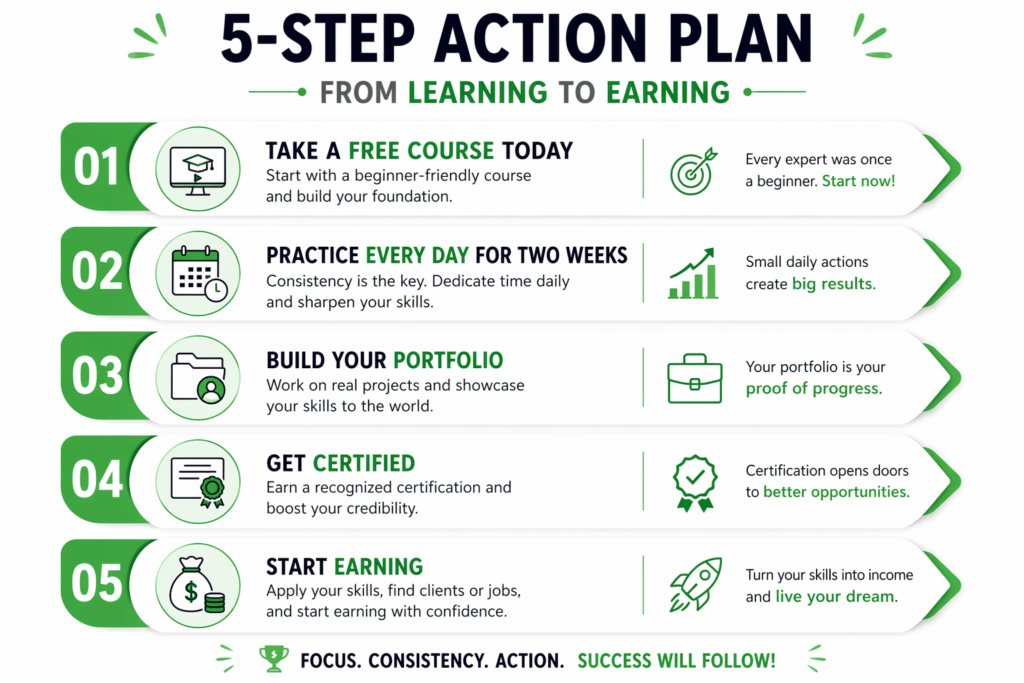
- Take a free course today. Start with the Google Prompt Engineering course or Anthropic’s official documentation. Both are free, beginner-friendly, and take less than a day to complete.
- Practice every day for two weeks. Write 5 new prompts daily across different use cases: blog writing, summarizing articles, generating ideas, drafting emails. Don’t aim for perfection — aim for consistency.
- Build your portfolio. Create 10–15 prompt examples with real before/after outputs. Host them on a free Notion page or GitHub repo. This is your proof of skill.
- Get certified. Enroll in a paid course — Udemy ($15–$30) or Coursera IBM/DeepLearning.AI (~$49/month). Earn a shareable certificate and add it to your LinkedIn profile.
- Start earning. List services on Fiverr or Upwork. Sell a prompt pack on PromptBase or Gumroad. Apply for one prompt engineer job on LinkedIn. The first step is always the hardest — take it.
| ✅ Your Starter Checklist — Do This Week ☐ Create free ChatGPT and Claude accounts ☐ Complete Google Prompt Engineering course (free) ☐ Write 5 prompts today — any topic, any tool ☐ Read the Anthropic Prompt Engineering guide ☐ Choose one paid course for next month ☐ Set up a Notion portfolio page |
The gap between knowing about prompt engineering and actually using it is just 10 minutes a day. Start today.
| Ready to build more AI skills? Top 7 AI Skills for 2026 — Programming, MLOps, and Generative AI AI Courses for Beginners: Your Complete 2026 Guide Resume Writing Course — present your new AI skills professionally |