Follow this battle-tested sql roadmap to go from zero to job-ready — no computer science degree required.
| 🛡️ Why You Can Trust This Guide |
| I’ve spent years analyzing what separates SQL learners who get hired from those who stay stuck in tutorial loops. |
| Every phase in this roadmap reflects real hiring patterns, common interview questions, and the actual SQL skills |
| data teams use daily — not academic theory. I’ve also cross-referenced job boards and LinkedIn data in 2025–2026 |
| to ensure the career advice here is current and actionable. |
Why Most People Fail to Learn SQL Efficiently
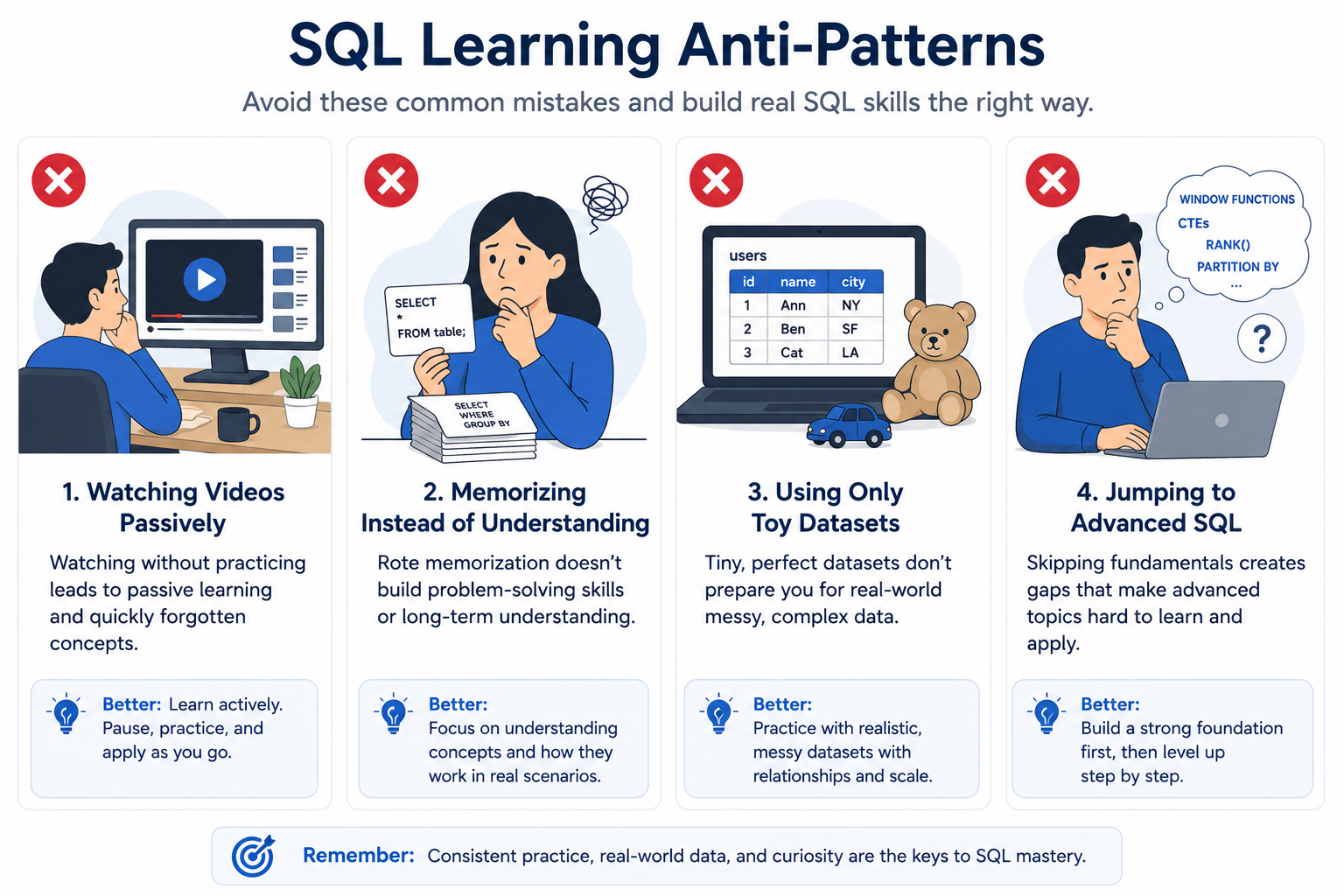
Here’s the truth nobody wants to say: most SQL learners don’t fail because SQL is hard. They fail because they follow the wrong path.
From my experience working with hundreds of aspiring data professionals, the same three patterns come up over and over:
- Tutorial hopping — watching five different courses but never finishing one or building anything real
- Syntax memorization without problem-solving — knowing what SELECT does but having no idea how to structure a query for a real business question
- No structured roadmap — jumping from basic queries to stored procedures without mastering the critical steps in between
The result? Months of effort with nothing to show in an interview. This sql roadmap was built specifically to fix that.
What This SQL Learning Roadmap Will Help You Achieve
By following this sql learning roadmap phase by phase, you will:
- Become job-ready for data analyst, backend developer, and data engineering roles
- Build real projects you can put on a portfolio or GitHub
- Know exactly which SQL skills to focus on based on your target career path
Most people who follow a structured roadmap to learn SQL get interview-ready in 8–12 weeks of consistent practice. I’ve seen it happen — and I’ll show you how.
Who This SQL Learning Roadmap Is For
This guide was written for:
- Complete beginners who have never touched a database
- Business analysts who use Excel but want to move into SQL-powered data work
- Developers who know how to code but want to strengthen their database skills
- Students preparing for data roles after graduation
- Career switchers looking for a structured roadmap sql path into data
If you’re preparing for a broader data career, check my guide on the data analyst roadmap for career growth — it covers where SQL fits inside the bigger picture.
What Actually Matters in SQL Learning in 2026
The SQL Skills Companies Actually Look For
I analyzed hundreds of data job listings in 2025 and 2026. Here’s what actually shows up in requirements — not what courses teach:
- Query writing — clean, efficient, readable SELECT statements
- Joins — specifically LEFT JOIN and multi-table joins appear in nearly every data analyst role
- Data cleaning — handling NULLs, duplicates, and type casting
- Aggregation — GROUP BY with COUNT, SUM, AVG, and HAVING
- Performance basics — understanding indexes and query cost at a conceptual level
That’s the core. Everything else is secondary until you’ve nailed these five areas.
| 💡 Pro Tip |
| Focus on JOINs early. In my experience, candidates who struggle with LEFT JOIN vs INNER JOIN fail |
| more SQL interviews than those who don’t know what a stored procedure is. |
What Beginners Waste Time Learning Too Early
What I’ve seen consistently is that beginners burn out because they try to learn things that won’t help them for months:
- Premature optimization — spending hours on query performance before writing basic correct queries
- Rare SQL functions — PIVOT, ROLLUP, CUBE — almost never asked in entry-level interviews
- Vendor-specific complexity — deep PostgreSQL internals or Oracle PL/SQL blocks before learning portable SQL
Save the advanced stuff for Phase 5 and 6. Early in the sql road map, breadth beats depth.
SQL Roles You Can Target After Learning
This is where the sql developer road map becomes a career decision, not just a learning one. Here’s a realistic role breakdown:
| Role | SQL Priority | Key SQL Skills | Other Tools |
| Data Analyst | Very High | Joins, aggregations, CTEs | Excel, Power BI, Python |
| Backend Developer | High | Schema design, transactions, indexing | ORM, APIs, Git |
| Data Engineer | High | ETL, window fns, performance tuning | Spark, Airflow, dbt |
| BI Developer | High | Complex reporting queries, DAX + SQL | Power BI, Tableau |
| Analytics Engineer | Very High | dbt, CTEs, modular query design | dbt, BigQuery, Snowflake |
To understand what a BI Developer career actually looks like, read my breakdown on business intelligence developer skills and roles.
| 📌 Key Takeaways |
| 1. Companies hire for JOINs, aggregation, and data cleaning — not advanced optimization. |
| 2. Different roles require different SQL depths — know your target before you start. |
| 3. Avoid vendor-specific SQL and rare functions until you’re past the fundamentals. |
The Complete SQL Roadmap for Beginners
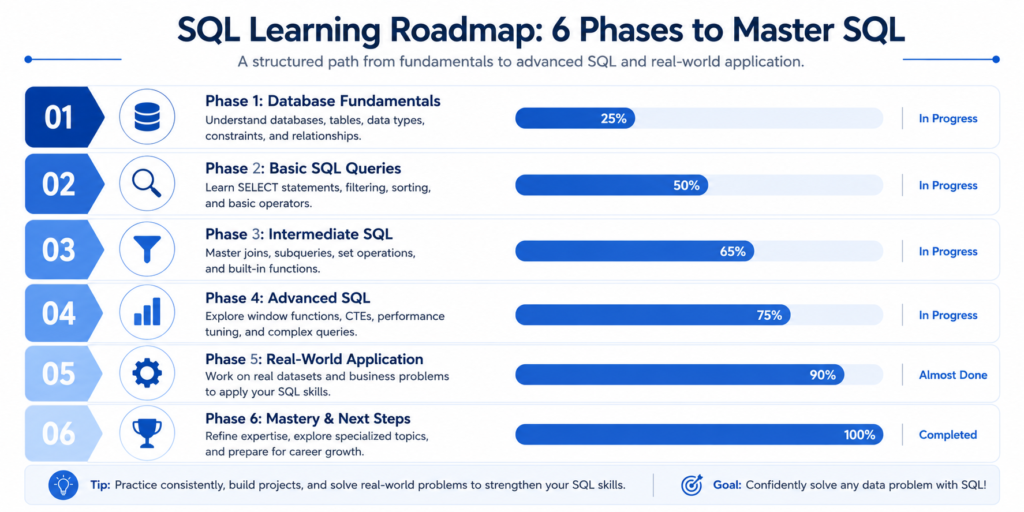
Here’s the full phase-by-phase breakdown. Each phase builds on the last — don’t skip ahead.
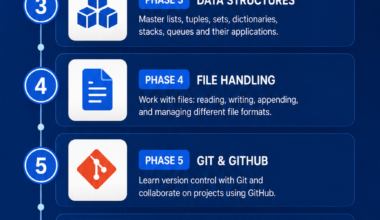
| Phase | Focus Area | Key Skills | Time Estimate |
| 1 | Database Fundamentals | Tables, keys, relationships | 1–2 weeks |
| 2 | Basic SQL Queries | SELECT, WHERE, ORDER BY | 1–2 weeks |
| 3 | Filtering & Aggregation | GROUP BY, HAVING, COUNT/SUM | 1–2 weeks |
| 4 | Joins | INNER, LEFT, RIGHT, multi-table | 2 weeks |
| 5 | Intermediate SQL | CTEs, subqueries, CASE WHEN, window fns | 3–4 weeks |
| 6 | Advanced SQL | Optimization, indexing, transactions | 4+ weeks |
Phase 1 — Understanding Databases and SQL Fundamentals
Before writing a single query, you need a mental model of how databases actually work. This is what I always teach first:
- Tables — a structured collection of data with rows and columns, like a spreadsheet but relational
- Rows — individual records (e.g., one customer, one sale, one transaction)
- Columns — the fields or attributes of each record (e.g., customer_id, order_date, amount)
- Primary keys — a unique identifier for each row; critical for understanding JOINs later
- Relationships — how tables connect to each other using foreign keys
Most tutorials skip this and jump straight into SELECT. Don’t. Understanding the structure is what makes your queries make sense.
| ⚠️ Common Mistake |
| Beginners often write queries without knowing what the data looks like. Always inspect your table structure first using |
| DESCRIBE tablename or SELECT * FROM tablename LIMIT 5. |
Phase 2 — Mastering Basic SQL Queries
Here’s what actually works when learning basic queries: focus on one clause at a time, then combine them.
- SELECT — choose which columns to retrieve (start here, always)
- WHERE — filter rows based on conditions (this is where most business logic lives)
- ORDER BY — sort your results ascending or descending
- LIMIT — restrict how many rows are returned (essential for exploring big datasets)
- DISTINCT — remove duplicates from your result set
A good challenge: take any public dataset (Kaggle has thousands free) and write 20 queries using only these five clauses. That repetition is worth more than any video.
Phase 3 — Filtering, Grouping, and Aggregation
This is where SQL starts to feel powerful. Aggregation is the backbone of data analysis — and it’s what most analyst interviews test first.
- GROUP BY — group rows that share a value (e.g., group sales by region)
- HAVING — filter groups after aggregation (different from WHERE, which filters rows)
- COUNT() — count rows in a group
- SUM() — total a numeric column
- AVG() — calculate the average of a column
From my experience, the HAVING vs WHERE confusion trips up almost every beginner. Remember: WHERE filters before grouping; HAVING filters after. Practice this distinction until it’s automatic.
| 💡 Pro Tip |
| Build a query that answers: ‘Which product category generated more than $10,000 in total sales this year?’ — this single query forces you to use |
| GROUP BY, SUM, and HAVING together. That’s your Phase 3 exam. |
Phase 4 — Joins That Real Projects Actually Use
JOINs are non-negotiable. No SQL roadmap is complete without serious join practice — and no data analyst interview skips them.
- INNER JOIN — returns rows that have matching values in both tables (the most common type)
- LEFT JOIN — returns all rows from the left table, and matching rows from the right (critical for preserving records with no match)
- RIGHT JOIN — the reverse of LEFT JOIN (less common in practice, but good to understand)
- Multi-table joins — joining three or more tables in a single query (this is real-world SQL)
What I’ve seen in interviews: candidates are almost always asked to write a LEFT JOIN query and explain the result. Practice explaining your JOINs out loud, not just writing them.
| ⚠️ Common Mistake |
| Using INNER JOIN when you need LEFT JOIN is one of the most common bugs in production queries. When in doubt, ask: |
| ‘Do I need all records from the left table, even if there’s no match?’ If yes, use LEFT JOIN. |
Phase 5 — Intermediate SQL That Makes You Employable
This is the phase that separates entry-level candidates from competitive ones. Master these and you’ll stand out in 80% of analyst interviews.
- CASE WHEN — conditional logic inside queries (like an IF statement in SQL)
- Subqueries — nested SELECT statements that let you query from a derived result
- CTEs (Common Table Expressions) — reusable named query blocks using WITH; cleaner than subqueries for complex logic
- Window functions — ROW_NUMBER, RANK, LAG, LEAD, SUM OVER PARTITION — these are what separate intermediate from advanced SQL
If I had to pick the single most career-boosting SQL skill, it would be window functions. Learn them. Practice them with real datasets. They appear in virtually every senior data role interview.
Phase 6 — Advanced SQL Concepts for Real-World Work
You don’t need all of this to get a first job — but you’ll need it to grow.
- Query optimization — reading EXPLAIN plans, reducing full table scans, rewriting inefficient queries
- Indexing basics — how indexes speed up reads and what trade-offs they introduce for writes
- Stored procedures — pre-compiled SQL logic stored in the database for reuse
- Transactions — grouping operations with BEGIN, COMMIT, ROLLBACK to maintain data integrity
For the data analytics career path that uses these skills in production, see my guide on data analytics tools used by professionals.
| 📌 Key Takeaways |
| 1. Phase 1–3 makes you SQL-literate. |
| 2. Phase 4–5 makes you employable. |
| 3. Phase 6 makes you senior. |
The SQL Developer Roadmap
SQL for Data Analysts vs SQL Developers
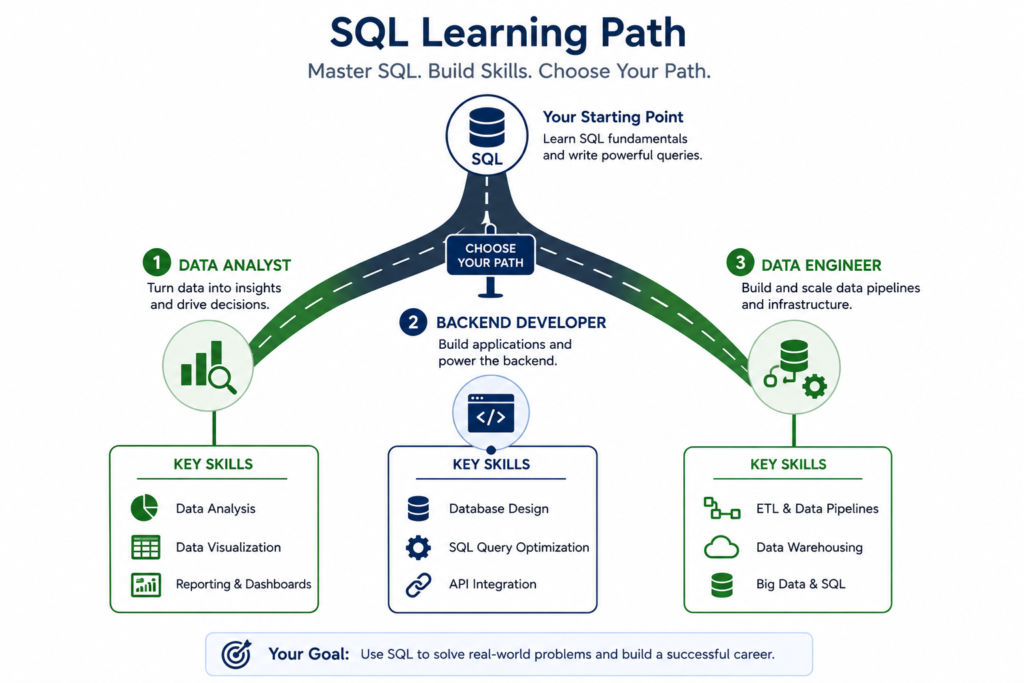
The sql developer roadmap branches at Phase 5. From that point, your learning path depends heavily on your target role.
- Data Analysts prioritize: aggregation, reporting queries, CTEs, window functions, dashboard-ready data shaping
- SQL Developers (backend) prioritize: schema design, stored procedures, transactions, database normalization, ORM interaction
- Tooling differs too: analysts lean on PostgreSQL, BigQuery, Snowflake; backend developers often work with MySQL, SQL Server, or SQLite in application stacks
Here’s what actually works: figure out your target role before Phase 5, and specialize your practice projects accordingly.
Skills Backend Developers Should Learn Alongside SQL
If you’re following the sql developer roadmap toward backend engineering, SQL is only part of the picture:
- APIs — understanding how your application layer queries the database (REST endpoints calling stored procedures or parameterized queries)
- ORM basics — tools like SQLAlchemy (Python) or Sequelize (Node.js) abstract raw SQL, but you need to understand the SQL underneath
- PostgreSQL / MySQL — pick one and go deep; PostgreSQL is generally recommended for modern applications
- Database design — normalization (1NF, 2NF, 3NF), ER diagrams, and schema planning before writing a single query
SQL Skills Data Engineers Need Beyond Queries
The data engineer roadmap requires SQL plus a layer of infrastructure knowledge:
- ETL concepts — Extract, Transform, Load; understanding data movement between systems
- Data warehousing — columnar storage, partitioning, and how BigQuery or Snowflake differ from transactional databases
- Data pipelines — orchestration tools like Apache Airflow trigger SQL transformations at scale
- Performance tuning — query cost analysis, materialized views, and partition pruning in analytical workloads
| 📌 Key Takeaways |
| 1. Decide your target role before Phase 5 — it changes what you prioritize. |
| 2. Data Analysts: master reporting SQL and CTEs. |
| 3. Developers: add schema design and ORM knowledge. |
| 4. Data Engineers: learn warehousing and pipeline concepts on top of SQL. |
Practical SQL Learning Framework That Actually Works
The 80/20 SQL Topics You Should Prioritize First
From my experience coaching learners, 80% of SQL interview success comes from 20% of the topic list:
- SELECT + WHERE + ORDER BY + LIMIT (the foundation — know this cold)
- GROUP BY + aggregation functions (COUNT, SUM, AVG, MIN, MAX)
- INNER JOIN and LEFT JOIN with multi-table queries
- CASE WHEN for conditional logic
- CTEs using WITH — they’re cleaner and more readable than nested subqueries
Master these five areas first. Everything else in this sql roadmap builds on them.
Best Practice Routine for Learning SQL Faster
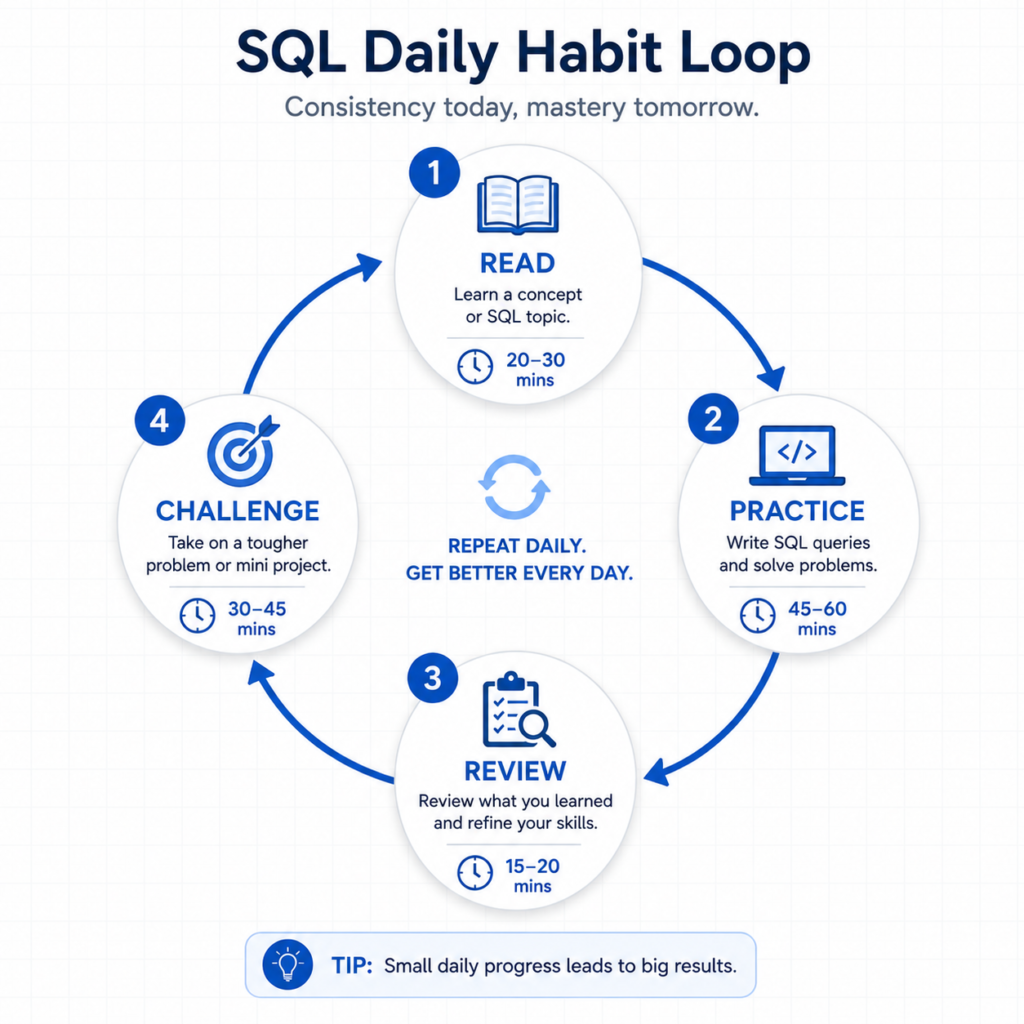
Here’s the routine that actually produces results — tested across beginner cohorts:
- Day 1–2: Read the concept and understand the logic, not just the syntax
- Day 3–5: Write at least 10 queries using that concept on a real dataset
- Day 6: Review your queries, fix inefficiencies, and explain them out loud
- Day 7: Solve one or two challenge problems that force you to combine multiple concepts
Consistency beats intensity. 45 minutes every day for 10 weeks beats a 20-hour weekend binge.
How to Practice SQL Without Getting Stuck
When learners stall, it’s usually one of three things:
- They’re using a dataset they don’t understand — switch to something familiar (your own shopping data, sports stats, or public Netflix datasets)
- They’re trying to build something too complex — break every query problem into the smallest possible sub-problem first
- They’re reading errors instead of understanding them — paste your error into Google or a documentation search; most SQL errors have exact answers online
| 💡 Pro Tip |
| Use DB Fiddle (free, browser-based) to test queries without installing anything. It’s perfect for quick experiments without |
| committing to a full local setup early in your learning. |
Real SQL Projects Beginners Should Build
Building projects is the single fastest way to cement your SQL roadmap skills:
- Sales dashboard database — products, orders, customers, and revenue rollups by date and region
- Inventory management system — stock levels, reorder triggers, supplier relationships
- Customer analytics — cohort analysis, retention queries, segmentation by purchase behavior
- Employee management — departments, salaries, performance scores, reporting hierarchies
Each of these forces you to use joins, aggregations, and filtering together — the exact combination companies test in SQL interviews.
Mistakes That Kill SQL Learning Progress
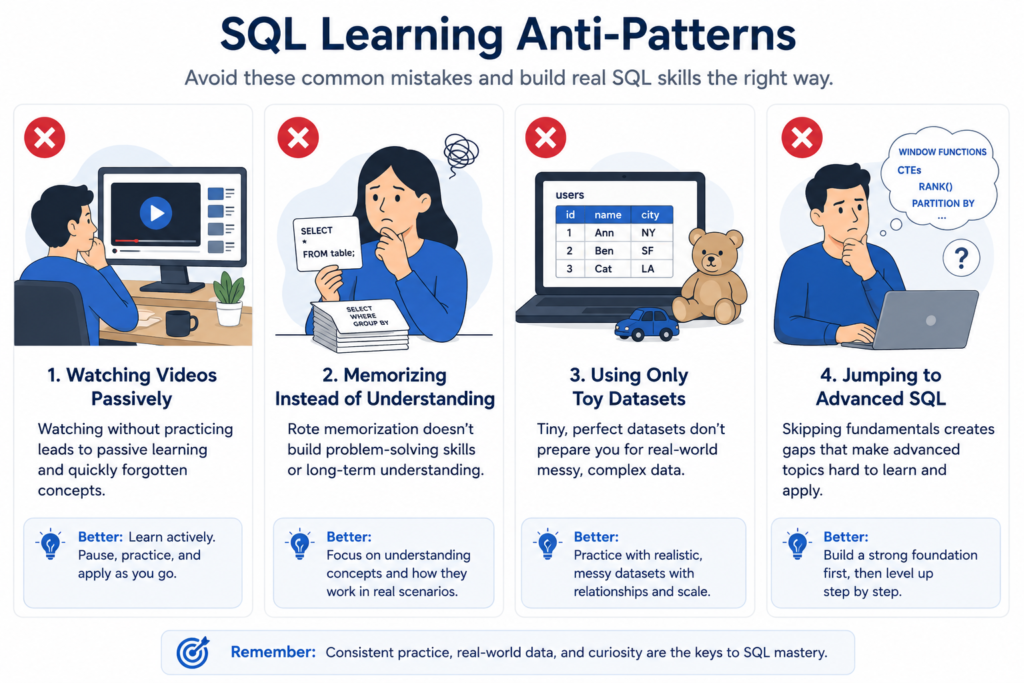
Memorizing Syntax Instead of Solving Problems
Here’s what actually works: forget flashcards. SQL syntax is simple enough that you’ll remember it through use. What you need to practice is problem decomposition — taking a business question (‘Which customers haven’t ordered in 90 days?’) and breaking it into a query structure. That skill doesn’t come from memorization; it comes from solving problems on messy data.
Watching Tutorials Without Writing Queries
I’ve talked to hundreds of learners who watched 50+ hours of SQL video content and still couldn’t write a basic JOIN query without looking it up. Passive consumption feels productive but isn’t. For every 15 minutes of content you watch, write at least 5–10 queries. Typing builds muscle memory. Watching doesn’t.
Avoiding Real Datasets Too Long
What I’ve seen consistently is that learners stay on toy datasets too long. The moment you try to write a GROUP BY on 50,000 rows of real messy data — with NULLs, duplicates, and inconsistent formatting — your SQL ability jumps. Sites like Kaggle, data.gov, and Mode’s public warehouse all have real datasets. Use them in Week 2, not Month 3.
Learning Advanced Topics Before Fundamentals
Some learners see ‘window functions’ or ‘indexing’ in a job description and dive straight into those topics. This is the fastest path to confusion and burnout. You cannot understand ROW_NUMBER() OVER (PARTITION BY…) if you don’t understand GROUP BY first. Follow this sql roadmap in sequence. The phases are ordered for a reason.
| ⚠️ Common Mistake |
| Jumping to CTEs and window functions before mastering JOINs is the number one reason intermediate learners plateau. |
| Revisit Phase 4 before advancing to Phase 5 if joins still feel shaky. |
Beginner vs Advanced SQL Skills
Here’s a quick visual breakdown of what skills belong at each level:
| Beginner | Intermediate | Advanced |
| SELECT, WHERE, ORDER BY | Window functions | Query plan analysis |
| Basic filtering | CTEs and subqueries | Index design |
| Simple joins | CASE WHEN logic | Stored procedures |
| GROUP BY, COUNT, SUM | Multi-table joins | Transactions & ACID |
| Basic aggregations | Aggregation with filters | Partitioning & sharding |
What Beginners Should Focus On First
Your entire focus for the first 4–6 weeks should be clean, correct, readable SQL. Not clever SQL. Not optimized SQL. SQL that returns the right answer to a clear business question. Prioritize: SELECT, WHERE, GROUP BY, basic aggregations, and INNER JOIN. Everything else waits.
What Intermediate Learners Must Learn Next
If you’re past the basics, the intermediate level is where most people stall. The jump from basic queries to window functions is steep. The trick is to learn CTEs first — they’re the bridge. Once you can write complex logic in a CTE, the OVER (PARTITION BY) syntax for window functions becomes much more intuitive.
What Advanced SQL Professionals Usually Know
Advanced SQL professionals rarely use functions beginners haven’t heard of. What they know is how to write efficient queries at scale, how to design schemas that make queries fast, and how to debug slow queries using EXPLAIN. These are experience-based skills that come from real production work — not tutorials.
Tools and Resources That Make SQL Learning Easier
Beginner-Friendly SQL Platforms
For the first two phases of this sql roadmap, browser-based tools are ideal — no installation friction, immediate feedback:
- SQLZoo — interactive tutorials in the browser, perfect for Phase 1–2
- W3Schools SQL — good for quick syntax reference, not for practice
- Khan Academy SQL — free, beginner-paced, good explanations
- Mode SQL Tutorial — real analyst-focused content with a built-in practice environment
Best Databases to Practice SQL in 2026
| Platform / Tool | Best For | Cost |
| SQLZoo | Absolute beginners — browser-based | Free |
| Mode Analytics | Real-world dataset practice | Free |
| LeetCode (DB) | Interview prep, problem solving | Free / Paid |
| StrataScratch | Real company SQL problems | Free / Paid |
| DB Fiddle | Quick schema testing in browser | Free |
| PostgreSQL (local) | Production-grade practice environment | Free |
Free Resources Worth Using
- Khan Academy SQL course (free, structured, beginner-friendly)
- PostgreSQL official documentation — the best SQL reference available
- roadmap.sh/sql — a community-maintained visual SQL roadmap that complements this guide
- Kaggle SQL courses — free, dataset-heavy, practical
For structured course recommendations, I’ve reviewed the best data analyst courses for beginners — many include hands-on SQL content.
Certifications That Actually Help Careers
SQL-specific certifications are rare, but these credential paths include meaningful SQL components:
- Microsoft Power BI Data Analyst Associate — heavy on SQL + DAX for reporting roles
- Google Professional Data Engineer — includes BigQuery SQL at scale
- IBM Data Analyst Certificate (Coursera) — beginner-friendly SQL included
If you’re targeting a reporting or BI career, see my comparison of business intelligence analytics certifications and whether they’re worth the investment.
Also see: Microsoft Certified Power BI Data Analyst Associate certification for the BI-specific path.
How Long Does It Take to Learn SQL?
Realistic Timelines Based on Your Goals
| Goal | Realistic Timeline | Daily Commitment |
| Pass basic SQL interview | 4–6 weeks | 45–60 min/day |
| Entry-level analyst job | 2–3 months | 60–90 min/day |
| Mid-level SQL competency | 4–6 months | 90 min/day + projects |
| Advanced / senior-level | 12+ months | Daily + real project work |
Fastest Path to Job-Ready SQL Skills
If you want to get hired as quickly as possible, here’s the most direct roadmap sql sequence:
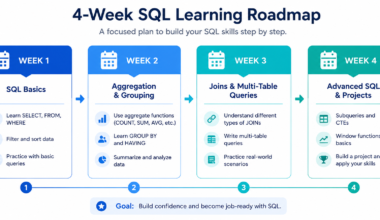
- Week 1–2: Complete Phase 1 and 2 (fundamentals + basic queries)
- Week 3–4: Complete Phase 3 (aggregation — this is 30% of most interviews)
- Week 5–6: Complete Phase 4 (JOINs — this is another 40% of most interviews)
- Week 7–8: Start Phase 5 (CTEs + CASE WHEN, at minimum)
- Week 9–12: Build 2 portfolio projects and start solving LeetCode/StrataScratch problems
That’s a 12-week sprint to interview readiness. It requires consistency — not intensity — but it works.
Daily Study Plans That Work
- 20 min: Read one concept from official documentation or a focused tutorial
- 30 min: Write queries using that concept on a real dataset (not a demo)
- 10 min: Review yesterday’s queries and identify one thing you’d improve
This 60-minute daily structure produces faster results than 3-hour weekend sessions because SQL is a motor skill as much as a knowledge skill — and motor skills require consistent repetition.
SQL Roadmap Checklist
Beginner SQL Checklist
- Understand what a relational database is and how tables relate
- Write SELECT queries with multiple columns
- Filter results using WHERE with multiple conditions
- Sort results with ORDER BY ASC and DESC
- Use DISTINCT to remove duplicates
- Use LIMIT to preview large datasets
- Write GROUP BY queries with COUNT, SUM, AVG
- Understand the difference between WHERE and HAVING
Intermediate SQL Checklist
- Write INNER JOIN and LEFT JOIN across two tables
- Write a multi-table JOIN (3+ tables)
- Use CASE WHEN for conditional column values
- Write a subquery in the WHERE clause
- Rewrite a subquery as a CTE using WITH
- Use ROW_NUMBER() and RANK() with OVER (PARTITION BY)
- Handle NULL values with IS NULL, COALESCE, and NULLIF
Job-Ready SQL Checklist
- Solve 30+ SQL problems on LeetCode or StrataScratch
- Build at least one portfolio project with 3+ tables
- Explain your queries out loud without notes
- Understand basic query performance (indexes, table scans)
- Write window functions for running totals and ranking
- Demonstrate SQL in a take-home project or live interview exercise
Frequently Asked Questions
Is SQL Enough to Get a Job in 2026?
SQL alone can get you an entry-level data analyst or BI analyst role in many companies, especially if you pair it with Excel or a visualization tool like Power BI. However, most data roles at tech companies and startups also expect Python basics. Use SQL as your foundation and add Python after reaching Phase 5 of this roadmap.
Which SQL Database Should Beginners Learn First?
Start with PostgreSQL. It’s free, open-source, widely used in both startups and enterprises, follows standard SQL closely, and is supported by every major cloud platform (AWS RDS, Google Cloud SQL, Azure). MySQL is a solid alternative — but PostgreSQL is the better long-term investment.
Should I Learn SQL Before Python?
Yes — for data roles. SQL is simpler to learn, more immediately applicable to data analysis work, and faster to get interview-ready with. Once you’re at Phase 5 of this sql roadmap, add Python. The two languages complement each other; SQL handles data retrieval and transformation, Python handles modeling, automation, and advanced processing.
Can I Learn SQL Without a Computer Science Degree?
Absolutely. SQL is one of the most learner-friendly technical skills available. I’ve worked with marketers, accountants, nurses, and teachers who became competent SQL analysts within 3 months. The key is structured practice over passive learning — which is exactly what this roadmap provides.
How Much SQL Is Enough for Data Analytics?
For most data analyst roles, completing Phases 1–5 of this sql roadmap is sufficient. You need strong proficiency in JOINs, aggregations, CTEs, CASE WHEN, and the basics of window functions. Phase 6 (optimization, stored procedures, transactions) is valuable but rarely required for entry-level positions.
For a complete career readiness checklist, see my guide on data analyst certifications worth getting in 2026.
Final Action Plan
The Best Order to Learn SQL Starting Today
Here’s the sequence I recommend for anyone starting this sql road map from zero:
- Set up PostgreSQL locally OR use DB Fiddle in your browser — start writing queries today, not next week
- Complete Phase 1 and 2 before touching any course or tutorial — understand databases first
- Spend extra time on Phase 3 and 4 — these two phases cover 70% of what SQL interviews test
- Start Phase 5 only after you can write any Phase 4 query from memory
- Build a project during or after Phase 5 — this is your portfolio proof
- Use Phase 6 topics to prepare for senior or engineering roles
What to Learn After SQL
Once you’ve completed this sql roadmap, here’s what to add:
- Python (pandas, NumPy) — for data manipulation beyond SQL
- Power BI or Tableau — for visualization and reporting
- dbt (data build tool) — if targeting analytics engineering or data engineering roles
- Cloud platforms — BigQuery (Google), Redshift (AWS), or Snowflake for warehouse-scale SQL
For a broader view of the data learning path, read my full data analyst roadmap guide. And if you need Power BI skills alongside SQL, check my guide on Power BI courses for beginners.
Your First 30-Day SQL Roadmap
Here’s a concrete 30-day sprint to get you through the most important phases:
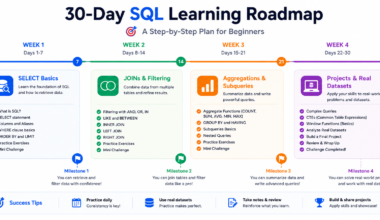
- Days 1–5: Phase 1 — database fundamentals, tables, keys, relationships
- Days 6–12: Phase 2 — SELECT, WHERE, ORDER BY, LIMIT, DISTINCT
- Days 13–19: Phase 3 — GROUP BY, HAVING, COUNT, SUM, AVG
- Days 20–27: Phase 4 — INNER JOIN, LEFT JOIN, multi-table joins
- Days 28–30: Build a mini project combining everything from Days 1–27
By Day 30, you’ll have covered more ground than most learners cover in 3 months of unstructured study. And you’ll have a working project to show for it.
| 🚀 Take Action |
| Ready to start? Set up PostgreSQL or open DB Fiddle right now. |
| Write your first SELECT query within the next 10 minutes. |
| Commit to 45–60 minutes of SQL practice daily for 30 days. |
| Bookmark this sql roadmap and use the checklist to track your progress. |
Published by BestCoursesHub | Updated: 2026
Explore more guides: Data Analyst Courses | Data Analytics Tools | BI Developer Guide