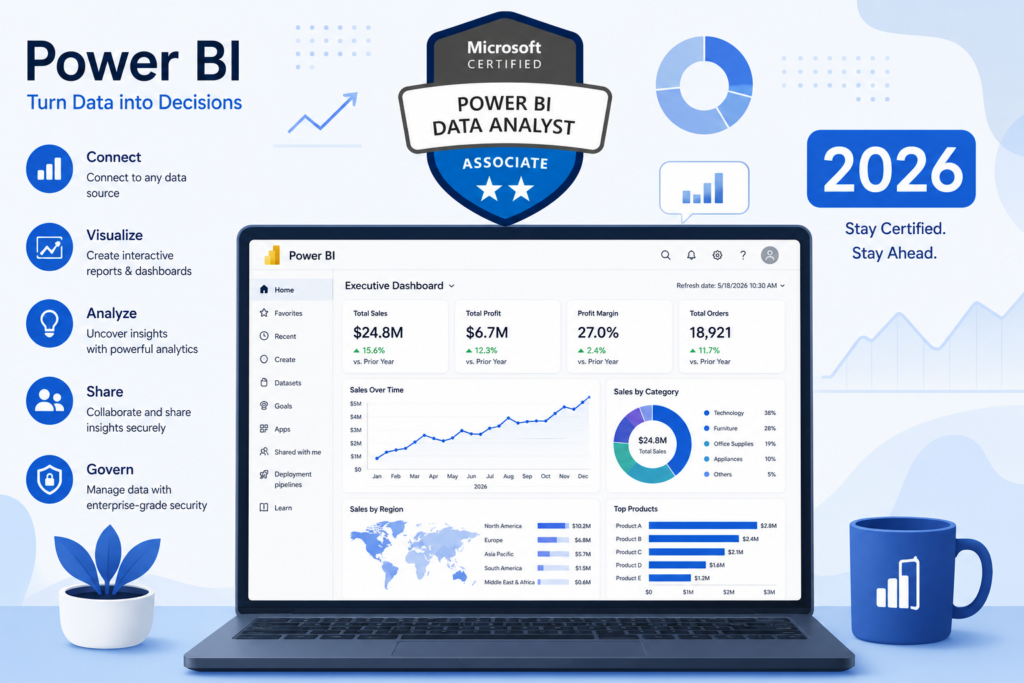
I’ll be honest with you — when I first looked at the Microsoft Certified Power BI Data Analyst Associate certification, I almost skipped it. I thought: another badge, another exam, same old outcome. I was completely wrong.
The PL-300 certification has quietly become one of the most employer-recognised data credentials in the Microsoft ecosystem. In 2026, organisations are not just looking for people who ‘know’ Power BI — they want proof. And this certification is that proof.
Whether you’re starting from scratch, switching careers, or trying to formalise skills you’ve built on the job, this guide covers everything: what the exam actually tests, how to prepare efficiently, where most candidates go wrong, and what happens to your career after you pass.
I’ve put together this guide based on real preparation experience, community feedback from certified professionals, and a careful analysis of the official Microsoft exam objectives. Let’s get into it.
Why the PL-300 Certification Is Suddenly More Valuable in 2026
The business intelligence landscape shifted dramatically over the last two years. Microsoft Power BI now sits inside the broader Microsoft Fabric ecosystem, meaning certified analysts have direct relevance to enterprise-grade data workflows. Demand for Power BI professionals in 2026 is measurably higher than in 2023, and the PL-300 exam has been updated to reflect modern tooling.
Companies shortlisting candidates for data roles now filter by certification on job boards more aggressively than ever. The PL-300 is listed as preferred or required in thousands of active job listings across North America, Europe, and Southeast Asia.
Who Should Actually Pursue This Certification
- Business analysts who build Power BI reports but lack formal recognition
- Data professionals transitioning from Excel or SQL into BI tools
- Developers adding data skills to their profile
- IT professionals supporting Power BI environments
- Graduates entering analytics who want a competitive edge
| KEY TAKEAWAY |
| The microsoft certified power bi data analyst associate certification (PL-300) validates your ability to model data, build visuals, and deploy reports in Power BI. |
| Exam cost: USD $165 | Passing score: 700/1000 | Duration: 100 minutes |
| Best suited for: data analysts, BI developers, and business analysts already using Power BI or planning to. |
Why You Can Trust This Guide
This guide was built by cross-referencing the official Microsoft Learn PL-300 exam objectives, community discussions from certified professionals, and firsthand preparation insights. Every section maps directly to the exam skill domains published by Microsoft.
If you’re also exploring other credentials alongside Power BI, I’ve written a full breakdown of the best data analyst certifications available in 2025 and 2026 — worth reading before you commit to this path.
What the Microsoft Certified Power BI Data Analyst Associate Certification Actually Proves
Let me be direct: this certification proves you can do the actual work. Not that you watched a few tutorials, not that you followed along with a YouTube playlist. The PL-300 tests applied skills — the kind that matter in real projects.
The Real Skills Microsoft Tests in the PL-300 Exam
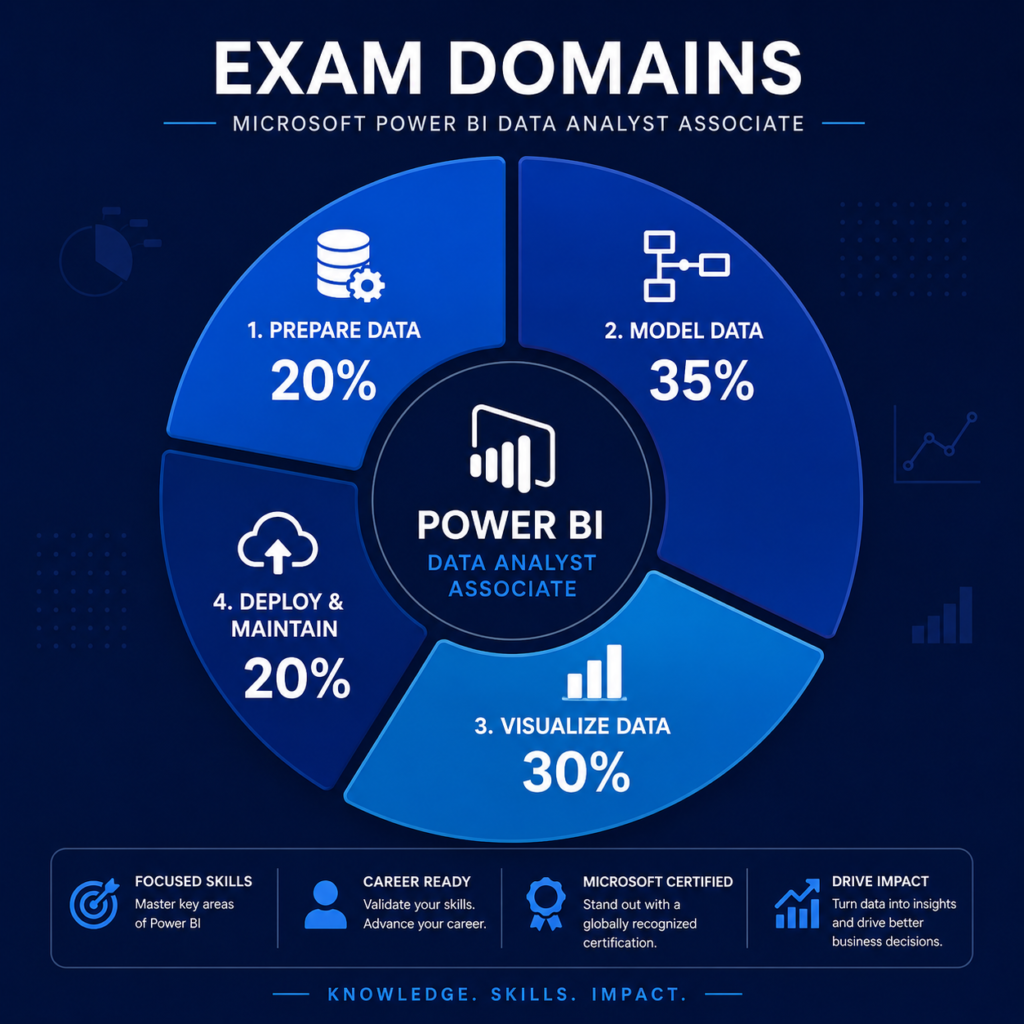
The exam tests four core domains. Here’s the breakdown with approximate weighting:
| Skill Domain | Exam Weight | Key Areas |
| Prepare the Data | 15-20% | Get data, clean data, transform in Power Query |
| Model the Data | 30-35% | Relationships, DAX, calculated columns, measures |
| Visualize and Analyze Data | 25-30% | Reports, dashboards, filters, AI visuals |
| Deploy and Maintain Assets | 15-20% | Workspaces, row-level security, gateways, refresh |
Why Employers Still Value Power BI Certifications
Hiring managers are consistent on this: a certification does not replace experience, but it dramatically reduces their uncertainty. When a resume shows PL-300, they know the candidate has passed a structured, proctored exam with real technical questions. That removes ambiguity.
Power BI certifications also signal that you understand Microsoft’s data ecosystem — not just the tool itself. For organisations running Microsoft 365, Azure, and Teams, that fluency matters.
If you’re exploring the broader BI space, my guide on business intelligence analytics certifications covers where PL-300 fits relative to other credentials.
What Makes This Certification Different From Generic Data Analytics Courses
Most data analytics courses teach you concepts. The PL-300 exam measures whether you can apply those concepts inside Power BI specifically. You’ll encounter scenario-based questions where you have to choose the right DAX function, the correct relationship cardinality, or the most appropriate visualisation type — not just define terms.
That’s a meaningful distinction. If you want a broader foundation before specialising in Power BI, my overview of the best data analytics tools might help you see the full picture.
Understanding the PL-300 Exam Before You Start Studying
PL-300 Exam Structure Explained Simply
The PL-300 is a proctored exam available online or at a testing centre. Here’s what you’re walking into:
| Exam Detail | Specification |
| Exam Code | PL-300 |
| Total Questions | 40-60 (varies per attempt) |
| Time Allowed | 100 minutes |
| Passing Score | 700 out of 1000 |
| Exam Cost | USD $165 (regional pricing applies) |
| Languages | English, Japanese, Chinese, Korean, German, French, Spanish, Portuguese |
| Retake Policy | Wait 24 hrs after 1st fail; 14 days between subsequent attempts |
| Validity | 1 year (annual renewal via free assessment) |
Skills Measured in the Certification Exam
Microsoft publishes the official skill outline. Here’s what each domain actually means in practice:
- Prepare the Data: Connecting to sources (Excel, SQL, APIs, SharePoint), profiling data, cleaning in Power Query, applying transformations.
- Model the Data: Building star schema models, defining relationships (one-to-many, many-to-many), creating DAX measures and calculated columns, optimising model performance.
- Visualize and Analyze Data: Choosing appropriate chart types, configuring filters/slicers, using AI visuals (Key Influencers, Decomposition Tree), creating paginated reports.
- Deploy and Maintain Assets: Workspace management, row-level security (RLS) setup, scheduled refresh, sensitivity labels, gateway configuration.
Exam Cost, Passing Score, Duration, and Retake Policy
The exam costs USD $165 in most markets, though Microsoft discounts are available for students and those in qualifying markets. The 700/1000 threshold is a scaled score, meaning different question difficulties carry different weights.
If you fail, the retake policy is forgiving: 24 hours after a first failure, then 14-day gaps after that. You can take the exam up to five times within 12 months.
| PRO TIP |
| Scoring 700 does not mean answering exactly 70% of questions correctly. Microsoft uses psychometric scaling. Answering harder questions correctly gives you more points. Focus on understanding concepts — not raw question count. |
What Actually Makes the PL-300 Exam Difficult
From my experience reviewing candidate feedback, the PL-300 catches people out in three specific areas:
- DAX complexity: CALCULATE, FILTER, ALL, ALLEXCEPT — these functions appear in tricky scenario questions where context switching is the key concept.
- Ambiguous visualisation questions: Microsoft asks about best practice, not just what is technically possible. Knowing when NOT to use a chart type is tested.
- Deployment scenarios: Row-level security setup and workspace permission models trip up candidates who skipped the deployment section during study.
The Fastest Roadmap to Pass the PL-300 Certification
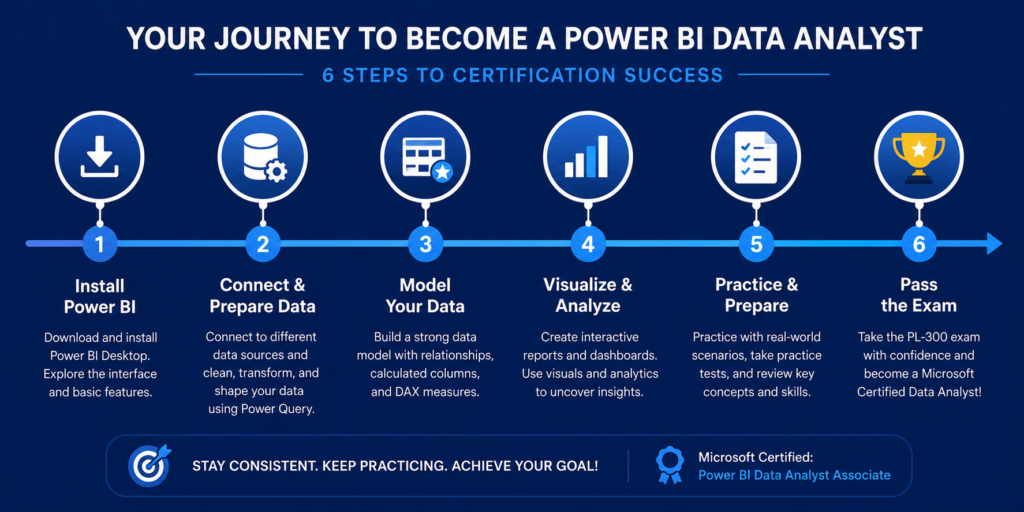
There is no universal preparation timeline. How long you need depends entirely on where you’re starting. Here’s what I recommend based on different starting points.
Beginner Roadmap: Starting From Zero
If you’ve never used Power BI before, budget 10-14 weeks for serious preparation.
- Week 1-2: Install Power BI Desktop. Complete Microsoft Learn’s ‘Get started with Microsoft data analytics’ path.
- Week 3-4: Learn data transformation in Power Query — this is foundational.
- Week 5-7: Study data modelling — star schema, relationships, basics of DAX.
- Week 8-10: Build three practice dashboards from scratch using public datasets (Kaggle, data.gov).
- Week 11-12: Study visualisation best practices and deployment concepts.
- Week 13-14: Full practice exams and review of weak areas.
If you’re genuinely starting from zero, I’d suggest first reading my guide on data analyst courses for beginners to build the right foundation before diving into PL-300 prep.
Intermediate Roadmap: Already Using Power BI at Work
If you’re already building reports professionally, 4-6 weeks is realistic.
- Week 1-2: Map your existing knowledge against the official PL-300 skill outline. Identify gaps — most intermediate users have gaps in DAX context and RLS.
- Week 3-4: Deep-dive the two or three domains where you’re weakest.
- Week 5: Take two full practice exams.
- Week 6: Review wrong answers, then book and sit the real exam.
Advanced Roadmap: Data Analysts Transitioning Into BI Roles
For experienced analysts coming from SQL, Python, or Tableau, focus on Power BI-specific concepts:
- DAX vs SQL mental model differences (especially context transition)
- Power BI Service vs Power BI Desktop — the deployment side is often unfamiliar
- Row-level security implementation — not tested elsewhere
- Paginated reports using Power BI Report Builder
Weekly Study Plan That Actually Works
| Week | Focus Area | Daily Time | Key Activity |
| 1 | Power Query and Data Prep | 1-1.5 hrs | Transform 3 different data sources |
| 2 | Data Modelling Basics | 1-1.5 hrs | Build a star schema from scratch |
| 3 | DAX Fundamentals | 1.5-2 hrs | Write 20 DAX measures, understand context |
| 4 | Visualisation and Reports | 1-1.5 hrs | Build a full interactive dashboard |
| 5 | Deployment and Security | 1 hr | Configure RLS on a practice dataset |
| 6 | Practice Exams and Gap Analysis | 1.5-2 hrs | Take 2 full mocks, review every wrong answer |
What You Need to Learn Before Taking the Exam
Power BI Data Modeling Skills That Matter Most
Data modelling is the highest-weighted domain. Here’s what actually appears on the exam:
- Star schema design: Fact tables, dimension tables, why avoiding many-to-many relationships where possible is best practice.
- Relationship types: One-to-one, one-to-many, many-to-many — when each is appropriate and what filter propagation means.
- Calculated columns vs measures: The exam tests this distinction heavily. Measures use filter context; calculated columns use row context.
- Cross-filter direction: Single vs bidirectional — knowing when bidirectional filtering causes performance problems.
- Aggregations: When to use implicit vs explicit aggregations.
| KEY TAKEAWAY |
| If you can build a clean star schema, define correct relationships, and write a CALCULATE measure from scratch — you’re ready for the modelling domain. |
DAX Concepts Candidates Often Struggle With
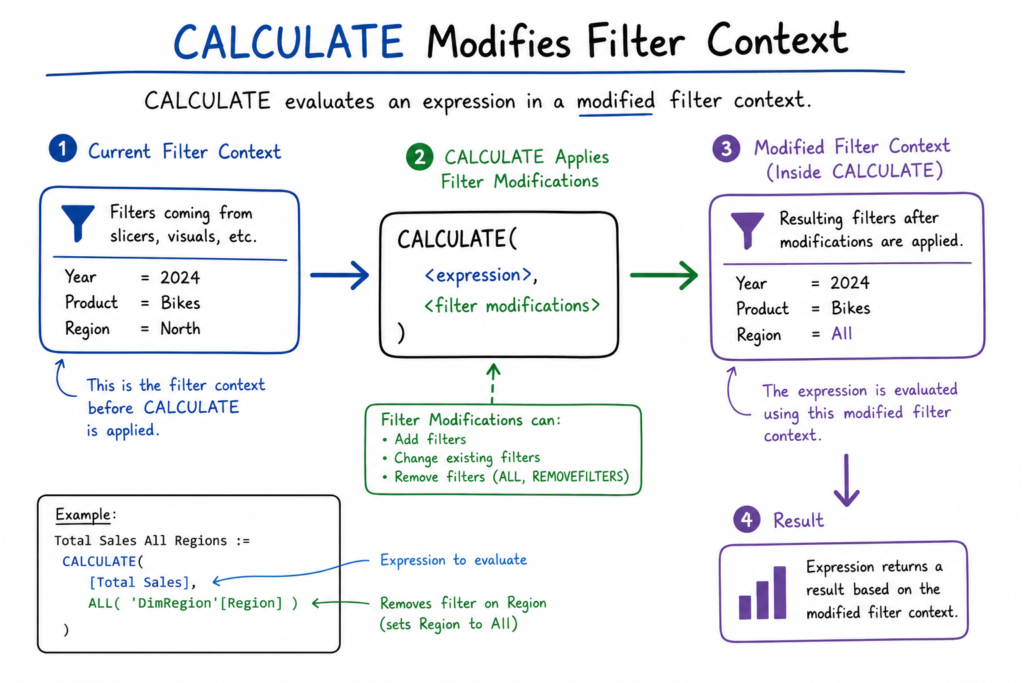
DAX is where most candidates lose marks. Here’s what actually trips people up:
- CALCULATE and filter context: The most tested DAX concept. Know how CALCULATE modifies filter context, and what happens when you nest it.
- Time intelligence functions: TOTALYTD, SAMEPERIODLASTYEAR, DATESINPERIOD — these appear frequently in scenario questions.
- ALL, ALLEXCEPT, REMOVEFILTERS: Context modification functions that candidates frequently confuse with each other.
- RELATED and RELATEDTABLE: Cross-table lookups — tested in modelling scenarios.
- RANKX and TOPN: Ranking measures that require understanding of iterator context.
| COMMON MISTAKE |
| Memorising DAX syntax without understanding filter context will not get you through the exam. Microsoft tests whether you know WHY a measure returns a certain value — not just what to type. |
Data Transformation With Power Query
Power Query appears in the ‘Prepare the Data’ domain. Key skills to master:
- Merging and appending queries
- Unpivoting columns — a very common exam scenario
- Custom columns using M language basics
- Handling data type mismatches and null values
- Incremental refresh setup — tested in deployment context
Dashboard Design and Visualization Best Practices
The exam tests conceptual knowledge — not just technical operation. Know the right chart for the right scenario:
| Scenario | Best Visualisation |
| Show change over time | Line chart |
| Compare categories | Bar or column chart |
| Show part-to-whole | Donut or stacked bar |
| Show geographic distribution | Map visual or filled map |
| Identify drivers/influencers | Key Influencers visual |
| Explore hierarchical breakdowns | Decomposition Tree |
| Show KPIs vs target | KPI visual or Gauge |
Security, Deployment, and Workspace Concepts
This domain is consistently underestimated. Key areas to study:
- Row-Level Security (RLS): Static vs dynamic RLS, how to create RLS roles in Power BI Desktop, testing with ‘View as Role’.
- Workspace tiers: My Workspace vs shared workspaces, Pro vs Premium capacity differences.
- Gateways: Personal vs on-premises data gateway — which to use for scheduled refresh from different source types.
- Sensitivity labels: Microsoft Information Protection integration — increasingly tested in 2025/2026 exam versions.
- Endorsements: Promoted vs Certified datasets — know the difference and who can apply each.
Best Power BI Courses and Study Resources for PL-300 Preparation
Microsoft Learn vs Paid Power BI Courses
| Resource Type | Cost | Best For | Limitation |
| Microsoft Learn | Free | Official content, exam alignment | Can feel dry; limited practice questions |
| Udemy Courses | $15-$20 | Beginner-friendly, video-heavy | Quality varies widely by instructor |
| Coursera / edX | $50-$200 | Structured learning paths | Slower pace, less exam-focused |
| Pluralsight | Subscription | Role-specific paths, skill assessments | Higher cost |
| Enterprise DNA | $200+/yr | Deep DAX expertise | Overkill for certification alone |
I’ve reviewed several of the best Power BI courses for beginners on this site — if you’re new to the tool, start there before jumping into exam prep.
Free Resources That Are Surprisingly Effective
- Microsoft Learn PL-300 Learning Path: Free, official, updated regularly. Complete this first.
- Guy in a Cube (YouTube): Patrick LeBlanc and Adam Saxton cover practical Power BI concepts that map closely to exam scenarios.
- sqlbi.com: The definitive resource for DAX. Their free articles and videos are more exam-relevant than most paid courses.
- Power BI Community Forums: Real-world problem-solving that reinforces exam concepts through application.
- Official Microsoft Documentation: For deployment and security topics specifically, the official docs are clearer than any paid course.
Practice Exams That Simulate the Real PL-300 Experience
Here is the honest truth: most free practice exam dumps online are outdated and unreliable. These are the ones worth using:
- MeasureUp: Microsoft’s official practice test partner. Expensive (~$99) but most accurately reflects question style.
- Whizlabs PL-300: Good value, questions are scenario-based and reasonably up to date.
- Exam Topics community questions: Use with extreme caution — many questions are outdated. Use for pattern recognition only, not for memorising answers.
| PRO TIP |
| Take a practice exam cold — no preparation — at the very start of your study. Your score tells you exactly where to focus. Candidates who skip this step often over-study topics they already know. |
Study Resources Most Candidates Ignore
- Power BI Desktop release notes: Features added in the last 12 months often appear in updated exam questions.
- Microsoft Fabric documentation: Power BI is now part of Microsoft Fabric — understanding how they connect is increasingly relevant.
- The PL-300 Study Guide by Daniil Maslyuk: A community-favourite resource with genuinely exam-relevant DAX coverage.
Common Mistakes That Cause Candidates to Fail the PL-300 Exam
Memorizing Questions Instead of Understanding Concepts
This is the most common failure path. Candidates download question dumps, memorise the answers, and then walk into the exam to find that Microsoft has updated the question bank or presents the same concept from a different angle.
The PL-300 tests applied knowledge. If you cannot explain WHY an answer is correct, you will struggle with scenario-based variants.
| COMMON MISTAKE |
| Using brain dumps as your primary study method is the fastest way to fail. Microsoft actively rotates questions. Understand the concept — then the answer follows regardless of how the question is framed. |
Ignoring Real Power BI Hands-On Practice
Reading and watching videos is not enough. The exam presents realistic scenarios — ‘You have a dataset with these characteristics. A manager needs this type of report. What should you do?’ — and answering correctly requires having actually built things in Power BI.
Build at least three projects from scratch during your preparation. Use public datasets from Kaggle or the World Bank. The muscle memory of building dashboards will serve you during the exam.
Spending Too Much Time on Rarely Tested Topics
Streaming datasets, real-time dashboards, and some advanced paginated report features are in the documentation but rarely appear on the current exam. Candidates who deep-dive these areas often under-prepare for DAX and modelling, which carry the highest weighting.
Stick to the official skill outline. If a topic is not listed there, do not prioritise it.
Poor Time Management During the Exam
You have 100 minutes for up to 60 questions. That’s roughly 1.5-2 minutes per question — tight when scenario questions require reading a paragraph of context before answering.
- Flag difficult questions and move on immediately — do not lose 5 minutes on one question.
- Answer all questions before reviewing flagged ones — unanswered questions score zero.
- Read scenario questions twice — Microsoft hides key details (like ‘without affecting other visuals’) that change the correct answer.
What Actually Happens After You Earn the Certification
Job Roles You Can Target After PL-300
- Power BI Developer: Building enterprise reports and dashboards. The most direct match for the certification.
- Business Intelligence Analyst: Sitting between business stakeholders and data teams, translating requirements into Power BI solutions.
- Data Analyst (Microsoft Stack): Broader role covering data collection, cleaning, modelling, and reporting.
- Reporting Analyst: More focused on report delivery — common in finance and operations teams.
- Analytics Consultant: Client-facing role at consultancies — PL-300 is frequently listed as preferred in these postings.
For a detailed look at what the BI developer career path looks like, my guide on becoming a business intelligence developer walks through the full progression.
Salary Expectations for Certified Power BI Professionals
| Role | Entry Level | Mid Level | Senior Level |
| Power BI Developer | $65,000-$85,000 | $85,000-$110,000 | $110,000-$145,000 |
| BI Analyst | $60,000-$80,000 | $80,000-$105,000 | $105,000-$135,000 |
| Data Analyst (MS Stack) | $55,000-$75,000 | $75,000-$100,000 | $100,000-$130,000 |
| Analytics Consultant | $70,000-$90,000 | $90,000-$120,000 | $120,000-$160,000 |
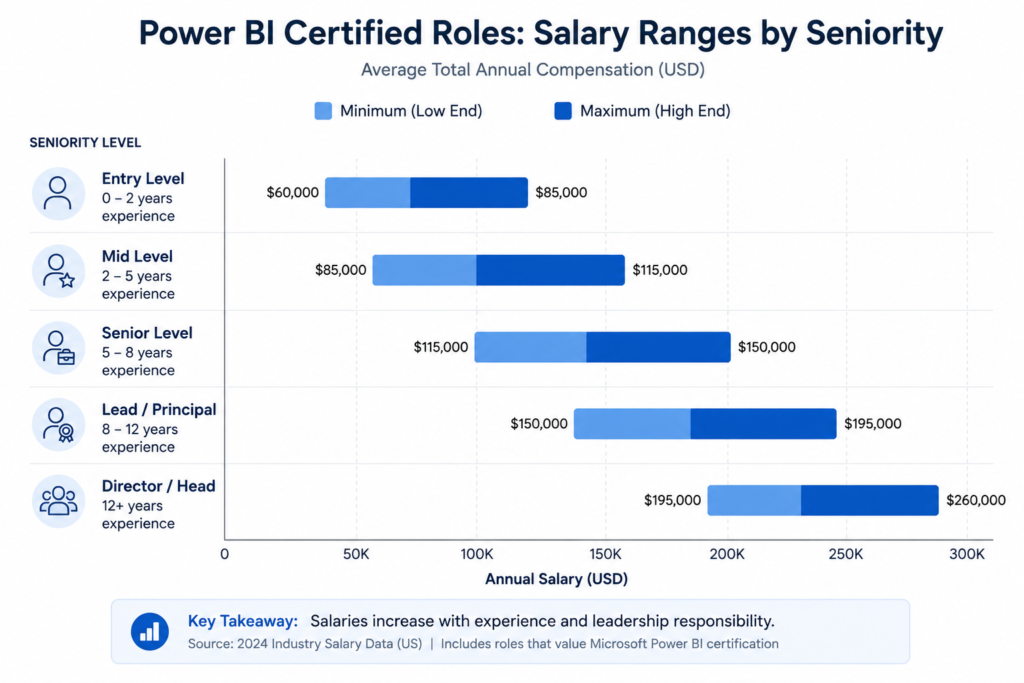
Salaries vary significantly by market. Figures above are US-based. UK equivalent: subtract approximately 25-30%. Southeast Asia figures are substantially lower but growing rapidly.
How Recruiters View Microsoft Power BI Certifications
From what I’ve seen in job market data and conversations with hiring professionals: the PL-300 works best as a signal amplifier. If your resume shows relevant experience, the certification confirms your skills are validated. If you have no experience, the certification alone will not land you senior roles — but it will get you past automated screening filters and into interviews.
Recruiters running applicant tracking systems (ATS) often filter by ‘PL-300’, ‘Power BI certified’, or ‘Microsoft certified data analyst’ — terms that your resume should include after passing.
How to Add the Certification Properly to LinkedIn and Your Resume
- LinkedIn: Go to Profile > Add section > Licenses and Certifications. Use the exact name: ‘Microsoft Certified: Power BI Data Analyst Associate’. Add credential ID from your Credly badge.
- Resume: Under ‘Certifications’ section, write: Microsoft Certified: Power BI Data Analyst Associate (PL-300) — Month Year. Include the Credly verification URL.
- Email signature: Add ‘MC: Power BI Data Analyst Associate’ after your name — subtle but noticed by Microsoft-ecosystem professionals.
PL-300 Certification vs Other Data Analytics Certifications
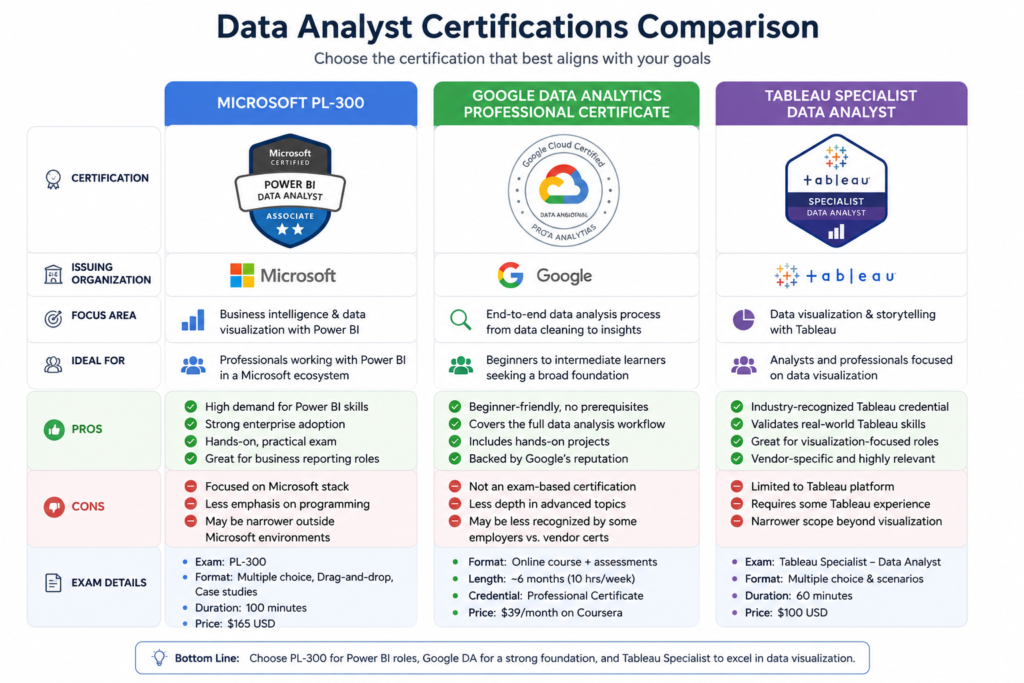
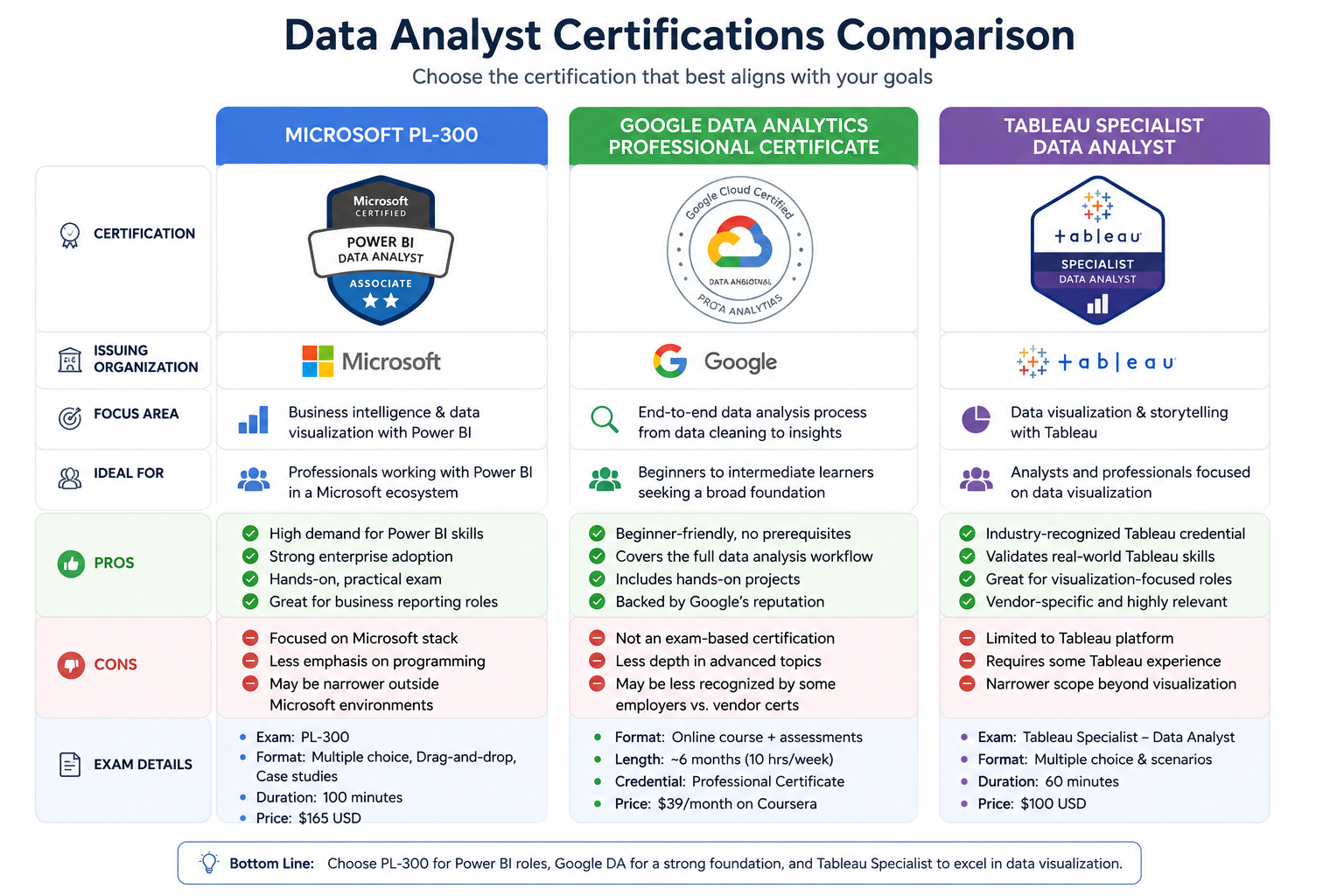
PL-300 vs Google Data Analytics Certificate
| Factor | PL-300 (Microsoft) | Google Data Analytics Certificate |
| Tool Focus | Power BI specifically | Spreadsheets, SQL, Tableau, R |
| Exam Format | Proctored, scenario-based | No exam — project-based |
| Cost | ~$165 | ~$300 (Coursera subscription) |
| Employer Recognition | High in MS ecosystems | Good for entry-level generally |
| Difficulty | Moderate-High | Beginner-friendly |
| Best For | BI-focused roles | Broad data analyst entry roles |
PL-300 vs Tableau Certification
| Factor | PL-300 (Power BI) | Tableau Desktop Specialist |
| Tool | Microsoft Power BI | Tableau |
| Cost | ~$165 | ~$250 |
| Job Market | More enterprise demand | Strong in analytics-heavy firms |
| Difficulty | Moderate | Moderate |
| Integration | Deep Microsoft 365 sync | Strong with SQL/Python |
| Best For | Microsoft-stack organisations | Data-science adjacent roles |
PL-300 vs Azure Data Certifications
Azure data certifications (DP-900, DP-203, DP-300) focus on data engineering and cloud infrastructure — not data analysis and visualisation. They complement the PL-300 rather than compete with it:
- DP-900 (Azure Data Fundamentals): Beginner-level foundation. Good before PL-300 if you have no data background.
- DP-203 (Azure Data Engineer): Advanced certification for data pipeline engineering. A different career path entirely.
- PL-300 + DP-203: A powerful combination for senior BI/engineering hybrid roles.
Which Certification Makes the Most Sense for Your Career Path
| Your Situation | Best Certification |
| Working in a Microsoft-heavy organisation | PL-300 — direct alignment |
| Starting with no experience, wide interest | Google Data Analytics then PL-300 |
| Organisation uses Tableau | Tableau Specialist first |
| Interested in data engineering | DP-900 then DP-203 |
| Want the broadest analytics credibility | PL-300 + Google DA combination |
Beginner vs Advanced Candidates: Different Preparation Strategies
What Beginners Should Focus on First
If you’re new to data analytics altogether, the PL-300 will feel overwhelming if you dive straight in. My recommendation:
- First, build foundational data literacy. Understand what a database is, what SQL does conceptually, what a pivot table achieves. My guide on the data analyst roadmap for career growth gives you this foundation.
- Then install Power BI Desktop and spend two weeks just exploring — import a CSV, build a simple chart, create one measure.
- Then start structured PL-300 prep with a study plan.
Skipping the foundation phase means you’ll struggle to contextualise exam questions. Scenario-based questions assume you understand WHY a business needs a certain report — that comes from broader data literacy.
What Experienced Analysts Usually Overlook
Ironically, experienced analysts often underperform on specific PL-300 topics because they’ve built habits around workarounds rather than best practices.
- Experienced users often avoid DAX, relying on Power Query for everything — but the exam tests DAX heavily.
- Many analysts have never set up RLS because their organisation has separate permissions — the exam tests it regardless.
- Deployment concepts (gateways, workspaces, endorsements) are invisible in day-to-day work but clearly tested.
How Long Preparation Realistically Takes
| Starting Level | Realistic Prep Time | Daily Study Hours |
| Complete beginner | 12-16 weeks | 1-1.5 hours/day |
| Some data experience | 8-10 weeks | 1 hour/day |
| Power BI user (basic) | 5-7 weeks | 1-1.5 hours/day |
| Power BI user (regular) | 3-5 weeks | 1 hour/day |
| BI professional | 2-3 weeks | 1-2 hours/day |
Practical Checklist Before Booking Your PL-300 Exam
Skills Checklist
- Can build a star schema model from raw data
- Can write CALCULATE, SUMX, RELATED, RANKX, and time intelligence measures
- Can unpivot columns and merge queries in Power Query
- Can configure row-level security with dynamic rules
- Can create drill-through pages and bookmarks
- Can set up scheduled refresh and configure a data gateway
- Know when to use which visualisation type for a given scenario
- Understand workspace roles (Admin, Member, Contributor, Viewer)
Practice Exam Readiness Checklist
- Scored 75%+ on two full-length practice exams
- Reviewed every wrong answer with a detailed explanation
- Completed all modules on Microsoft Learn PL-300 path
- Built at least two real dashboards from scratch
- Reviewed the official skill outline in the last 7 days
Technical Setup Checklist for Online Exams
- Stable internet connection — at least 1 Mbps upload and download
- Webcam and microphone functional — proctors verify your identity
- Clean desk environment — remove papers, second monitors, phones
- Valid government ID ready for identity verification
- Pearson VUE OnVUE system check run at least 24 hours before exam
- Browser updated, antivirus and VPN disabled
Final Week Preparation Framework
- Day 1-2: Review your two weakest domains. Do not start new material — reinforce what you know.
- Day 3: Take one full practice exam under timed conditions. Score and log every wrong answer.
- Day 4: Review wrong answers only. Read the official Microsoft Learn pages for each topic you got wrong.
- Day 5: Light review of DAX syntax and visualisation scenarios. No new learning.
- Day 6: Rest. Seriously. Cognitive fatigue is real. Exam performance drops when you study right up to exam day.
- Exam Day: Log in 30 minutes early. Run the system check. Read every question twice before answering.
Frequently Asked Questions About the Microsoft Power BI Certification
Is the PL-300 Certification Hard?
Moderate to hard — harder than most Google or CompTIA certifications, easier than Azure Solution Architect or AWS Professional. The difficulty comes from scenario-based DAX questions and deployment scenarios, not from raw memorisation. Candidates with real Power BI experience typically find it manageable with 4-6 weeks of preparation.
Can Beginners Pass the PL-300 Exam?
Yes — but it takes longer and requires genuine hands-on practice. Beginners who pass in 3 months typically do so by combining structured study with building real projects. Beginners who fail usually skipped the hands-on component and relied only on video courses.
How Long Does It Take to Prepare?
Between 3 weeks (experienced Power BI professionals) and 14 weeks (complete beginners). The average candidate with some data experience takes 6-8 weeks of structured preparation. See the timeline table in the ‘Beginner vs Advanced’ section above for specifics based on your level.
Which Power BI Course Is Best for Certification Preparation?
For beginners, start with Microsoft Learn’s free PL-300 path. Add a Udemy course (look for updated 2024/2025 content from instructors like Leila Gharani or Daniel Weikert) for more structured video learning. For DAX specifically, SQLBI is unmatched.
My comparison of the best Power BI courses for beginners breaks this down in detail with specific course recommendations.
Is the Certification Worth It Without Experience?
Yes — with caveats. The certification will help you get interviews and pass ATS filters. But you’ll still need to demonstrate practical knowledge in the interview itself. I recommend building two or three portfolio projects before your job search, alongside the certification.
Does Microsoft Renew the Certification?
Yes. The Microsoft Certified: Power BI Data Analyst Associate certification is valid for one year. Renewal is free — Microsoft provides an online renewal assessment (shorter than the original exam) that you can take during the six-month window before expiry. If you let it lapse, you must retake the full exam.
Final Verdict: Should You Get the Microsoft Power BI Certification in 2026?
Here is my honest assessment after everything covered in this guide.
The Microsoft Certified Power BI Data Analyst Associate certification is one of the highest-signal, most employer-relevant certifications available for data professionals working in the Microsoft ecosystem. In 2026, with Power BI embedded inside Microsoft Fabric and organisations doubling down on data-driven decision-making, the demand for validated Power BI skills is real and growing.
Who Will Benefit the Most
- Data analysts using Power BI daily who want formal recognition of their skills
- Career changers entering data analytics who need a credible signal for hiring managers
- Business analysts in Microsoft-heavy organisations looking to move into BI roles
- IT professionals wanting to expand into data work
- Freelancers and consultants where credentials help win client trust
Who Should Probably Skip It
- Professionals in organisations that exclusively use Tableau, Looker, or Qlik — PL-300 will not create direct value
- Data scientists or ML engineers — Azure ML certifications are more relevant
- Those looking for a quick win with no commitment to actually learning Power BI — the exam is too scenario-based for memorisation-only approaches
The Most Effective Next Step After Reading This Guide
| RECOMMENDED ACTION |
| 1. Take a cold practice exam today — see exactly where your gaps are. |
| 2. Create your study schedule using the roadmap in this guide. |
| 3. Build your first practice dashboard from a public dataset this week. |
| 4. Book your exam slot 6 weeks from today — deadlines create accountability. |
If you’re still deciding whether Power BI is the right path for your specific career goals, I’d recommend reading my broader guide on data analyst certifications to see how PL-300 compares across the full certification landscape.
And if you’re early in your data career and want a roadmap that goes beyond certification prep, my data analyst roadmap for career growth covers the full progression from beginner to senior analyst.
| KEY TAKEAWAY |
| The PL-300 certification is worth pursuing in 2026 if you work in or want to enter Microsoft-stack data roles. |
| The investment is ~$165 for the exam plus 4-12 weeks of preparation depending on your starting level. |
| The return: higher interview callback rates, salary leverage, and a credential that renews annually for free. |
Image Placement Guide
| Section | Image Title | Alt Text | Image Prompt |
| Introduction | |||
| Exam Structure | |||
| Fastest Roadmap | |||
| DAX Concepts | |||
| Certification Comparison | |||
| After Certification — Salary |
BestCoursesHub.com | Microsoft Certified Power BI Data Analyst Associate Certification Guide | All information accurate as of Q2 2026. Microsoft updates exam objectives periodically — verify at learn.microsoft.com.