Introduction
Let me be direct with you: cybersecurity is no longer a niche technical field that only IT departments care about. In 2026, it’s one of the most critical skill sets on the planet — and the demand for people who understand even the cybersecurity basics is higher than it’s ever been.
I’ve spent years working in and writing about the cybersecurity space, and the number one problem I see beginners run into is this — they don’t know where to start. There’s too much scattered information, too many courses, too many buzzwords, and not enough clear, practical guidance that actually makes sense to someone starting from zero.
That’s exactly what this guide is designed to fix.
Whether you’re a student, a career switcher, a working professional who wants to understand threats better, or someone who simply wants to protect themselves online — this guide covers everything you need to know. I’ll walk you through the core concepts, the best courses and certifications, real-world frameworks like NIST and CISA, hands-on practice tools, and an actionable plan to get started today.
And if you’re already exploring related skills, I’d also recommend checking out this in-depth cybersecurity skills guide that complements what we’re covering here.

Who This Guide Is For
Beginners Starting from Zero
If you’ve never touched cybersecurity before, this guide is built for you. I deliberately avoid jargon overload, and everything is explained in plain English. You don’t need a computer science degree to understand how to learn cybersecurity basics — you just need the right starting point, and that’s exactly what you’re reading.
Most cybersecurity content online assumes you already know networking, Linux, and programming. This guide doesn’t. Therefore, I’ll explain each concept from the ground up, and you’ll leave with a solid foundation.
Career Switchers & IT Professionals
Maybe you’re already working in IT support, software development, or system administration — and you want to pivot toward cybersecurity. In that case, you’re in a great spot. You already have transferable skills. However, you still need to understand how the security-specific concepts work, what the key frameworks are, and which certifications will actually move the needle for your career.
This guide gives you the structured overview you need without repeating things you already know.
Students Preparing for Certifications & Interviews
If you’re studying for CompTIA Security+, Google Cybersecurity Certificate, or even just preparing for your first cybersecurity job interview — this guide has you covered. I’ve included the most common cybersecurity basics interview questions, how to answer them with real understanding, and a checklist of must-know concepts that interviewers consistently test for.
Quick Answer — Cybersecurity Basics Explained Simply
The Core Idea Behind Cybersecurity (In Plain English)
At its simplest, cybersecurity is the practice of protecting systems, networks, and data from unauthorized access, damage, or attack. Think of it as the digital equivalent of locks, security cameras, and alarm systems — except instead of protecting your house, you’re protecting computers, servers, and the information that flows through them.
In my experience, beginners grasp this concept faster when they stop thinking of cybersecurity as purely a technical problem. It’s also a human problem. Most successful attacks don’t exploit complex code — they exploit people. That’s why understanding cybersecurity basics means understanding both the technology and the behavior.
The 5 Fundamental Pillars You Must Understand
Before you dive into tools and commands, you need to understand these five foundational pillars:
- Confidentiality — keeping sensitive data private and away from unauthorized users
- Integrity — ensuring data hasn’t been tampered with or altered
- Availability — making sure systems and data are accessible when needed
- Authentication — verifying that a user or system is who they claim to be
- Non-repudiation — ensuring actions can be traced and not denied
These pillars aren’t theory for theory’s sake — they’re the lens through which every real security decision is made.
How Cybersecurity Works in Real Life Systems
In practice, cybersecurity works through layers. No single tool or technique protects everything — instead, organizations build overlapping layers of defense. For example, your network might have a firewall at the perimeter, intrusion detection inside the network, encrypted communications between services, multi-factor authentication at login, and monitoring systems watching for unusual behavior.
This layered approach is often called “defense in depth,” and it’s a concept that comes up constantly, whether you’re studying for a cybersecurity basics quiz, taking a cybersecurity basics course, or working your first real security job.
The Core Cybersecurity Fundamentals That Actually Matter in 2026
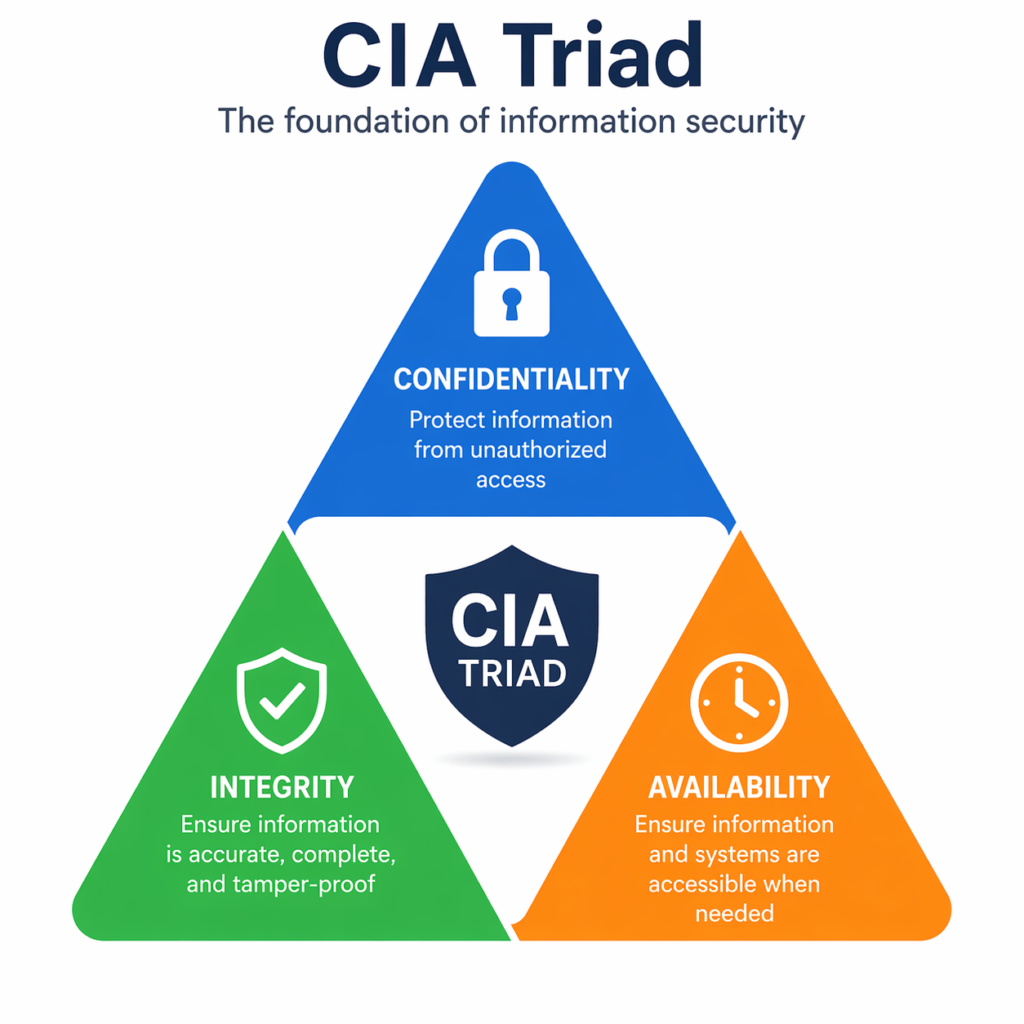
CIA Triad (Confidentiality, Integrity, Availability) in Practice
The CIA Triad is the backbone of cybersecurity thinking. However, a lot of beginners learn the acronym and forget that each element has real, practical implications.
Confidentiality in practice means encrypting a customer database so that even if it’s stolen, the data is unreadable. Integrity in practice means using checksums or digital signatures to verify that a file wasn’t modified during transfer. Availability in practice means designing backup systems so that a ransomware attack doesn’t permanently take down your hospital’s records.
Every security decision you’ll ever make — whether it’s configuring a firewall or setting password policies — connects back to one or more of these three principles.
Networking Basics Every Cybersecurity Learner Must Know
I cannot overstate this: if you skip networking fundamentals, you will struggle to understand cybersecurity at any meaningful level. Cybersecurity networking basics are non-negotiable.
Here are the core networking concepts you must understand:
- IP Addresses & Subnetting — how devices are identified on a network
- DNS (Domain Name System) — how domain names translate to IP addresses (a common attack target)
- TCP/IP Protocol Suite — the foundation of internet communication
- Ports & Services — what they are and why attackers target specific ones
- Firewalls & Routers — how traffic is filtered and directed
- VPNs — how encrypted tunnels protect data in transit
A solid grasp of networking cybersecurity basics will make everything else — from understanding attacks to configuring defenses — significantly more intuitive.
Common Threats (Phishing, Malware, Ransomware, Social Engineering)
Understanding what you’re defending against is just as important as knowing how to defend. In my experience, beginners often underestimate social engineering — the art of manipulating people — which remains the number one attack vector for most successful breaches.
Here’s a quick breakdown of the most common threats:
| Threat Type | How It Works | Common Target |
| Phishing | Deceptive emails/messages trick users into revealing credentials | Email users, employees |
| Malware | Malicious software infects and damages systems | Unpatched devices, downloads |
| Ransomware | Encrypts data and demands payment for decryption key | Hospitals, businesses, governments |
| Social Engineering | Manipulates people through trust and deception | Anyone — no technical skill needed from attacker |
| Man-in-the-Middle | Intercepts communication between two parties | Unsecured Wi-Fi networks, web sessions |
| SQL Injection | Injects malicious code into a database query | Web applications, login forms |
Authentication, Authorization, and Access Control
These three concepts are often confused, but they’re fundamentally different — and understanding the distinction is critical.
Authentication answers “Who are you?” — verifying identity through passwords, biometrics, or MFA. Authorization answers “What are you allowed to do?” — determining what resources an authenticated user can access. Access Control is the mechanism that enforces both.
In real systems, these concepts work together constantly. For example, when you log into your bank (authentication), the system then checks whether you’re allowed to view account #12345 (authorization) and blocks you from accessing other customers’ accounts (access control).
Encryption Basics Without the Math Confusion
Encryption is one of those topics that scares beginners because it sounds deeply mathematical. However, you don’t need to understand cryptographic algorithms to grasp how encryption works at a practical level.
Simply put, encryption converts readable data (plaintext) into scrambled data (ciphertext) using an algorithm and a key. Only someone with the correct key can reverse the process. There are two main types:
- Symmetric Encryption — same key encrypts and decrypts (fast, used for bulk data — e.g., AES)
- Asymmetric Encryption — a public key encrypts, a private key decrypts (used for secure key exchange — e.g., RSA, HTTPS)
In practice, HTTPS on every website you visit uses a combination of both — asymmetric encryption to exchange a session key, then symmetric encryption for the actual data transfer. That little padlock in your browser is encryption in action.
Step-by-Step Framework to Learn Cybersecurity Basics
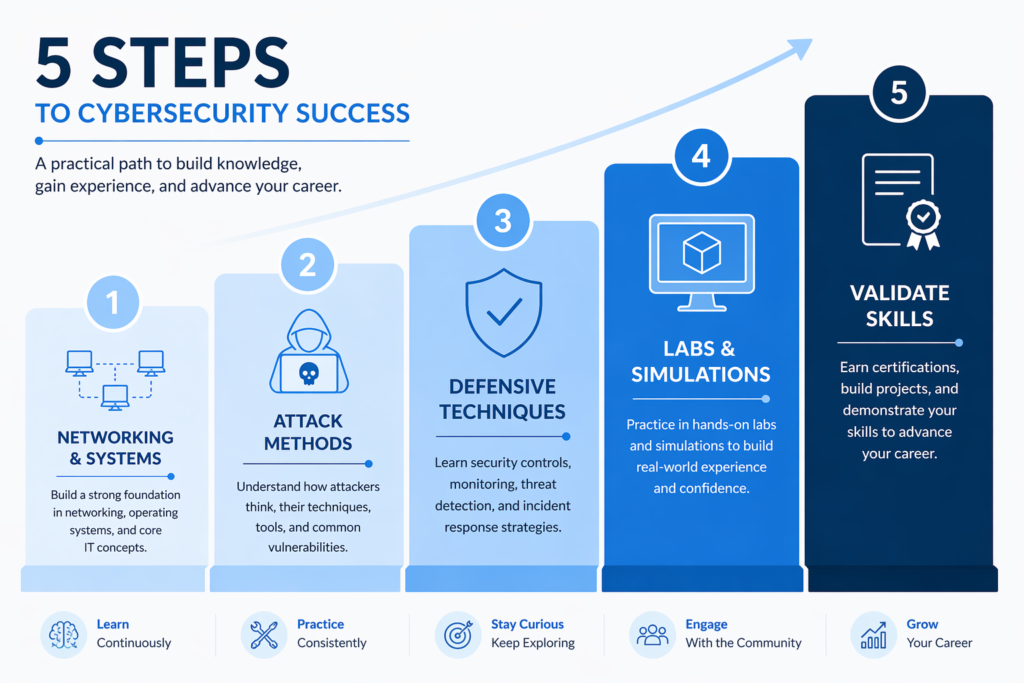
Step 1 — Understand Networking & Systems First
Before you touch a single security tool, spend at least two to three weeks on networking fundamentals. Learn how computers communicate. Understand the OSI model, TCP/IP, and how DNS works. Then shift to operating systems — specifically Linux, since most security tools and servers run on it.
Resources I personally recommend for this phase: Cisco’s Networking Academy (free), Professor Messer’s CompTIA Network+ materials, and TryHackMe’s Pre-Security path. Don’t skip this step — it’s the foundation everything else builds on.
Step 2 — Learn Common Attack Methods
Once you understand how systems work normally, you can start learning how attackers break them. This is where things get genuinely interesting. Study the OWASP Top 10 (the most common web application vulnerabilities), learn how phishing campaigns are constructed, and understand how malware propagates through networks.
Understanding attacks doesn’t mean executing them — it means knowing what defenders are up against. This knowledge is what makes your defensive decisions intelligent rather than reactive.
Step 3 — Explore Defensive Techniques
Now that you understand both normal system behavior and how attackers exploit it, defensive techniques start making intuitive sense. Study firewalls, intrusion detection and prevention systems (IDS/IPS), SIEM (Security Information and Event Management) tools, and endpoint protection. Learn how organizations monitor their networks for suspicious activity.
This is also where frameworks like NIST and CISA become practical — they give you a structured way to think about defense rather than a patchwork of random tools.
Step 4 — Practice with Labs & Simulations
Theory only gets you so far. Therefore, hands-on practice is non-negotiable. Platforms like TryHackMe, Hack The Box, and CyberDefenders offer structured labs that simulate real-world environments without requiring you to own expensive hardware.
I strongly recommend starting with TryHackMe’s free tier — it has a guided learning path specifically designed for cybersecurity basics that is perfect for beginners. Hack The Box is better once you have some experience, as it’s less guided and more challenge-based.
Step 5 — Validate Skills with Quizzes & Projects
Once you’ve studied and practiced, it’s time to validate what you’ve learned. Take a cybersecurity basics quiz on platforms like Quizlet, CompTIA’s practice tests, or Cybrary. Build a small home lab — even a virtual one using VirtualBox — and document what you’ve set up. This becomes the start of your portfolio.
Additionally, consider contributing to cybersecurity communities on Reddit (r/cybersecurity, r/netsec) where beginners ask real questions and get real answers from practitioners.
Best Courses & Certifications to Learn Cybersecurity Basics
Google Cybersecurity Certificate — Who It’s Best For
The Google Cybersecurity Certificate on Coursera is one of the best entry points I’ve seen for absolute beginners. It’s designed to take someone with no prior experience and get them job-ready in approximately six months at a comfortable pace. The curriculum covers cybersecurity basics, network security, Linux, SQL, Python for security, and SIEM tools.
What I particularly like is that it’s practical — you work with real tools that security analysts use daily. For a deeper look at whether it’s right for you, check out this detailed Google Cybersecurity Professional Certificate review.
IBM Cybersecurity Basics — Tools and Real-World Attacks
The IBM Cybersecurity Analyst Professional Certificate (available on Coursera) is excellent for understanding IBM cybersecurity basics — tools and cyberattacks in particular. It covers threat intelligence, network security, vulnerability assessment, and the kind of real-world attack scenarios that employers care about.
IBM’s program is slightly more technical than Google’s, therefore it works better for people who already have some IT background. However, motivated beginners can absolutely complete it — it just requires a bit more patience and repetition.
Cisco & Networking-Focused Learning Paths
Cisco Networking Academy offers a free Introduction to Cybersecurity course that’s a genuinely solid starting point. More importantly, Cisco’s broader curriculum teaches networking cybersecurity basics in depth — which, as I’ve already emphasized, is the foundation you must build before anything else.
If you’re interested in networking-focused cybersecurity roles like network security engineer or firewall administrator, Cisco’s CCNA Security certification is worth exploring after you complete the basics.
Coursera vs Udemy — Which Platform Works Better
This is a question I get asked constantly. Here’s my honest take:
| Factor | Coursera | Udemy |
| Content Quality | High — often from universities & top companies | Variable — depends on the instructor |
| Certification Value | Strong — Google/IBM certs are employer-recognized | Certificates are mostly for learning, not hiring |
| Price | Subscription-based (~$49/month) or financial aid | One-time purchase, often on sale for $10–20 |
| Best For | Career-oriented learners seeking credentials | Budget learners, specific skill gaps, quick topics |
| Beginner Friendly | Very structured and guided | Varies by course — check reviews carefully |
My recommendation: if you want a recognized credential, use Coursera for your main learning path. Use Udemy to supplement with specific topic courses that you need at a lower cost.
Free vs Paid Courses — What Actually Delivers Results
Free courses absolutely can get you skilled up — I’ve seen people land cybersecurity jobs using only free resources. However, the caveat is that free resources require significantly more self-direction. You have to curate your own learning path, find practice labs on your own, and stay motivated without structure.
Paid courses — particularly structured certificate programs — bundle all of that together. For most beginners, the structure is worth the investment. Additionally, if budget is a concern, Coursera’s financial aid program offers free access to almost all courses with a simple application.
For AI-adjacent learning that pairs well with cybersecurity, also consider exploring AI courses for beginners — security and AI are increasingly intersecting in 2026.
Essential Cybersecurity Frameworks & Standards You Should Know
NIST Cybersecurity Framework Simplified
The NIST Cybersecurity Framework (developed by the National Institute of Standards and Technology) is the most widely referenced security framework in the United States and increasingly worldwide. In 2024, NIST released version 2.0, which is what you should be studying now.
The framework organizes cybersecurity activities into six core functions:
- Govern — establish cybersecurity policies and accountability
- Identify — understand your assets, risks, and environment
- Protect — implement safeguards to prevent threats
- Detect — identify when a cybersecurity event has occurred
- Respond — take action when an incident is detected
- Recover — restore services and capabilities after an incident
For beginners, the NIST framework is valuable not as a certification target but as a mental model. It teaches you to think about security holistically rather than as a collection of disconnected tools and techniques.
CISA Guidelines for Beginners
CISA (the Cybersecurity and Infrastructure Security Agency) is the U.S. government’s cybersecurity agency. Their guidelines are particularly relevant if you’re interested in working in government cybersecurity or critical infrastructure protection.
For beginners, CISA’s most practical resource is their free training catalog at cisa.gov — they offer free cybersecurity courses, webinars, and exercises that are genuinely high quality. CISA cybersecurity basics training is especially useful for understanding how government and enterprise organizations think about risk and defense.
How Industry Frameworks Shape Real Security Practices
Frameworks aren’t just academic — they’re the language that security professionals use to communicate with executives, auditors, and compliance teams. When you understand NIST, ISO 27001, or CISA guidelines, you can explain security decisions in terms that non-technical stakeholders understand and approve funding for.
In practice, most organizations layer multiple frameworks depending on their industry — healthcare organizations follow HIPAA, financial institutions follow PCI-DSS, and government contractors follow NIST SP 800-53. Understanding this landscape gives you a significant advantage in interviews and on the job.
Tools & Resources to Accelerate Your Learning
Best PDFs, Books, and PPTs for Fast Learning
One of the most common searches I see is “cybersecurity basics PDF” — and for good reason. PDFs and structured documents let you study offline, annotate, and move at your own pace.
Here are the resources I recommend:
- “CompTIA Security+ Study Guide” by Mike Chapple & David Seidl — the definitive cybersecurity basics book for certification prep
- “The Web Application Hacker’s Handbook” — for understanding offensive techniques from a defender’s perspective
- NIST’s own publications (all free at nist.gov) — particularly SP 800-12, which is an excellent introduction to computer security
- CISA’s free resource library — practical cybersecurity basics PPT and PDF materials built for real practitioners
- “Cybersecurity Essentials” by Cisco Networking Academy — available as a free eBook in their course platform
Hands-On Platforms for Practice (Labs & Simulators)
Reading about cybersecurity is necessary but not sufficient. You need to practice. Here are the platforms I’ve personally used and recommend:
- TryHackMe — best for beginners, guided paths, browser-based labs, free tier available
- Hack The Box — better for intermediate learners, more challenging and realistic
- CyberDefenders — focused on defensive security and blue team skills
- PicoCTF — excellent free CTF (Capture The Flag) platform from Carnegie Mellon for beginners
- OWASP WebGoat — a deliberately vulnerable application to practice web security attacks
- VulnHub — downloadable vulnerable virtual machines for offline practice
Tools Used in Beginner Cybersecurity Training
| Tool | Category | What It Does | Difficulty |
| Wireshark | Network Analysis | Captures and analyzes network traffic packets | Beginner |
| Nmap | Network Scanning | Discovers hosts and services on a network | Beginner |
| Metasploit | Penetration Testing | Framework for developing and executing exploits | Intermediate |
| Burp Suite | Web Security | Intercepts and modifies web application traffic | Intermediate |
| Splunk | SIEM | Collects, indexes, and analyzes security data/logs | Intermediate |
| Kali Linux | Security OS | Linux distro pre-loaded with security tools | Beginner-Intermediate |
Where to Find Reliable Learning Materials
Not all online resources are created equal. For reliable, up-to-date cybersecurity basics content, I recommend these sources:
- SANS Internet Storm Center (isc.sans.edu) — daily threat briefings from real practitioners
- Krebs on Security (krebsonsecurity.com) — excellent investigative journalism on cybercrime
- OWASP (owasp.org) — the authority on web application security
- r/cybersecurity and r/netsec on Reddit — real community discussions (cybersecurity basics Reddit threads are surprisingly high quality)
- Cybrary (cybrary.it) — free and paid structured courses with lab environments
Real Examples — How Cybersecurity Basics Work in Practice
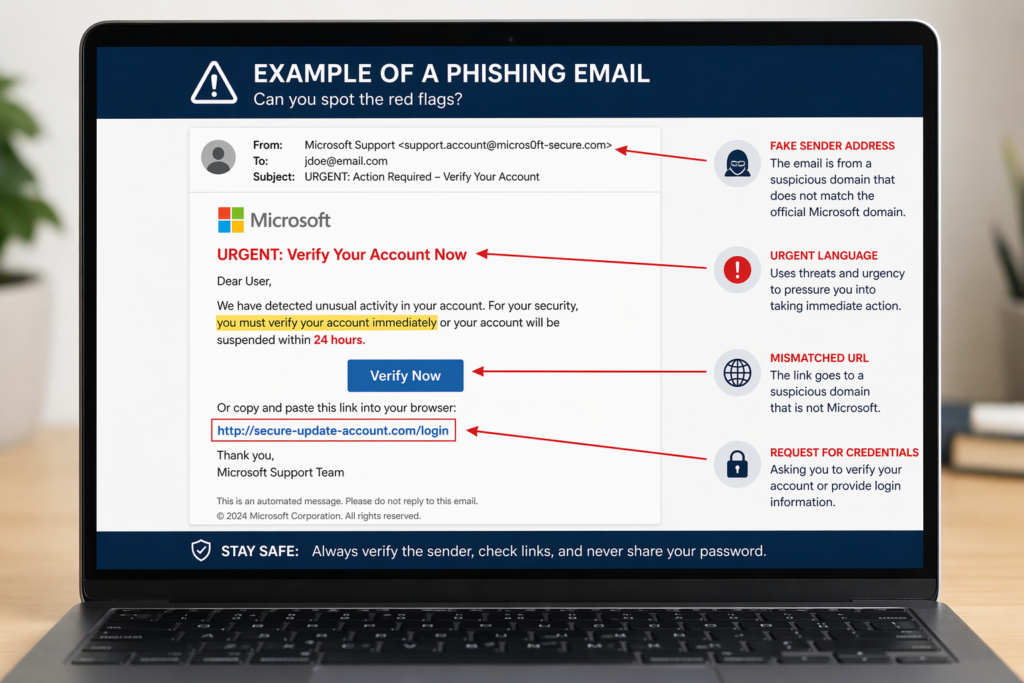
Example: How a Phishing Attack Actually Happens
Let me walk you through a real phishing attack scenario, step by step.
An attacker targets a company’s finance department. They research the company on LinkedIn and find that the CFO is named Jennifer. And they register a domain like ‘company-invoices.com’ (slightly different from the real domain). They then send an email to the accounts payable manager, spoofed to appear as if it’s from Jennifer, asking them to urgently process a wire transfer for a new vendor.
The email includes a link to a ‘vendor portal’ on the fake domain, which steals login credentials. The accounts payable manager, trusting the urgency and apparent sender, clicks the link and enters their credentials. The attacker now has access.
This example illustrates why authentication, email verification (SPF/DKIM/DMARC), and security awareness training are all critical defensive layers. No single tool prevents this — it requires multiple overlapping controls.
Example: Securing a Simple Network
Imagine you’re setting up a small office network for a 10-person company. Here’s how cybersecurity basics apply:
- Segment the network — separate guest Wi-Fi from internal company devices
- Configure a firewall — block unnecessary inbound and outbound ports
- Enable WPA3 encryption on wireless networks
- Set up a VPN for remote workers
- Implement a password manager and enforce strong password policies
- Enable automatic updates on all devices
- Set up centralized logging so you have visibility into activity
This isn’t a corporate enterprise setup — it’s practical and achievable for anyone. However, it reflects core security principles in action.
Example: Password Breach and Prevention
Passwords are breached in two main ways: database leaks (where a company stores passwords in plain text or weak hash and gets hacked) and brute force attacks (where an attacker systematically tries password combinations).
Prevention comes down to a few key practices: use long, unique passwords for every account (a password manager makes this manageable), enable multi-factor authentication wherever possible, and periodically check if your email appears in breach databases using services like HaveIBeenPwned.
On the system administration side, passwords should be stored as salted hashes using algorithms like bcrypt — never in plain text, and never with weak algorithms like MD5.
Case Insight from Industry Tools (IBM / Google)
Both IBM and Google have documented real-world case studies in their professional certificate programs. One pattern that consistently appears: organizations that suffered major breaches almost always had the technical controls in place — but either misconfigured them or failed to monitor them.
This is a crucial insight for beginners: cybersecurity isn’t just about having the right tools. It’s about configuring them correctly, monitoring them continuously, and responding quickly when something triggers an alert. Therefore, understanding security operations is just as important as understanding the tools themselves.
Common Mistakes That Kill Progress in Cybersecurity Learning
Jumping Into Tools Without Understanding Basics
This is the most common mistake I see. Someone gets excited, downloads Kali Linux, fires up Metasploit, and has absolutely no idea what they’re actually doing — or why. It feels like progress, but it’s actually surface-level exposure without real understanding.
Tools are meaningless without conceptual knowledge. You need to understand why a port scan works before you run Nmap. You need to understand HTTP before you use Burp Suite. Therefore, invest time in fundamentals first — your tool usage will be dramatically more effective and meaningful.
Ignoring Networking Fundamentals
I’ve already mentioned this, but it’s worth repeating because it’s that important. Networking is the substrate that cybersecurity runs on. If you don’t understand how data moves across a network, you won’t truly understand how attacks propagate, how defenses intercept them, or how to trace an incident.
Spend time with networking. It pays dividends across every single area of cybersecurity.
Overloading with Too Many Courses
Collecting certifications and courses without finishing any of them is a real problem — sometimes called “tutorial hell.” I’ve seen beginners simultaneously enrolled in five courses, making no real progress in any of them.
Pick one primary course and finish it before starting another. The Google Cybersecurity Certificate or IBM’s program are excellent choices. Supplement with YouTube videos or short Udemy courses for specific gaps, but keep your focus narrow and deep rather than broad and shallow.
Not Practicing Real Scenarios
Reading and watching videos is passive learning. Cybersecurity is a hands-on field that requires active practice. If you’re not regularly using platforms like TryHackMe or setting up your own lab environment, you’re leaving a massive gap between your theoretical knowledge and your actual capabilities.
Real employers test practical skills — in interviews, through CTF competitions, and increasingly through technical assessments. Therefore, the people who get hired are those who can demonstrate that they’ve done things, not just read about them.
Beginner vs Advanced — What Changes as You Grow
What Beginners Focus On First
At the beginner stage, your entire job is to build a solid conceptual foundation. You should be focused on understanding the CIA Triad, learning basic networking, recognizing common attack types, and getting comfortable with Linux command line basics. You should also be taking your first structured course — Google Cybersecurity or CompTIA Security+ are the two I most often recommend.
Don’t worry about specialization yet. Don’t worry about which tool is better or which programming language to learn first. Focus on breadth before depth at this stage.
How Intermediate Learners Expand Skills
Once you’ve completed a foundational course and have some hands-on lab experience, the intermediate phase is about choosing a direction and going deeper. Do you want to focus on penetration testing (ethical hacking), security operations (monitoring and incident response), cloud security, or application security?
At this stage, you start learning scripting — Python is the most relevant language for cybersecurity, both for automating tasks and for building tools. You also start understanding real SIEM environments, performing vulnerability assessments, and working through more challenging CTF problems.
Python is genuinely worth investing in. I’ve written about it in detail in my best Python course guide, which covers learning options specifically useful for technical roles including cybersecurity.
Transitioning Into Specialized Roles (Security Analyst, Pentester)
At the advanced level, you’re no longer studying cybersecurity basics — you’re a specialist. Security analysts work in Security Operations Centers (SOCs), monitoring for incidents and responding to threats. Penetration testers (ethical hackers) are hired to find vulnerabilities before malicious actors do.
To transition into these roles, you need role-specific certifications: CompTIA CySA+ for security analysts, OSCP (Offensive Security Certified Professional) for penetration testers, and CISSP for senior security leadership roles. These are earned through months of focused study and practice, not overnight — but they’re absolutely achievable with consistent effort.
For a direct look at the certification landscape, my guide on CompTIA Security+ courses is a great companion to this article.
Cybersecurity Basics for Interviews & Career Growth

Most Asked Cybersecurity Basics Interview Questions
Based on real interview feedback and community discussions on cybersecurity basics Reddit threads and professional forums, here are the questions that come up most often for entry-level roles:
- What is the CIA Triad and why does it matter?
- Explain the difference between symmetric and asymmetric encryption.
- What is a firewall and what types exist?
- What is the difference between IDS and IPS?
- How does a phishing attack work, and how would you prevent it?
- What is multi-factor authentication and why is it important?
- Explain what a vulnerability, threat, and risk are — and how they differ.
- What is the principle of least privilege?
- What steps would you take when responding to a security incident?
- What is a VPN and how does it work?
How to Answer with Real Understanding
The difference between a good answer and a great answer in cybersecurity interviews is specificity. Don’t just define terms — connect them to real-world scenarios. When asked about the CIA Triad, for example, don’t just say “Confidentiality, Integrity, Availability.” Instead say: “Confidentiality means protecting data from unauthorized access — for example, encrypting a database. Integrity means ensuring data hasn’t been tampered with — for example, using checksums on file transfers. Availability means systems are accessible when needed — for example, having failover servers to handle DDoS attacks.”
That level of answer — concise, concrete, connected to examples — is what separates candidates who get offers from those who don’t.
Building a Beginner-Friendly Portfolio
You don’t need to have worked a cybersecurity job to build a portfolio. Here’s what beginners can do right now:
- Document your home lab setup (what you built, why, and what you learned)
- Write CTF write-ups — detailed explanations of how you solved challenges
- Create a vulnerability assessment report for a test environment
- Contribute to open source security tools or documentation on GitHub
- Build a simple security awareness training guide for a hypothetical company
Post these on GitHub and link them from your LinkedIn profile. Employers who care about practical skills will notice.
Certifications That Actually Help You Get Hired
| Certification | Provider | Best For | Difficulty |
| Google Cybersecurity Certificate | Google/Coursera | Complete beginners, career switchers | Beginner |
| CompTIA Security+ | CompTIA | First industry-recognized cert, DoD jobs | Beginner-Intermediate |
| IBM Cybersecurity Analyst | IBM/Coursera | Analyst roles, SOC positions | Intermediate |
| CompTIA CySA+ | CompTIA | Security analyst / threat detection roles | Intermediate |
| OSCP | Offensive Security | Penetration testing roles | Advanced |
| CISSP | ISC2 | Senior security management roles | Advanced |
Cybersecurity Learning Checklist (Actionable)
Must-Know Concepts Checklist
Before you consider yourself foundationally ready, make sure you can confidently explain each of these:
- ✓ CIA Triad — Confidentiality, Integrity, Availability
- ✓ OSI Model — 7 layers and what happens at each
- ✓ TCP/IP Protocol Suite — how data travels across networks
- ✓ Common attack types — phishing, malware, ransomware, social engineering, MitM
- ✓ Authentication vs Authorization vs Access Control
- ✓ Symmetric vs Asymmetric encryption
- ✓ Firewalls, IDS, IPS — what they do and how they differ
- ✓ Principle of Least Privilege
- ✓ NIST Cybersecurity Framework — 6 core functions
- ✓ Multi-Factor Authentication — how it works and why it matters
Skills You Should Practice Weekly
- ✓ Use Wireshark to analyze network traffic (even your home network)
- ✓ Complete at least one TryHackMe room per week
- ✓ Read one cybersecurity news article or threat report
- ✓ Practice Linux command line for 20 minutes daily
- ✓ Review and test one new security concept or tool
Tools & Platforms to Master
- ✓ TryHackMe or Hack The Box — hands-on labs
- ✓ Wireshark — network traffic analysis
- ✓ Nmap — network scanning
- ✓ Kali Linux — security-focused operating environment
- ✓ Splunk or ELK Stack — log analysis and SIEM basics
- ✓ Burp Suite Community Edition — web application testing
Learning Timeline for 30–60–90 Days
| Timeline | Focus Area | Goals |
| Days 1–30 | Foundation Building | Complete networking basics, start a structured course (Google/IBM), join TryHackMe, learn Linux basics |
| Days 31–60 | Core Concepts + Practice | Finish core course, complete 8–10 TryHackMe rooms, study CIA Triad, encryption, threats in depth |
| Days 61–90 | Validation + Career Prep | Take practice quizzes, build portfolio items, study interview questions, plan certification path |
FAQ — Cybersecurity Basics (Based on Real Search Queries)
How can I learn cybersecurity basics as a complete beginner?
Start with a structured, beginner-friendly course. The Google Cybersecurity Certificate on Coursera is my top recommendation — it’s designed specifically for people with no prior experience, takes about six months to complete at a relaxed pace, and covers all the essential concepts. Pair it with free hands-on practice on TryHackMe, and you’ll have a solid foundation within a few months.
Which is the best cybersecurity basics course?
For most beginners, the Google Cybersecurity Certificate is the best overall starting course. It’s structured, practical, employer-recognized, and designed for complete beginners. If you already have some IT background, the IBM Cybersecurity Analyst Professional Certificate goes deeper and covers more technical ground. Both are available on Coursera. If you’re looking for free options, CISA’s free training catalog and Cisco’s NetAcad Introduction to Cybersecurity are excellent.
Are free cybersecurity courses enough to get a job?
Yes — but with an important caveat. Free courses alone rarely get you hired. What gets you hired is demonstrated, practical skill. You need to combine free course content with hands-on lab practice, a portfolio of real work, and either a recognized certification or strong project documentation that shows you can apply what you’ve learned. Free resources get you the knowledge; practice and portfolio get you the job.
What certifications should I start with?
Start with either the Google Cybersecurity Certificate (if you want something employer-friendly and designed for beginners) or CompTIA Security+ (if you want the most widely recognized entry-level certification in the industry, particularly for U.S. government and defense contractor positions). Both are achievable for beginners with 3–6 months of focused study.
Is cybersecurity hard to learn for non-technical people?
Cybersecurity has a learning curve, but it’s absolutely learnable for non-technical people — particularly if you start with the right resources and don’t try to skip the foundational concepts. The biggest challenge for non-technical beginners is usually the networking concepts, which feel abstract at first. However, with the right explanations and hands-on practice, those concepts become intuitive fairly quickly. I’ve seen people from accounting, healthcare, law, and teaching successfully transition into cybersecurity careers.
Final Action Plan — How to Start Cybersecurity Today
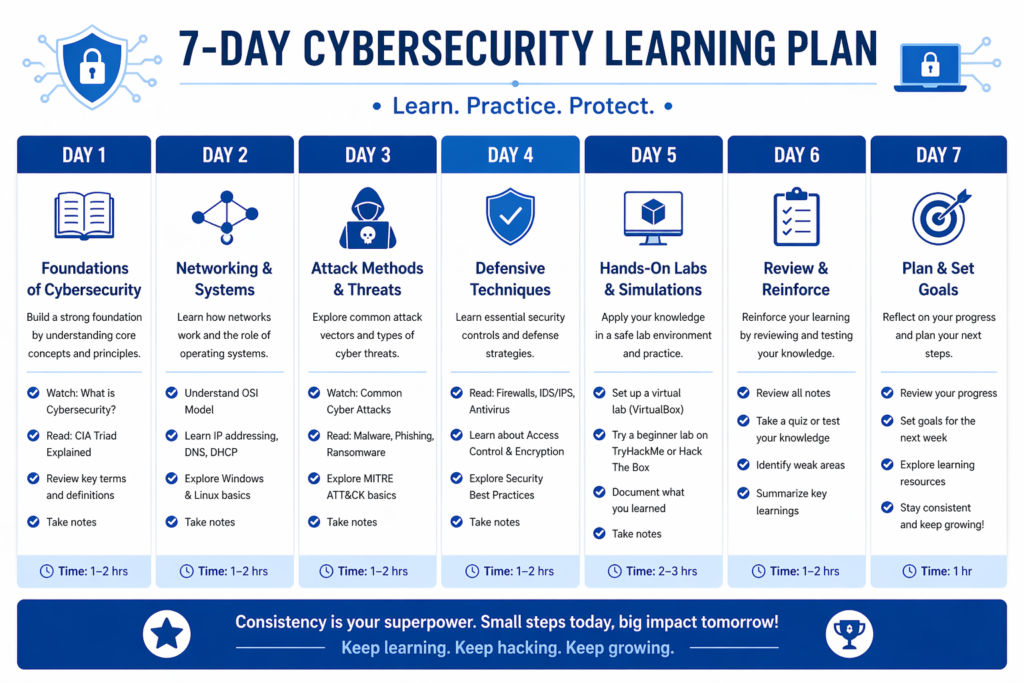
Your First 7 Days Learning Plan
| Day | Task | Time |
| Day 1 | Sign up for Google Cybersecurity Certificate on Coursera or CISA free training | 1 hour |
| Day 2 | Read a beginner intro to networking — focus on IP, TCP/IP, DNS | 1–2 hours |
| Day 3 | Create a free TryHackMe account and complete the “Pre-Security” intro path | 1–2 hours |
| Day 4 | Study the CIA Triad in depth with real-world examples | 1 hour |
| Day 5 | Learn about the 5 most common attack types with examples | 1 hour |
| Day 6 | Download and install VirtualBox + Kali Linux (set up your first lab) | 2–3 hours |
| Day 7 | Take a cybersecurity basics quiz online, review weak areas, plan Week 2 | 1 hour |
Your First Hands-On Project
Within your first 30 days, I recommend completing this beginner project: set up a home lab using VirtualBox with two virtual machines — one running Kali Linux, one running a deliberately vulnerable target like Metasploitable. Then practice basic network scanning with Nmap, analyze the traffic in Wireshark, and document everything you do and find in a written report.
This project demonstrates: lab setup skills, basic tool usage, network analysis, documentation ability — all things that matter to employers and give you something concrete to show and talk about.
How to Stay Consistent and Avoid Burnout
Consistency beats intensity every time in cybersecurity learning. It’s far better to study for 45 minutes every day than to binge-study for 8 hours on a weekend and then do nothing for two weeks. Therefore, build a realistic daily habit — even 30 minutes is productive.
Join communities. r/cybersecurity on Reddit, cybersecurity Discord servers, and local DEFCON chapters all provide community, accountability, and motivation. When you see others progressing and sharing what they’ve learned, it keeps you engaged.
Also, vary your learning methods. Mix video courses, reading, hands-on labs, and quizzes. The variety prevents the mental fatigue that causes people to quit.
Next Steps Toward a Cybersecurity Career
Once you’ve completed your foundational learning, here’s the progression I recommend:
- Complete a recognized certification (Google or Security+)
- Build at least 2–3 portfolio items (CTF write-ups, lab reports, or a personal project)
- Create a strong LinkedIn profile highlighting your certifications, projects, and learning journey
- Apply for entry-level roles: Security Analyst, SOC Analyst (Tier 1), IT Security Technician
- Continue learning while job hunting — specialization certifications like CySA+ will strengthen your applications
For resume-specific help as you approach applications, check out this resume writing course guide that covers how to present technical skills to non-technical hiring managers.
Conclusion
Cybersecurity basics aren’t just for IT professionals anymore. In 2026, they’re essential knowledge for anyone who works with technology — which is basically everyone. Whether you want to protect yourself online, switch careers into one of the fastest-growing industries in the world, or simply understand how digital systems actually work, the foundation you build here will serve you for years.
What I want you to take away from this guide is simple: start with fundamentals, practice consistently, don’t overload yourself with resources, and build things you can show people. The gap between where you are now and a cybersecurity career is bridgeable — I’ve seen people bridge it with nothing but free resources and disciplined practice.
The best time to start was yesterday. The second best time is right now.And if you found this guide useful, you’ll also want to read the broader cybersecurity skills guide for the next level of your learning journey.